
Finding the right ergonomic seating is one of the most critical decisions for any home office setup. With the rise of remote work, many professionals find themselves sitting for eight or more hours a day, making proper spinal alignment and physical comfort essential for long-term health. The popular brand Sihoo has become a prominent option in this space, offering a diverse lineup of chairs designed to accommodate different body types, preferences, and budgets. However, because their product range spans several distinct design philosophies, selecting the ideal model requires understanding how specific features align with your daily routine and physical workspace.
The best sihoo chair for your home office depends entirely on your unique body proportions, daily sitting duration, and the spatial constraints of your room. There is no single model that fits every individual perfectly. For those who spend long hours at their desks and require active, responsive support, the advanced dynamic lumbar mechanisms found in the Doro series offer highly sophisticated posture tracking. Users seeking reliable, classic mesh ergonomics on a practical budget will find the M series to be an excellent, straightforward solution. Meanwhile, taller individuals or those who prioritize a deep recline for relaxation will benefit most from the high-back profiles of the V series. Before making a final decision, verifying the exact physical dimensions of the chair against your desk height and available floor space is the most critical step to ensure a seamless fit.
Key Criteria for Comparing Sihoo Office Chairs
To make an objective comparison between different models, you must first establish a clear set of evaluation criteria based on your personal physical needs and work habits. Relying on generic recommendations often leads to discomfort, as a chair that feels perfectly supportive for one person may cause strain for another with a different build or desk setup.
Products mentioned in this guide
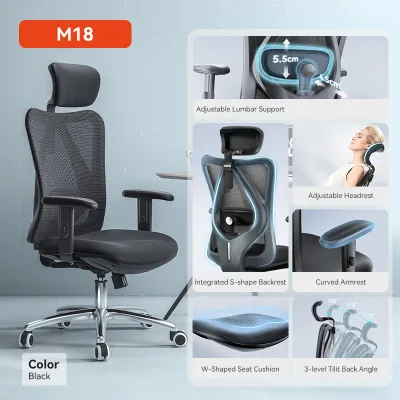
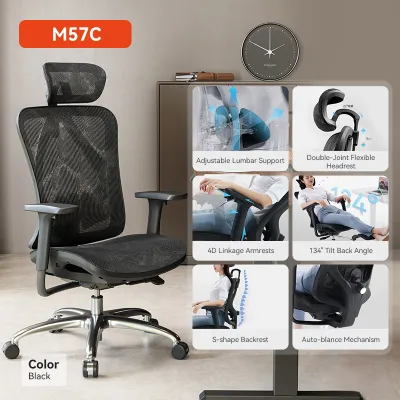
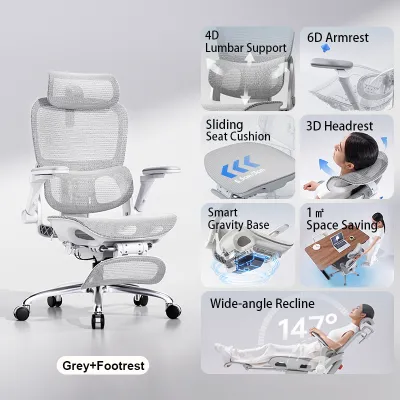
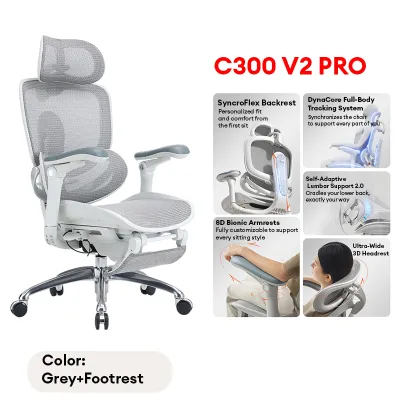
Prices are valid at publication and may change. Please refer to the product page for the latest price.
Body Type and Weight Capacity
Before comparing aesthetic designs, you must verify that a chair’s structural specifications match your physical proportions. Every model has a manufacturer-specified weight capacity and recommended height range that you should check on the official product specification sheets. Beyond weight limits, pay close attention to the seat width and depth dimensions. If a seat is too narrow, it can restrict movement and press uncomfortably against your thighs; if it is too deep, the front edge may press against the back of your knees, restricting circulation. Taller users need to ensure the backrest height and headrest adjustment range can extend high enough to support the cervical spine, while shorter users must verify that the seat height can adjust low enough to keep their feet flat on the floor.
Sitting Duration and Daily Usage
Your daily sitting habits dictate the level of ergonomic adjustability your chair requires. If you only use your home office for light tasks under four hours a day, a foundational model with standard lumbar support and basic tilt functions will generally suffice. However, if you work full-time from home and spend eight or more hours daily in your chair, your body requires advanced support systems to combat static muscle fatigue. Heavy usage demands highly responsive features, such as dynamic lumbar support that adapts as you shift positions, and high-tension mesh that distributes body weight evenly to prevent localized pressure points.
Adjustability Requirements for Shared Spaces
In many households, a home office is a shared resource used by multiple family members with varying heights and body shapes. If your chair will be used by more than one person, prioritizing multi-dimensional adjustability is essential. Look for models that offer independent seat depth adjustment, highly adjustable armrests (such as 3D or 4D configurations), and adjustable tilt tension. This level of customization ensures that each user can quickly configure the chair to maintain a healthy, neutral posture, protecting their wrists, shoulders, and lower back during their respective screen time.
Comparing Sihoo Chair Series and Design Focus
Sihoo categorizes its product lineup into several distinct series, each designed with a specific ergonomic philosophy and target user in mind. Understanding these broad categories allows you to narrow down your search based on what matters most to your daily comfort, rather than getting lost in a sea of individual model numbers. When shopping, always verify current model availability, exact dimensions, and local pricing through authorized online retailers or the official brand portal in Singapore, where typical price ranges span from S$150 for entry-level models to over S$600 for premium ergonomic designs.

Doro Series (Dynamic Lumbar and Advanced Ergonomics)
The Doro series represents the premium tier of Sihoo’s ergonomic engineering, specifically tailored for users who prioritize advanced postural support and active movement. The defining characteristic of this series is its dynamic lumbar support system, which is designed to automatically adjust its angle and pressure as you lean forward, sit upright, or recline. This self-adjusting mechanism eliminates the need for manual dial adjustments, providing continuous support to the lower back during long, uninterrupted work sessions.
In addition to dynamic lumbar tracking, Doro models typically feature high-grade adaptive mesh across both the seat and backrest. This mesh is engineered to offer a balance of firm support and flexible elasticity, conforming to the contours of your body while promoting maximum airflow. These models also showcase highly sophisticated armrest designs, often featuring 3D or 4D adjustments that allow you to customize the height, depth, angle, and width to match your keyboard positioning perfectly. If you are a heavy user looking to invest in long-term spinal health and prefer a highly responsive, modern seating experience, this series is the primary line to consider.
M Series (Classic Mesh and Essential Adjustments)
The M series is Sihoo’s foundational and highly popular line, recognized for delivering dependable, classic mesh designs that focus on essential ergonomic benefits. These chairs are engineered to provide reliable support without the added cost of premium, automated mechanical systems. They are particularly well-suited for standard home office setups where practical, budget-conscious comfort is the primary goal.
Chairs in the M series generally feature manual adjustment systems, such as height-adjustable lumbar pads that you can slide up or down to align with your lumbar curve, and depth-adjustable knobs to control the firmness of the support. The armrests on these models are typically 1D (height-adjustable only) or 2D, providing solid, stable support for your forearms during typing. The seat cushions in this series often utilize high-density foam covered in breathable fabric, or standard mesh, offering a firm and familiar sit. For users who want a proven, durable ergonomic chair for moderate daily use without paying a premium for automated features, the M series offers an excellent balance of utility and value.
V Series and Executive Options (High Back and Multi-Function)
The V series and associated executive-style models are specifically designed for users who require a commanding high-back profile, integrated head support, and extensive reclining capabilities. These chairs feature taller backrests that provide full-length support from the sacrum all the way up to the shoulders and neck. This makes them highly suitable for taller individuals who often find that standard office chairs do not offer adequate upper-back coverage.
One of the key highlights of the V series is its focus on multi-functional relaxation. These models are engineered with robust synchronized tilt mechanisms that allow for deep recline angles, often accompanied by extendable leg rests that slide out from under the seat. This design philosophy caters to professionals who use their home office chair not just for intensive typing, but also for reading, virtual meetings, or taking brief rest breaks. When considering a high-back executive model, it is vital to check the manufacturer’s maximum height recommendations to ensure that the integrated headrest aligns correctly with your neck rather than pressing uncomfortably against your shoulders.
Essential Ergonomic Features to Verify Before Buying
To ensure the chair you choose truly supports your body, you must look closely at the specific design of its components. Evaluating these individual features against your physical needs will help you avoid common pain points associated with poorly fitting office furniture.
Lumbar Support Mechanism
Your lower spine has a natural inward curve (lordosis) that must be supported to prevent slouching and muscle strain. When evaluating a chair, identify whether the lumbar support is fixed, height-adjustable, or dynamic. Fixed systems offer a single shape that may not align with your spine if you are shorter or taller than average. Height-adjustable lumbar pads allow you to manually slide the support to sit precisely in the small of your back. Dynamic systems, on the other hand, pivot and shift weight automatically as you change your seating angle, providing continuous contact. If you suffer from lower back stiffness, prioritizing an adjustable or dynamic lumbar system is highly recommended.
Armrest Configurations
Proper armrest alignment is crucial for reducing strain on your neck, shoulders, and upper back. Look for armrests that adjust to match your desk height, allowing your elbows to rest at a comfortable 90-degree angle while keeping your shoulders relaxed.
- 1D Armrests: Adjust only in height, which is sufficient for basic desk alignment.
- 2D Armrests: Adjust in height and can slide forward or backward, helping you get closer to your desk.
- 3D Armrests: Add the ability to pivot inward or outward, which supports your forearms during typing or reading.
- 4D Armrests: Allow you to adjust the width between the armrests, making them highly customizable for narrow or broad-shouldered individuals.
Headrest Adjustability
A headrest is highly beneficial if you spend significant time reclining during calls or reading sessions. However, a poorly designed or non-adjustable headrest can push your head forward into an unnatural posture. Ensure the model you select features a headrest that adjusts both in height and tilt angle. This dual-axis adjustability allows you to position the support directly under the base of your skull, keeping your neck in a neutral position and preventing cervical strain.
Seat Material and Edge Design
The material and shape of the seat cushion directly impact lower-body circulation and comfort. In warm or humid environments, such as Singapore’s tropical climate, full-mesh seats are highly advantageous because they prevent heat and moisture buildup. If you prefer a mesh seat, ensure the mesh tension is firm and resilient to prevent sagging over time. If you opt for a foam cushion, look for high-density molded foam that retains its shape under long-term use. Regardless of the material, verify that the front of the seat features a sloped “waterfall” edge. This curved design prevents the seat from cutting into the back of your thighs, protecting blood flow and preventing numbness in your legs.
Measuring Your Home Office Space for Chair Clearance
Even the most ergonomic chair will cause frustration if it does not physically fit within your workspace. Home offices, particularly in compact urban apartments or HDB flats, often have tight spatial constraints that require careful measurement before purchasing any furniture.
Desk Height and Armrest Clearance
Standard office desks typically stand around 75 centimeters high, but custom built-in desks or older furniture can vary. Before buying, measure the distance from your floor to the underside of your desk frame or keyboard tray. Next, check the manufacturer’s specifications for the maximum height of the chair’s armrests. To maintain a tidy workspace and save floor space when the chair is not in use, ensure that the armrests can be lowered sufficiently to slide completely underneath your desk. If your desk has a thick drawer directly beneath the work surface, this clearance measurement becomes even more critical.
Recline Space and Footprint
An office chair’s footprint extends far beyond its static base measurements when you utilize its recline features. Check the total depth of the chair when fully tilted back, and measure the available floor space behind your desk. You should ideally have at least 1 to 1.2 meters of clear space behind your desk to allow you to push back, turn, and recline comfortably without colliding with walls, bookshelves, or sliding wardrobe doors. Additionally, verify the width of your room’s doorway and lift access to ensure that the packaged box or fully assembled chair can be easily transported into your study.
Floor Surface Considerations
The type of wheels, or casters, on your chair must match your home office flooring to prevent damage and ensure smooth movement. Standard hard nylon casters are designed for carpeted floors but can easily scratch and wear down delicate hard surfaces such as parquet, luxury vinyl tiles (LVT), or polished timber. If your home office has hard flooring, verify if the model comes equipped with soft polyurethane (PU) casters, which glide quietly and protect the floor finish. If the chair only includes hard casters, consider purchasing a high-quality, non-slip protective chair mat or swapping the wheels out for specialized floor-friendly casters.
Decision Framework: Choosing the Right Sihoo Model
To finalize your decision, use this structured framework to match your daily habits, body type, and workspace conditions to the most suitable product category:
- Choose a Doro series model if:
- You sit at your desk for more than 8 hours a day and experience lower back fatigue.
- You want a highly responsive, self-adjusting lumbar support system that adapts to your movements.
- You prefer a modern, full-mesh aesthetic and have a budget that accommodates premium ergonomic features.
- Choose an M series model if:
- You need a reliable, durable chair for standard daily tasks (4 to 6 hours of sitting).
- You prefer a classic, straightforward design with manual ergonomic adjustments.
- You are working within a stricter budget but still want to protect your posture with proven lumbar support.
- Choose a V series or high-back model if:
- You are taller than average and require a high backrest with an adjustable headrest that properly aligns with your neck.
- You frequently recline, read, or take breaks in your office chair and want an integrated leg rest.
- You prefer a robust, supportive frame that offers full-body coverage from the shoulders to the lower back.
- Verify first if:
- Your physical desk height allows the chair's armrests to slide underneath smoothly.
- The floor space behind your desk is sufficient to accommodate the chair's full recline footprint.
- The manufacturer's stated weight capacity and seat dimensions align with your physical proportions.
Frequently Asked Questions (FAQ)
How do I verify the warranty for Sihoo chairs bought online?
To ensure your warranty is valid, purchase your chair only from official brand stores or authorized local distributors on major ecommerce platforms. Retain your digital invoice and order confirmation as proof of purchase. Upon receiving the chair, check the instruction manual or the distributor’s portal to see if you need to register the product online to activate the warranty period. Local warranties in Singapore typically cover manufacturing defects on essential structural components, such as the hydraulic gas lift, the tilt mechanism, the frame, and the caster base, for a period ranging from one to three years depending on the specific model.
What tools are typically required to assemble a Sihoo office chair?
Most models come packaged with all the specialized tools and hardware required for assembly, including a high-quality Allen (hex) key and clearly labeled screws. To ensure a smooth assembly process, it is highly recommended to lay out all components on a soft surface, such as a rug or the flattened cardboard box the chair arrived in, to prevent scratching your flooring or the chair’s plastic parts. Having a standard Phillips-head screwdriver on hand can also be helpful for securing certain plastic covers or optional accessories. Always follow the manufacturer’s step-by-step assembly manual closely, and double-check that all joints and bolts are tightened securely before sitting in the chair for the first time.

Community discussion
Share your experience or ask a question. Comments are reviewed before publication.