
Working with limited square footage in a Singapore HDB flat requires smart space planning. When your study desk is tucked into a bedroom corner or a multi-functional living area, keeping the tabletop clear is essential for maintaining focus. Adding a desk drawer under your workspace is a practical way to store stationery, cables, and documents without taking up valuable surface area.
However, buying an under-desk storage unit without precise planning often leads to a frustrating realization: your knees hit the bottom of the drawer, your office chair cannot tuck in, or the drawer blocks your legs entirely. Finding a model that fits your specific setup requires balancing the physical limits of your desk with your own ergonomic comfort.
How to Measure Your Desk Clearance and Available Legroom
To ensure your new drawer integrates seamlessly, start by measuring the vertical clearance of your desk. Place your tape measure on the floor and measure straight up to the lowest point of the desk’s underside. Do not simply measure to the top surface of the desk; many models feature thick support frames, metal crossbars, or cable management trays that sit several centimetres below the tabletop. These structural elements define your true vertical limit.
Products mentioned in this guide
![Under Desk Drawer / Shelf Sliding Drawer/ Storage Drawer / Self Adhesive [Dear J]](https://img.lazcdn.com/g/p/43a336df1cd815eaa373a2b789bc844a.png_400x400q80.png_.webp)
![[Local Seller] Minimalist Under Table Organiser Under Desk Drawer Organizer Stationery Organizer Under Desk Drawer Tray](https://img.lazcdn.com/g/p/e9e2896f2765e50b7f5bb096b3c5c23c.jpg_400x400q80.jpg_.webp)
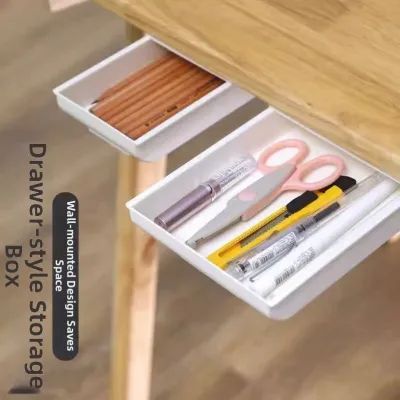
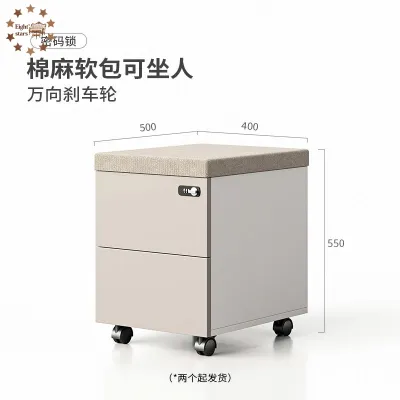
Prices are valid at publication and may change. Please refer to the product page for the latest price.
Next, determine the usable depth of your desk. Measure from the front edge of the desk to the back panel or any obstacles underneath, such as a modesty board or wall outlet. Your under-desk drawer must be shallow enough to sit completely flush with or recessed behind the front edge. If the drawer protrudes, it will prevent you from pushing your chair in fully, which wastes precious walkway space in a compact HDB room.
Calculating your personal knee clearance is the next vital step. Sit in your office chair at your preferred working height with your feet flat on the floor. Measure from the floor to the top of your thighs, then add a buffer of 5 to 10 cm to allow for natural leg movement, shifting, or crossing your legs. Subtract this total thigh-height requirement from your desk’s underside clearance to determine the absolute maximum height your under-desk drawer can be.
Finally, measure the horizontal space between the desk legs or side panels. This measurement dictates the maximum allowable width for any under-desk accessory. You must ensure that even after the drawer is installed, there is still enough remaining width for your office chair to slide in comfortably with your hips and legs unconstrained.
Choosing the Right Desk Drawer Under Your Workspace: Dimensions and Mounting Styles
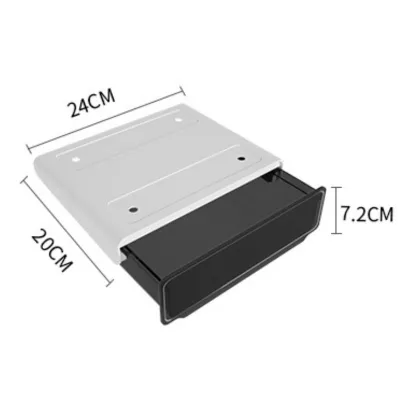
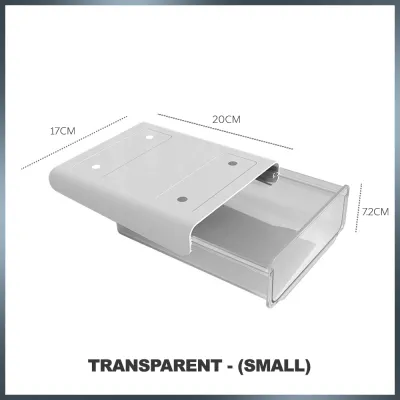
When evaluating product specifications, always distinguish between external and internal dimensions. The external height and depth determine whether the unit will physically fit under your desk, while the internal dimensions dictate what items you can actually store. Low-profile designs are highly recommended for standard-height workspaces in Singapore, which typically stand around 73 to 75 cm tall. A slim drawer casing of 5 to 8 cm in height is often the sweet spot for preserving legroom while still holding pens, notebooks, and tablets.

The mounting style you choose will dictate how the drawer is secured and how much weight it can safely support. Different designs place different demands on your desk’s structure and materials. Always verify the maximum load capacity specified by the manufacturer before placing heavy items inside.
Clamp-On Drawers
Clamp-on models are ideal for renters or anyone who wants a damage-free installation. Before purchasing, run your hand along the underside of your desk’s front edge to check for beveled finishes, structural lips, or curved corners that might prevent the clamps from gripping flatly.
You must also verify the manufacturer’s specifications for minimum and maximum desk thickness. Most clamp systems are designed for desktops between 1 cm and 4 cm thick, so measuring your tabletop thickness beforehand prevents purchasing an incompatible unit.
Screw-Mounted Drawers
For a permanent and highly stable storage solution, screw-mounted drawers are the preferred choice. Before drilling, verify your desktop’s thickness to ensure the mounting screws do not puncture through the top surface.
It is critical to check the construction of your desk. Avoid screw-mounting into hollow-core or honeycomb-paper desktops, as these budget materials lack the density to hold screws under load. Look out for internal metal frames or pre-drilled hardware inserts that might interfere with your drilling path.
Freestanding or Rolling Drawers
If mounting a drawer directly to the underside of your desk is not feasible, a floor-standing or rolling unit is a highly flexible alternative. Measure the exact floor-level width between your desk legs, keeping in mind that some desk frames taper or have angled legs that narrow near the ground.
Consider your flooring material when choosing rolling units. Hard nylon casters can scratch vinyl or laminate flooring common in HDB flats over time; look for polyurethane wheels or place a protective chair mat down to ensure smooth, damage-free movement. If you are ordering a larger, fully assembled rolling cabinet, also verify that its finished dimensions can easily pass through your home’s doorways and lift access during delivery.
Common Sizing and Clearance Mistakes to Avoid
One of the most frequent mistakes is forgetting to account for the height of your office chair’s armrests. When you install a desk drawer under your desk, you lower the clearance height of the desk’s front edge. If your armrests are fixed or cannot be lowered sufficiently, they will collide with the drawer casing, forcing you to sit further away from your workspace and leading to poor typing ergonomics.
Another common oversight is ignoring existing under-desk accessories. Items like keyboard trays, CPU holders, mounted power strips, and cable management baskets already occupy valuable space underneath your work surface. Failing to map out these items before buying a drawer can result in a crowded, unusable setup where accessories physically block one another.
Structural elements of the desk itself are also frequently overlooked. Many modern desks feature steel support beams running lengthwise down the center of the underside, or wooden modesty panels at the back. These structural components can completely block a drawer’s tracks or mounting brackets, so always inspect the entire underside of your desk rather than assuming it is a flat, empty surface.
Lastly, avoid purchasing a drawer based solely on its external dimensions. Some models feature thick plastic casings or bulky slide mechanisms that significantly reduce the actual internal storage space. Always check the manufacturer’s internal compartment dimensions to ensure your specific devices, like an iPad or A4 documents, will fit flat inside the drawer.
Alternative Storage Solutions for Extremely Tight Workspaces
If your measurements reveal that installing an under-desk drawer will severely compromise your legroom or ergonomic posture, it is best to abandon the idea. Forcing a drawer into a space that is too tight will lead to physical discomfort, back strain, and a cramped working environment. Fortunately, there are several highly effective vertical and external storage alternatives that preserve your legroom.
Desktop monitor stands with built-in drawers are an excellent way to gain storage without sacrificing space underneath the desk. These risers elevate your screen to a healthier eye level while providing slim compartments directly on your desktop for stationery, phones, and small office supplies.
Utilizing vertical wall space is another highly efficient strategy for small HDB rooms. Installing slim, wall-mounted floating shelves or a modular pegboard directly above your desk allows you to store books, headphones, and decorative items within arm’s reach without consuming any desk or floor space.
You can also utilize the sides of your desk by attaching hanging organizers. Felt pocket organizers, magnetic metal bins, or clamp-on cup holders hang off the outer edges of the desk frame, keeping your essential tools close by while leaving the area directly under the desk completely open for your legs.
Finally, consider a slim mobile pedestal that sits beside your desk rather than directly underneath it. A narrow drawer unit (around 30 cm wide) can easily fit into a corner of the room. If your desk is in a tight corner, you can roll the cabinet out of the way when you need to sit down, and roll it back into place when you finish your work day.
Frequently Asked Questions (FAQ)
Can I install an under-desk drawer on a glass or hollow-core desk?
Drilling into glass is highly dangerous and will shatter the surface, while drilling into hollow-core desktops (which often use a honeycomb paper interior) will not provide enough grip for screws, causing the drawer to fall. For these fragile or non-solid materials, opt for clamp-on models with protective padding or use a freestanding rolling pedestal instead.
How do I prevent a clamp-on drawer from slipping or scratching the desk?
Look for clamp-on drawers that feature built-in silicone, rubber, or EVA foam padding on the clamping brackets to protect your desk’s finish. If the model you purchase lacks this padding, you can place a thin strip of non-slip drawer liner or felt between the clamp and the desk surface, and remember to periodically check and tighten the clamps to prevent slipping.
Will an under-desk drawer block my ergonomic footrest?
Yes, if the drawer is deep and your desk is shallow, they can easily collide. To avoid this, measure the combined depth of your footrest and the drawer to ensure they do not overlap in your footwell, or choose a shallow drawer that mounts close to the front edge of the desk.

Community discussion
Share your experience or ask a question. Comments are reviewed before publication.