
The Steelcase Think office chair does not automatically come with a headrest as a standard, default feature. Instead, the headrest is an optional configuration that must be selected at the time of purchase, or added later through specific parts. For home office users seeking neck support, understanding whether your existing or prospective chair supports a headrest requires looking closely at the specific model generation, the original purchase specification, and the structural design of the backrest.
Does the Steelcase Think Come With a Headrest?
When purchasing a Steelcase Think chair, the presence of a headrest depends entirely on the specific configuration chosen during the ordering process. Standard base models sold by retailers and distributors typically feature a mid-back design without any neck support. Fully loaded or customized configurations, however, can be ordered directly from the manufacturer or authorized dealers with an integrated, factory-installed headrest.
If you are buying a secondhand chair or inspecting your current setup, you can verify the configuration by checking the product label or spec sheet. The product label, usually located on the underside of the seat cushion, contains the model number and SKU. This SKU details the exact build options, including whether the chair was manufactured with a headrest frame. Visually, a factory headrest model has a dedicated extension of the central spine of the backrest, which supports the neck cushion.
Products mentioned in this guide
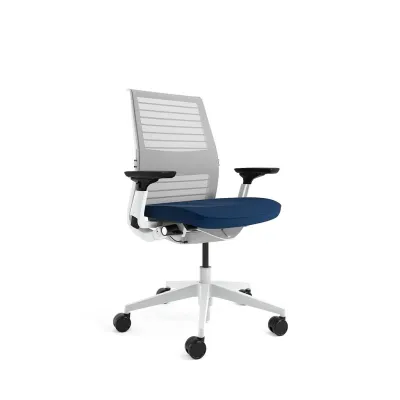
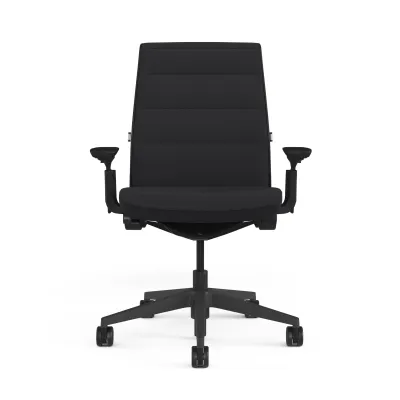
Prices are valid at publication and may change. Please refer to the product page for the latest price.
In Singapore, default retail configurations and showroom stock often lean toward the headrest-free version to suit standard office setups. If you require a headrest, you must explicitly verify the product description before finalizing an online order, as many standard listings feature the mid-back version by default.
Official and Aftermarket Headrest Add-On Options
If your Steelcase Think chair did not come with a factory-installed headrest, adding one later involves navigating a few technical challenges. The first step is to check for official manufacturer retrofit kits. Steelcase occasionally offers replacement parts or add-on kits through authorized service channels, but these are highly dependent on the specific generation of your Think chair. The Think has undergone design updates over the years, and a headrest assembly designed for a newer version may not align with the mounting points of an older model.

When official parts are unavailable or cost-prohibitive, many home office users look toward aftermarket solutions. These generally fall into two categories: clamp-on headrests and strap-on cushions. Clamp-on headrests attach directly to the top frame of the backrest using adjustable screws and protective brackets.
Before purchasing any third-party accessory on an online marketplace, you must carefully verify the mounting compatibility. The Steelcase Think features a distinct, flexible backrest with integrated flexors that contour to your spine. A clamp-on headrest that is too rigid or heavy can distort this curvature, put undue stress on the frame, or fail to grip the slim profile of the upper backrest securely. Always check the maximum weight limits and physical dimensions of the clamp mechanism to ensure it matches the thickness of the Think’s frame.
Installation Checks and Warranty Implications
Modifying your office chair with non-original parts requires a careful assessment of safety and warranty terms. Before drilling holes, clamping heavy metal brackets, or altering the frame of your Steelcase Think, you should consult the original manufacturer’s warranty documentation. High-end ergonomic chairs often come with extensive multi-year warranties covering structural components. Installing an unauthorized third-party accessory can void this warranty if the modification causes structural damage, cracks the frame, or alters the intended mechanical function of the chair.
For those proceeding with an aftermarket installation, performing basic safety checks is essential. Ensure that any clamp-on mechanism uses rubber or foam padding to prevent scratching or cracking the plastic frame. Tighten all fasteners securely, but avoid over-tightening, which can strip the plastic threads or warp the backrest. Once installed, test the stability of the headrest by applying gentle pressure; it should not wobble, slide, or slip when you lean back.
If the installation requires force, or if the backrest frame begins to bend or show stress marks, stop immediately. Forcing an incompatible accessory onto the chair can lead to sudden structural failure during use, posing a physical safety risk. If you are unsure about the compatibility or safety of an add-on, consult a qualified furniture technician or reach out to an authorized service center for guidance.
Assessing Your Ergonomic Need for Neck Support
Before investing time and money into sourcing a headrest, it is helpful to evaluate whether your daily work habits actually require one. Ergonomically, a headrest serves a very specific purpose: it supports the weight of your head when you are in a reclined or resting posture. During active, upright tasks—such as typing, writing, or intensive mouse work—your head should naturally align over your spine without resting against a back support. If you find yourself leaning forward while working, a headrest will remain unused for most of the day.
If you experience neck strain, the root cause might not be the lack of a headrest. Often, adjusting other elements of your workstation can resolve discomfort. For instance, raising your computer monitor so the top of the screen is at eye level prevents you from tilting your head downward. Adjusting the seat depth and lumbar support of your Steelcase Think can also improve your overall spinal alignment, naturally reducing tension in your shoulders and neck.
To decide if a headrest is truly beneficial for your setup, consider the following checklist of habits and symptoms:
- You spend a significant portion of your day in a reclined posture, such as during virtual meetings, phone calls, or video viewing.
- You frequently lean back to rest or think throughout the workday.
- You experience neck fatigue specifically when reclining, rather than during active typing.
- Your monitor height and desk ergonomics are already optimized, yet neck discomfort persists during rest breaks.
Frequently Asked Questions (FAQ)
Will adding a third-party headrest void my Steelcase warranty? (FAQ)
Yes, installing non-official modifications or third-party accessories can void the manufacturer’s warranty on the affected parts of your Steelcase Think chair. If a clamp-on or drill-on headrest causes structural damage, cracks the frame, or alters the backrest’s mechanical movement, the warranty will typically not cover the repairs. Always review the specific warranty terms provided with your chair or consult an authorized dealer before making physical modifications.
Can I adjust the Steelcase Think headrest if my chair came with one? (FAQ)
Yes, factory-installed headrests on the Steelcase Think are designed with adjustability in mind, though the exact range of motion depends on the chair’s generation. Typically, these headrests allow for height adjustments to align with the curve of your neck, and some models feature a tilt or pivot mechanism to customize the angle of support. To avoid damaging the internal mechanisms, refer to the official user manual or contact manufacturer support for the precise adjustment limits and instructions for your specific model.

Community discussion
Share your experience or ask a question. Comments are reviewed before publication.