
Selecting the right ergonomic chair for your home office involves balancing physical support, spatial constraints, and your daily work habits. The Steelcase lineup—spanning the Series 1, Series 2, Leap, and Gesture—offers distinct design philosophies tailored to different user profiles. To find the ideal match, you must evaluate how each model’s adjustability, footprint, and armrest design align with your specific desk setup and posture requirements. Understanding the subtle differences between these models will help you avoid common pitfalls like purchasing a chair that is too bulky for your room or lacks the specific adjustments your body needs.
Core Differences Across the Steelcase Lineup
Designed as an entry-level ergonomic solution, the Series 1 focuses on delivering essential physical support within a highly compact footprint. This makes it an excellent choice for smaller home offices or study corners where space is limited. The design features a lightweight mesh back and integrated lumbar support, providing a clean, modern aesthetic that does not dominate a room visually. It offers fundamental adjustments, such as seat depth and armrest height, making it a practical entry point into ergonomic seating.
The Series 2 is positioned as a mid-tier option, building upon the compact frame of the Series 1 while introducing more advanced materials. It features a responsive backrest that utilizes a geometric mesh design, which is engineered to flex and support your spine as you move. This model offers a step up in customization, allowing you to choose between different back styles and upholstery options, making it easier to match your home’s interior design while securing enhanced back support.
Products mentioned in this guide
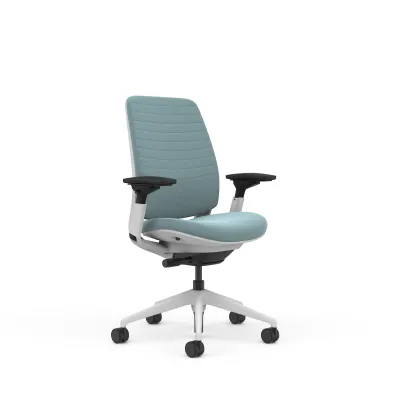
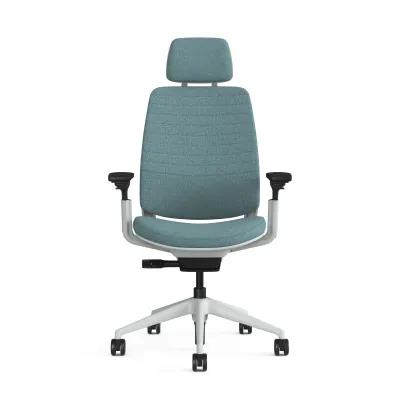
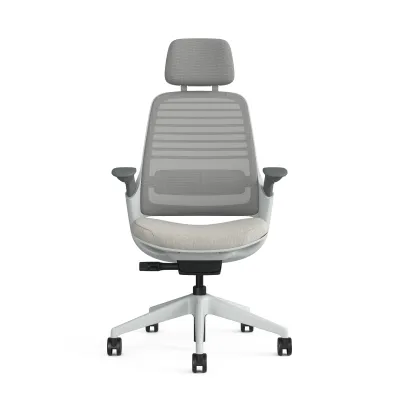
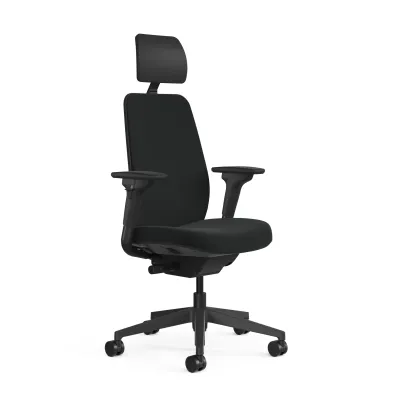
Prices are valid at publication and may change. Please refer to the product page for the latest price.
The Leap is a classic staple in the world of ergonomic seating, renowned for its highly customizable manual adjustments. It is engineered with LiveBack technology, a system designed to change shape dynamically to mimic the natural movement of your spine. This model is highly adjustable, allowing you to fine-tune the lower back firmness, upper back force, seat depth, and lumbar height. It is built for users who require precise control over their seating posture and plan to spend long, continuous hours at their desks.
The Gesture represents a modern approach to workspace seating, designed specifically to accommodate the way people interact with modern technology. During its development, designers observed how users shift postures when switching between laptops, tablets, and smartphones. Its standout feature is its highly adaptable armrests, which rotate and move through a full 360-degree range of motion to support your arms in almost any position. The backrest and seat are linked to move synchronously, maintaining support even when you recline deeply.
Key Comparison Dimensions for Home Office Use
When working from home, you often sit for longer stretches without the natural interruptions of a corporate office, making adjustability critical. You should evaluate the lumbar support mechanism of each series to see how it aligns with your back. The Leap chair offers a highly pronounced, manually adjustable lumbar curve and lower back firmness control, allowing you to dial in the exact level of support you need. In contrast, the Series 1 and Series 2 rely on a simpler, height-adjustable lumbar pad that slides along the backrest. Seat depth adjustment is another critical factor; ensure the model you choose allows you to slide the seat pan forward or backward to maintain proper clearance behind your knees.

Your typing and device habits dictate the level of armrest adjustability you require. Standard armrests adjust vertically and horizontally, which is sufficient for dedicated keyboard typing. However, if you frequently switch between typing on a laptop, sketching on a tablet, and taking calls on a mobile phone, highly adjustable armrests are essential. The Gesture’s armrests are designed to mimic the human arm, allowing you to bring them inward to support your elbows while holding a phone, or outward when typing on a wide keyboard. This adaptability helps prevent shoulder and neck strain by keeping your upper body properly supported.
Home offices must blend seamlessly with residential decor, unlike corporate spaces. The visual weight of a chair matters, especially in open-plan living areas or compact bedrooms. The Series 1 and Series 2 offer a lighter, more streamlined silhouette with various mesh back colors that can easily match home interiors. The Leap and Gesture have a more substantial, executive presence with fully upholstered backs, which may dominate a small room visually. You must also consider how the materials will perform in Singapore’s warm, humid climate; breathable mesh options on the Series 1 and Series 2 may feel cooler than the thick foam and fabric of the Leap or Gesture unless your workspace is constantly air-conditioned.
Always verify the physical specifications of each chair before making a decision. Check the manufacturer’s documentation for the maximum weight capacity and overall chair dimensions. Ensure the outer width of the armrests and the base diameter allow the chair to slide fully under your desk when not in use, preserving valuable floor space. If your desk has a drawer unit or a low keyboard tray, measure the clearance carefully to ensure the chair’s armrests can fit underneath without scraping.
Matching the Chair to Your Work Style and Space
Choose the Series 1 if your budget is a primary constraint and your home office space is limited. If you need a reliable, branded ergonomic chair that fits neatly into a small bedroom corner or a shared living space without breaking the bank, this model provides the essential adjustments required for standard working hours. It is ideal for students or remote workers who need a compact, functional chair that does not overwhelm their living area.
Choose the Series 2 if you want a balance of modern aesthetics and core ergonomic adjustments without paying a premium price. This model is ideal if you prefer a more responsive, flexible backrest than what the entry-level model offers, and you want to customize the look of your chair with modern mesh patterns. It bridges the gap between budget-friendly design and advanced ergonomic support.
Choose the Leap if you prioritize highly customizable lumbar support and spend long, continuous hours in a traditional seated posture. If you frequently experience lower back discomfort and prefer a chair that allows you to manually dial in the exact tension and shape of the backrest, the Leap’s extensive adjustment knobs provide the necessary precision. It is a proven workhorse for those who sit for eight or more hours a day.
Choose the Gesture if you frequently switch between multiple devices, recline often during creative thinking or calls, and need highly adaptable armrests. The Gesture is well-suited for dynamic workers who do not sit in a single static position and require support that moves fluidly with their arms and torso. It is the premium choice for a modern, tech-heavy home office setup.
Verify first if your body dimensions fall outside standard ranges or you have specific medical requirements. If you are exceptionally tall, short, or require specialized orthopedic support, do not rely solely on general recommendations. Visit a local showroom to test how the seat depth, cylinder height, and backrest contour align with your body before committing to a purchase.
What to Verify Before Purchasing
Before placing an order, measure your desk height, under-desk clearance, and the width of your room pathways. If you live in a high-rise apartment in Singapore, verify that the delivery box or fully assembled chair can easily fit through your front door, hallway corridors, and the passenger lift. A chair that cannot clear your desk’s drawer units or under-desk cable trays will force you into an awkward posture, defeating the purpose of an ergonomic investment.
High-quality ergonomic chairs represent a significant financial investment, often costing upwards of S$1,000 depending on the model and configuration. Review the manufacturer’s warranty terms carefully, noting what components are covered and for how long. Ensure you are purchasing from an authorized local retailer to guarantee access to local customer service, replacement parts, and warranty claims without the hassle of international shipping.
Check whether the chair is delivered fully assembled or requires user setup. If assembly is required, confirm that all necessary tools are included and review the online manual beforehand. Additionally, investigate the return conditions and trial periods offered by the seller. Testing a chair in a showroom for fifteen minutes is helpful, but a multi-day trial period in your actual home office is the most reliable way to ensure the chair supports your body comfortably over a full working day.
Frequently Asked Questions (FAQ)
Is a headrest necessary for home office work?
A headrest is generally not necessary if you spend most of your day sitting upright and typing at a keyboard. However, if your work style involves frequent reclining to read documents, take phone calls, or engage in creative thinking, an adjustable headrest can provide valuable neck support. Note that headrests are often optional accessories that must be selected at the time of purchase, and aftermarket compatibility varies by series, so check the product specifications carefully.
How do I maintain the mesh and fabric upholstery?
To keep your chair in optimal condition, check the manufacturer’s care label for specific cleaning instructions. Regular maintenance should include vacuuming the seat and backrest with an upholstery attachment to remove dust and debris, which is particularly important in humid environments where dust mites can accumulate. Avoid using harsh chemical cleaners or abrasive brushes that could degrade the mesh fibers or wear down the fabric weave.
Do these chairs require professional assembly?
Most of these chairs do not require professional assembly, as they are often shipped fully assembled or in a few large, easily connectable pieces. Standard assembly typically involves inserting the gas cylinder into the five-star base and securing the seat pan. Always consult the included instruction manual before starting, and if any structural components seem misaligned or if you lack the confidence to assemble it safely, contact the retailer or a qualified professional for assistance.

Community discussion
Share your experience or ask a question. Comments are reviewed before publication.