
Choosing the right headrest for a premium ergonomic chair like the Steelcase Leap requires understanding how different support systems interact with your neck’s natural curvature during active work. While the factory Steelcase Leap headrest is engineered to integrate seamlessly with the chair’s dynamic LiveBack system, alternative premium headrests—both OEM options for competing chairs and specialized third-party attachments—often prioritize different ergonomic philosophies. The Leap’s headrest is designed primarily to support the cervical spine during mild-to-moderate recline, whereas some aftermarket alternatives offer deeper, highly articulated cradling meant for relaxation. Evaluating these differences ensures you select a setup that maintains a neutral posture and prevents fatigue during long hours at your desk.
To make an informed decision, you must look beyond brand names and analyze the mechanical, material, and ergonomic characteristics of each option. A headrest should not simply be an afterthought; it is an extension of the chair’s spine support system. By comparing adjustability, build quality, posture alignment, and installation compatibility, you can determine whether the integrated Steelcase Leap headrest or a premium alternative best suits your daily workflow and physical proportions.
Core Adjustability Features to Compare
When evaluating premium chair headrests, adjustability is the primary factor that determines whether the support will actually align with your body. The Steelcase Leap headrest utilizes an integrated sliding track mechanism that allows for straightforward vertical adjustments. This design keeps the headrest relatively close to the backrest, maintaining a low profile that moves in tandem with the chair’s recline. However, this sliding track system often offers less depth adjustment compared to articulated, multi-jointed arms found on some third-party headrests designed for high-end chairs.
Products mentioned in this guide
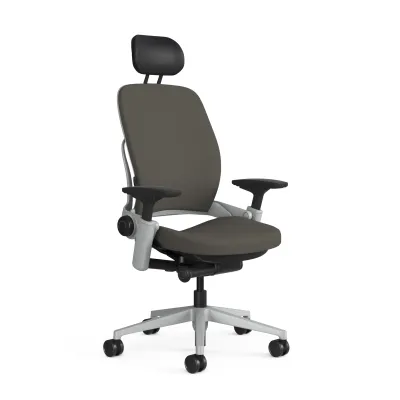
Prices are valid at publication and may change. Please refer to the product page for the latest price.
Depth adjustment is crucial because the distance between your cervical spine and the chair back changes depending on your posture. Articulated arms use dual or triple pivot points that allow you to pull the headrest forward or push it back independently of the height. If you frequently shift between an upright typing position and a deep recline, a headrest with independent depth articulation can be adjusted to meet your neck in both positions. In contrast, a fixed-arm or track-only system relies entirely on the chair’s recline angle to position the headrest, which may leave a gap when you sit fully upright.
Tilt and angle articulation represent another critical point of comparison. Some premium headrests feature a free-floating tilt mechanism that automatically adjusts to the angle of your head as you move. This dynamic movement reduces the need for manual adjustments throughout the day. Other designs use a friction-fit or locking mechanism that keeps the headrest at a fixed angle until you manually loosen and reposition it. When comparing options, check the manufacturer specifications for the total range of vertical travel and the degree of tilt angle to ensure the hardware can accommodate your height and preferred seating angles.
Build Quality and Material Durability
The longevity of a headrest depends heavily on its structural materials and joint design. Premium OEM headrests, such as the integrated Steelcase Leap option, typically feature frames made from glass-reinforced polymers that match the flexibility and strength of the chair’s main frame. These engineered plastics are designed to flex slightly under pressure, absorbing movement without cracking or developing permanent deformation. When inspecting alternative headrests, look closely at the joints and adjustment points; high-quality models often incorporate metal cores or reinforced aluminum brackets at high-stress pivot points to prevent sagging over time.

Upholstery and cushion construction directly impact both comfort and thermal regulation. The Leap headrest is typically upholstered in matching Steelcase fabrics or leathers, wrapped over high-density molded polyurethane foam. This dense foam provides firm, consistent support that resists flattening even after years of daily use. When comparing alternatives, particularly third-party mesh headrests, verify the tension and durability of the mesh material. Low-quality mesh can sag over time, causing your neck to press against the hard outer frame, whereas high-density foam maintains its shape and distributes pressure more evenly across the sub-occipital muscles.
Before finalizing a purchase, it is essential to review the manufacturer’s warranty terms, specifically looking for coverage on moving parts and joints. Original equipment manufacturers often back their headrests with extensive warranties that align with the chair’s overall coverage, reflecting confidence in their structural integrity. Third-party manufacturers, on the other hand, may offer much shorter warranty periods. Inspecting the adjustment joints for wobble, checking the tightness of the tension screws, and reading the care instructions for the upholstery fabric will give you a clear indication of the headrest’s long-term durability.
Ergonomic Support and Posture Alignment
The fundamental purpose of a headrest is to support the cervical spine and maintain a neutral posture, where your ears align vertically with your shoulders. The Steelcase Leap headrest is designed to offer subtle support primarily when you are in a reclined position, encouraging active movement rather than static resting. When you sit fully upright to type, the headrest is positioned slightly back to allow your head to move freely without being pushed forward. This design philosophy assumes that a healthy upright posture does not require constant headrest contact, which can sometimes encourage lazy posture or muscle weakness.
In contrast, some premium alternative headrests are designed to provide continuous contact even during upright tasks. To determine which approach works best for you, you can measure your neck gap. Sit in your normal working posture and have someone measure the distance from the curve of your neck to the backrest of the chair. If you have a deep cervical curve or tend to lean forward, you may require a headrest with more pronounced forward projection to fill that gap and prevent forward head posture, commonly referred to as “tech neck.”
To verify if a headrest supports neutral alignment, test how it feels during different tasks. When reclining to read or join a video call, the headrest should cradle the base of your skull—specifically the sub-occipital area—rather than pushing against the middle of your neck or the top of your head. If a headrest pushes your chin down toward your chest, it is too far forward or too low, which increases strain on the upper thoracic spine. Look for adjustable features that allow you to fine-tune the height and depth so that the support matches your unique spinal curvature.
Compatibility, Installation, and Value
Compatibility is a critical hurdle when upgrading your seating setup. The factory Steelcase Leap headrest is designed to be built into the chair during manufacturing; retrofitting an original OEM headrest onto a standard Leap chair that was purchased without one is highly complex and usually requires replacing the entire backrest assembly. Because of this limitation, many users turn to third-party aftermarket headrests specifically engineered to clamp onto the Leap’s frame. When exploring these third-party options, it is vital to verify that the attachment mechanism is compatible with your specific chair generation, as frame dimensions can vary between older and newer models.
The installation process itself requires careful consideration, as some aftermarket kits require drilling into the chair’s plastic frame or using heavy-duty clamps that can leave permanent marks. Before proceeding, check if the installation process will void your chair’s original manufacturer warranty. Non-invasive clamp-on headrests that use rubberized padding to protect the chair’s frame are generally preferred, as they can be removed easily without damaging the underlying structure. Always ensure you have the correct tools, such as specific hex keys or screwdrivers, and follow the step-by-step instructions to prevent stripping the hardware.
From a financial perspective, you must weigh the S$ price of the headrest add-on against the overall value of your ergonomic setup. A premium headrest can represent a significant additional investment on top of the base chair’s cost. To justify this expense, evaluate the cost-to-feature ratio by comparing how much adjustability and comfort the add-on provides relative to its price. If a high-end headrest resolves chronic neck strain and allows you to work comfortably for longer periods, the investment is easily justified; however, if you rarely recline or already maintain excellent upright posture, those funds might be better spent on other ergonomic adjustments, such as an adjustable keyboard tray or a monitor arm.
Decision Framework: Which Headrest Fits Your Setup?
To choose the right headrest, you must align the hardware’s capabilities with your daily work habits and physical dimensions. The integrated Steelcase Leap headrest is the ideal choice if your primary workflow involves active, upright typing interspersed with moderate reclining, and you prefer a seamless, factory-matched aesthetic. Because it is designed to move in harmony with the Leap’s backrest, it provides a highly cohesive seating experience that supports natural spinal movement without requiring constant manual adjustments.
On the other hand, you should consider premium third-party alternatives if your daily routine involves frequent, deep reclining for reading, editing, or resting, and you require highly customizable depth adjustment to cradle your neck. These aftermarket options are also the practical choice if you already own a standard Leap chair without a factory headrest and want to avoid the high cost and complexity of a full backrest replacement. Additionally, if you prefer a mesh surface for better airflow or require a wider vertical adjustment range to accommodate a taller torso, specialized third-party headrests offer the flexibility that the standard OEM model lacks.
Before making your final decision, perform a thorough check of your current workspace configuration. Measure your desk height, monitor level, and your own torso height to ensure the headrest’s adjustment range aligns with your physical needs. By verifying these operational limits and understanding your personal posture habits, you can select a headrest that transforms your premium chair into a perfectly tailored ergonomic workstation.

Community discussion
Share your experience or ask a question. Comments are reviewed before publication.