
Choosing between the Steelcase Gesture and the Herman Miller Aeron comes down to your preferred sitting style, your home office’s temperature, and how much you move throughout the workday. The Herman Miller Aeron is a highly structured, suspended mesh chair designed to enforce an upright, ergonomically correct posture while offering exceptional breathability. In contrast, the Steelcase Gesture is a highly adjustable, upholstered chair designed to support a wide variety of unconventional postures, such as leaning back, lounging, or shifting sideways while using multiple devices. Both chairs represent significant investments in long-term spinal health, but they serve fundamentally different philosophies of comfort.
Core Design and Material Differences
The fundamental design philosophy of each chair dictates how it feels from the moment you sit down. The Herman Miller Aeron utilizes a proprietary suspended pellicle mesh across both the seat and backrest. This mesh is stretched over a rigid composite frame, creating a floating sensation that distributes body weight evenly without the need for traditional foam padding. Because there is no solid barrier behind or beneath you, air flows freely through the material, preventing heat and moisture buildup.
For home offices in warm or humid climates, such as Singapore, where air conditioning might not run continuously, this open-weave mesh design offers a distinct advantage in temperature regulation. It keeps the body cool during extended working sessions by allowing body heat to dissipate naturally. However, because the mesh is suspended over a hard frame, the outer edges of the seat pan and backrest are rigid. If you tend to sit cross-legged, tuck one foot under your thigh, or lean heavily to one side, your body may press against these hard plastic borders, which can cause discomfort over long periods.
Products mentioned in this guide
Prices are valid at publication and may change. Please refer to the product page for the latest price.
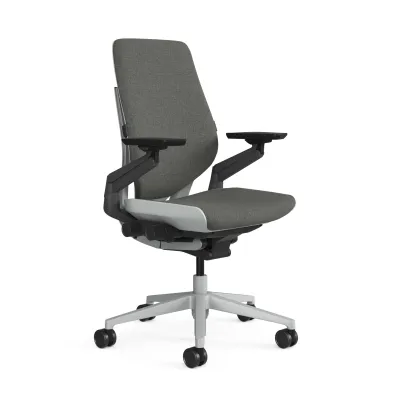
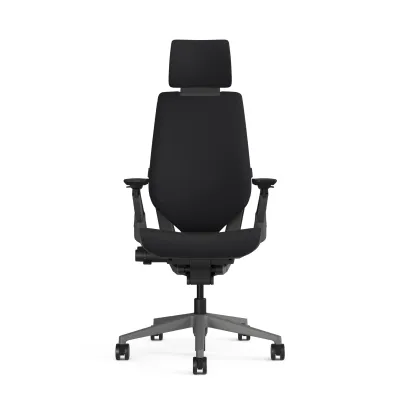
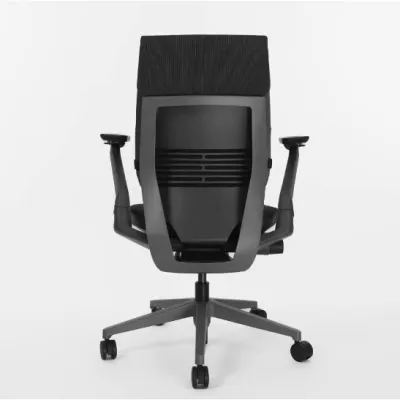
The Steelcase Gesture takes a completely different approach, utilizing a traditional upholstered design with a flexible, slim-profile foam cushion on both the seat and back. Instead of a rigid frame boundary, the Gesture features a flexible perimeter that bends slightly when pressure is applied. This allows you to sit in various non-traditional positions without encountering hard plastic edges. The upholstered fabric or leather covers a dense, supportive foam core designed to distribute pressure evenly over long hours.
While the Gesture’s cushioning provides immediate, soft comfort that many find more familiar than mesh, it naturally retains more body heat. If your home office lacks consistent climate control, you may find the upholstered surface warmer over time compared to the Aeron’s mesh. When choosing between these two material philosophies, check the manufacturer’s fabric options; some upholstery materials offer higher breathability ratings or moisture-wicking properties than standard polyester blends.
Adjustability and Ergonomic Support
Ergonomic adjustability is where these two chairs diverge most significantly in their daily utility. The Steelcase Gesture is widely recognized for its highly articulated armrests, which mimic the movement of the human arm. They can rotate, slide, raise, and lower through an exceptionally wide range of motion. This design is specifically engineered to support modern workflows, where users frequently transition between typing on a keyboard, using a mouse, and holding a mobile phone or tablet close to the body. If you find your elbows hovering or your shoulders tensing while switching devices, the Gesture’s armrests can be positioned inward to support your forearms directly.

The Herman Miller Aeron’s armrests, while highly adjustable on modern iterations, operate on a more traditional track. They adjust for height, depth, and pivot angle, but they do not offer the same extreme inward lateral movement as the Gesture. They are designed primarily to keep your arms in a neutral typing position parallel to your desk. If your workflow is centered almost exclusively on standard desktop computing, the Aeron’s armrests provide stable, reliable support, but they may feel less accommodating if you frequently hold mobile devices or shift your seating angle.
Lower back support is another critical point of comparison. The Aeron features a highly structured lumbar support system, most notably the PostureFit SL option, which uses two adjustable pads to support both the sacrum and the lumbar spine. This system is designed to maintain the natural S-curve of your spine and actively discourages slouching. It is a firm, highly noticeable support mechanism that forces you into a healthy posture. If you have specific lower back needs, consult the official product manual to understand how to adjust the tension and height of these pads to align with your spine.
The Steelcase Gesture integrates its lumbar support more subtly into the backrest design. It features a flexible backrest that automatically contours to the shape of your spine as you move, supplemented by an adjustable lumbar support slider that lets you position the focal point of the support higher or lower. The feel is less aggressive than the Aeron’s PostureFit system, offering a supportive cradle that moves with you rather than a rigid structure that holds you in place.
Recline and tilt mechanisms also reflect these differing philosophies. The Aeron uses a sophisticated synchro-tilt mechanism with a tilt limiter and forward tilt option. The forward tilt is particularly useful for task-intensive work, allowing the seat pan to angle slightly downward as you lean forward over your desk. The tilt tension is highly adjustable, allowing you to find a perfect balance where the chair moves effortlessly with your body weight. The Gesture features a robust recline system with a variable back stop, allowing you to lock the recline at several specific angles or leave it open with adjustable resistance. The seat also glides forward slightly as you recline, keeping your eyes aligned with your monitor and your feet flat on the floor.
Sizing, Weight Limits, and Space Fit
Finding the right physical fit is essential to ensure that the ergonomic features of either chair function as intended. Herman Miller addresses body diversity by offering the Aeron in three distinct, fixed sizes: A, B, and C. Size A is designed for smaller frames, Size B is the standard medium size suitable for the majority of users, and Size C is built for taller or heavier individuals. Because these sizes are fixed, you must consult the manufacturer’s official height and weight chart before purchasing. A common mistake is choosing a size based solely on seat width without verifying if the backrest height and seat depth align with your torso and thigh length.
The Steelcase Gesture uses a universal sizing approach, relying on a highly adjustable seat depth mechanism to accommodate different body types on a single chair frame. By turning a knob, you can slide the seat pan forward or backward to ensure proper support behind your thighs without cutting off circulation at the knees. This makes the Gesture highly versatile for shared home offices where multiple family members of varying heights use the same workspace.
Beyond body fit, you must verify the physical footprint of the chair against your home office layout. Measure your desk’s clearance height, particularly the space between the floor and the underside of the desk drawer or keyboard tray, to ensure the armrests can slide underneath when the chair is not in use. Check the official product specifications for the maximum outer dimensions of the base, as the five-star caster base on both chairs requires a clear radius to rotate freely without striking desk legs or nearby walls.
Floor protection is another critical consideration for home setups. Both chairs can be ordered with different caster options optimized for either hard floors (such as parquet, vinyl, or tile) or carpeted surfaces. Standard hard casters can scratch hardwood or crack delicate tiles over time, while soft roll casters provide quiet movement and protect delicate flooring. Before finalizing your order, verify the caster specifications on your invoice to ensure they match your specific flooring material, or consider adding a dedicated chair mat to prevent wear.
Decision Framework: Which Chair Fits Your Workflow?
To make your final decision, evaluate your daily working habits and physical preferences against the core strengths of each chair. The Herman Miller Aeron is the ideal choice if you prefer a highly structured, disciplined sitting experience that actively maintains your posture. It is particularly suited for those who work in warmer rooms and prioritize maximum breathability, as well as users who fit cleanly into one of the three dedicated size categories and prefer the floating sensation of suspended mesh over traditional foam.
The Steelcase Gesture is the better fit if your workflow involves frequent posture changes, collaborative tasks, or the use of multiple devices like tablets and smartphones alongside your main computer. Its highly adaptable armrests and flexible seat perimeter accommodate shifting, leaning, and lounging without sacrificing support. It is also the practical choice for shared home workspaces, as its adjustable seat depth allows it to be quickly reconfigured for different users.
Before making a significant investment in either premium chair, verify the local purchasing conditions in Singapore. Check the specific warranty terms offered by authorized local distributors, as premium office chairs often carry extensive multi-year warranties that are only valid when purchased through official channels. Additionally, confirm the return policies and whether local showrooms are available for a physical sitting trial, allowing you to test the adjustments and material feel firsthand before committing.
Frequently Asked Questions (FAQ)
How do I clean and maintain the mesh or fabric materials?
To maintain the appearance and longevity of your chair, always consult the manufacturer’s care label or official maintenance guide before applying any cleaning solutions. For the Herman Miller Aeron’s pellicle mesh, regular vacuuming with a soft brush attachment is usually sufficient to remove dust and debris from the weave. If a spill occurs, gently blot the area with a clean, damp cloth; avoid rubbing, which can fray the fibers. For the Steelcase Gesture’s upholstered fabric, spot-clean using a mild, water-free solvent or a dry-cleaning product designed for upholstery, testing it first on an inconspicuous area. Never use harsh household detergents, bleach, or abrasive scrubbing tools, as these can degrade the structural integrity of the fibers and foam.
Do these chairs require professional assembly?
Most premium office chairs, including the Steelcase Gesture and Herman Miller Aeron, are shipped either fully assembled or partially assembled in a large box. If your chair requires partial assembly, it typically involves simple steps such as inserting the gas cylinder into the base and securing the seat assembly, which can be completed using basic tools included in the package. Always review the manufacturer’s assembly manual before beginning. If you encounter any resistance when fitting parts together, or if components appear misaligned or damaged upon unboxing, stop immediately. Do not force the parts, as this can damage the ergonomic mechanisms; instead, contact the authorized retailer or manufacturer support for guidance.

Community discussion
Share your experience or ask a question. Comments are reviewed before publication.