
The search for the ideal premium office chair often narrows down to established industry leaders. When comparing the Haworth Very against renowned alternatives from Herman Miller and Steelcase, there is no single universal winner. The best choice depends entirely on your specific body mechanics, daily work habits, and workspace constraints. This guide breaks down the critical ergonomic features, build verification steps, and spatial requirements to help you make a condition-based decision for long work sessions.
To find a chair that supports you through long hours of focused work, you must look past marketing buzzwords and focus on how a chair’s mechanical adjustments align with your physical frame. Premium seating is an investment in your daily comfort and long-term physical well-being. By examining the specific adjustment ranges, material choices, and spatial footprints of these leading brands, you can identify which model matches your daily routine.
Core Ergonomic Adjustments: Matching Support to Your Posture
The foundation of any premium ergonomic chair lies in its ability to adapt to your unique spinal curvature and movement patterns. The Haworth Very is notable for its optional asymmetric lumbar support system. This mechanism allows users to adjust the tension on the left and right sides of the lower back independently. If you tend to lean slightly to one side or have asymmetrical support needs, this feature provides targeted stabilization that symmetrical lumbar bands cannot replicate. In contrast, many Herman Miller models utilize a dynamic, auto-adjusting sacral or lumbar support system that responds to your body weight, while Steelcase designs often employ a manual dial to curve the lower backrest. You should test these systems to see whether you prefer active, manual control or passive, self-adjusting support.
Products mentioned in this guide
Prices are valid at publication and may change. Please refer to the product page for the latest price.
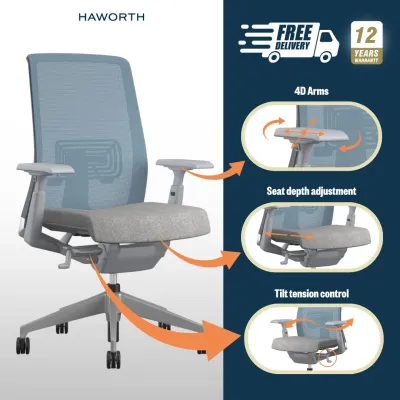
Armrest adjustability is another critical factor for preventing shoulder strain and wrist fatigue during long typing sessions. Look for chairs that offer four-dimensional (4D) armrests, which adjust for height, width, depth, and pivot angle. The Haworth Very offers highly adjustable armrests that can slide inward to support narrow shoulders or pivot outward when you need a wider stance for tablet use or reading. When comparing this to alternatives, verify whether the armrests can lower sufficiently to clear your desk surface when you slide the chair forward. Some competing models feature armrests that pivot on a fixed arc, which may alter your distance from the keyboard when adjusted.
Beyond lumbar and arm support, the seat pan and tilt mechanisms dictate how well a chair accommodates different working postures. A proper seat depth adjustment ensures that your thighs are fully supported without the front edge of the seat pressing into the back of your knees. Check the seat slide range on each model; a gap of about two to three fingers between the seat edge and your knees is ideal. Furthermore, evaluate the tilt tension and recline lock settings. The Haworth Very utilizes a weight-activated tilt mechanism with a back-stop, which keeps you balanced as you recline. Some users prefer this balanced tension, while others favor the variable tilt-limiting stops found on alternative premium chairs, which allow you to lock the backrest at specific angles for task-focused upright work.
Material and Build Verification: What to Check Before Buying
When investing in a high-end office chair, the materials used directly impact both daily comfort and long-term durability. The Haworth Very typically features a mesh backrest paired with an upholstered foam seat cushion. This hybrid design offers a balance of breathability and plush support. When evaluating mesh backrests, check the tension and elasticity of the weave. High-quality mesh should feel supportive without sagging or creating pressure points along your shoulder blades. If you prefer a fully mesh chair, such as certain iconic Herman Miller models, observe how the suspension mesh distributes your weight. While full mesh offers maximum airflow, some users find that a contoured foam seat cushion, like those found on the Haworth Very or Steelcase models, provides better pressure relief for the sit bones during extended sessions.

Structural integrity is another crucial element that requires physical verification. Do not rely solely on product descriptions; instead, inspect the physical labels located on the underside of the seat pan or on the gas cylinder. These labels indicate compliance with international testing standards, such as ANSI/BIFMA, which certify that the chair has undergone rigorous safety and durability testing. Check the maximum weight capacity rating of the specific configuration you are considering. A robust aluminum or reinforced nylon base, coupled with a heavy-duty class 4 gas cylinder, is essential for maintaining stable height adjustments over years of daily use.
Finally, a premium price tag should be backed by a comprehensive manufacturer warranty. Review the warranty document carefully to understand what is covered and for how long. Many top-tier brands offer warranties spanning up to twelve years, but the coverage details can vary significantly between components. For instance, the structural frame and base might be covered for the full duration, while the gas cylinder, armrest pads, and mesh fabric may have shorter coverage periods. Verify whether the warranty covers both parts and labor, and check if you are responsible for shipping costs if the chair needs to be sent to a local service center for repairs.
Sizing and Space Compatibility: Measuring for Your Workspace
An ergonomic chair can only perform its job if it fits seamlessly into your physical workspace. Before making a purchase, measure the overall footprint of the chair, including the maximum spread of the caster base. In compact home offices or tight study corners, a wide base can collide with desk legs or nearby storage units. Measure your desk’s under-carriage clearance, taking into account any drawers or keyboard trays. You must ensure that the chair’s armrests can slide under the desk when not in use, allowing you to sit close enough to your workstation to maintain a neutral typing posture without leaning forward.
Delivery and assembly logistics are equally important, especially if you live in a high-rise apartment or condominium. Measure your doorways, hallway turns, and elevator dimensions to ensure the delivery team can safely transport the package to your study room. If the chair requires assembly, verify whether the necessary tools are included and check if the manufacturer provides clear, step-by-step instructions or video guides to prevent assembly errors that could compromise the chair’s stability.
Additionally, you must match your personal physical dimensions with the chair’s specified adjustment ranges. Every chair has an optimal user height and weight envelope. If you are exceptionally tall or short, check the minimum and maximum seat height limits. A seat that does not lower enough will leave your feet dangling, causing pressure on your thighs, while a seat that does not rise high enough will force your knees above your hips, straining your lower back. Ensure the cylinder range matches your desk height, particularly if you use a fixed-height desk rather than an adjustable standing desk.
Decision Framework: Which Premium Chair Fits Your Workflow?
Selecting the right premium chair requires a systematic approach that aligns the chair’s mechanical strengths with your daily workflow. The Haworth Very is an excellent choice if your daily tasks require frequent posture changes and you highly value targeted, asymmetrical lumbar support. Its weight-activated tilt and responsive backrest make it highly suitable for users who transition between typing, reading, and taking calls throughout the day. The ability to fine-tune the lumbar tension on either side of your spine provides a level of customized support that is particularly beneficial if you have minor postural imbalances.
Conversely, you may want to consider alternatives from Herman Miller or Steelcase if your work habits demand different specialized features. For instance, if you work in a warm environment without air conditioning, a full-mesh model from Herman Miller might be preferable for its superior ventilation. If your workflow involves deep reclining or constant movement, a Steelcase model with a live-back system that mimics the natural movement of your spine might offer a more seamless feel. Always prioritize the specific mechanical features that address your primary discomfort points during the workday.
If you have pre-existing musculoskeletal issues, such as chronic lower back pain, herniated discs, or shoulder impingement, consult with a qualified ergonomic specialist or physical therapist before making a final decision. A professional can analyze your sitting posture and recommend specific adjustments or support types that align with your medical needs. Remember that an ergonomic chair is a tool to support healthy posture, but it cannot replace professional medical advice or the necessity of taking regular movement breaks.
To evaluate the true cost of a premium chair, look beyond the initial retail price and calculate its long-term value. Divide the purchase price by the number of years covered under the manufacturer’s warranty to determine the cost-per-year of ownership. For example, a chair costing S$1,200 with a twelve-year warranty costs just S$100 per year, which often represents better value than purchasing a cheaper, non-adjustable chair that may need replacement every two to three years. This long-term perspective helps justify the upfront investment in a high-quality, adjustable seating solution.
Frequently Asked Questions (FAQ)
Is the Haworth Very suitable for long gaming sessions?
The Haworth Very can be highly suitable for gaming, provided its adjustment options align with your gaming setup. For console gaming, where players often recline with a controller, the weight-activated tilt and supportive backrest allow for a relaxed yet stable posture. For PC gaming, which requires precise mouse and keyboard movements, the 4D armrests can be adjusted to support your forearms at the correct height, reducing shoulder fatigue. However, you should check the density of the seat cushion; some gamers prefer a thicker, softer cushion for long, static sessions, whereas the Very features a firmer, ergonomically contoured foam designed to promote active sitting and proper circulation.
How do I verify the authenticity and warranty of premium office chairs?
To ensure you are purchasing a genuine product with a valid manufacturer warranty, always locate the official serial number and manufacturing label on the underside of the seat pan. This sticker contains essential details, including the model number, manufacture date, and unique serial code, which are required for warranty registration and service claims. Avoid purchasing from unauthorized third-party sellers or unverified online marketplaces, as these transactions often void the manufacturer’s warranty. Instead, purchase directly from authorized local distributors or the brand’s official showroom, and confirm that your purchase is registered in their local warranty database.

Community discussion
Share your experience or ask a question. Comments are reviewed before publication.