
Choosing the right seating for your home office is a critical decision that directly impacts your daily comfort, focus, and long-term physical well-being. With remote work becoming a permanent fixture for many professionals, the debate between purchasing a gaming chair or a traditional ergonomic office chair has intensified. Neither option is universally superior; the optimal choice depends on your individual posture habits, daily work duration, physical dimensions, and the specific environment of your home workspace.
Ergonomic office chairs are engineered primarily for targeted postural support, micro-adjustments, and high breathability, making them highly suitable for structured, long-duration tasks. Gaming chairs, on the other hand, prioritize a cradled, high-back sitting experience, deep reclining capabilities, and a distinct aesthetic inspired by motorsports. Before making a financial commitment, you should carefully assess your typical sitting hours, your home’s climate control, and any existing back or neck concerns to determine which design philosophy aligns with your daily routine.
Core Differences: Design, Materials, and Adjustability
To understand which chair type suits you best, it is essential to examine their structural foundations. The most visible difference lies in the backrest design. Gaming chairs typically feature a high-back bucket seat with pronounced side bolsters, a design borrowed directly from racing car seats. While these bolsters are excellent for keeping a driver secure during high-speed turns, in a home office they tend to restrict lateral movement and shoulder expansion. In contrast, ergonomic office chairs generally utilize a contoured backrest designed to follow the natural S-curve of the human spine, allowing your shoulders and upper body to move freely as you reach for items on your desk.
Products mentioned in this guide
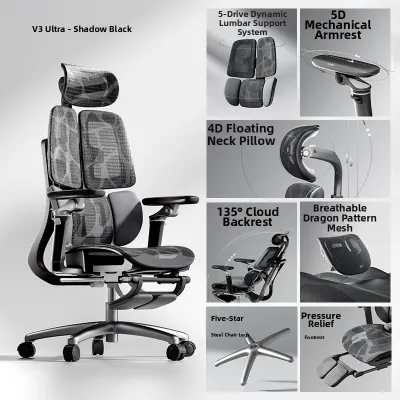
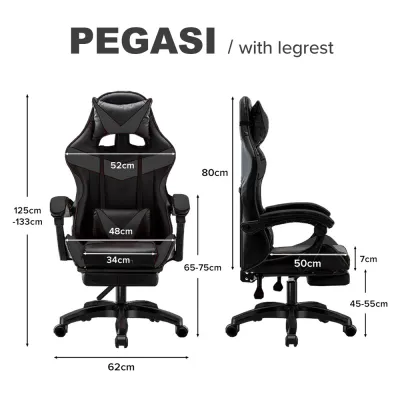
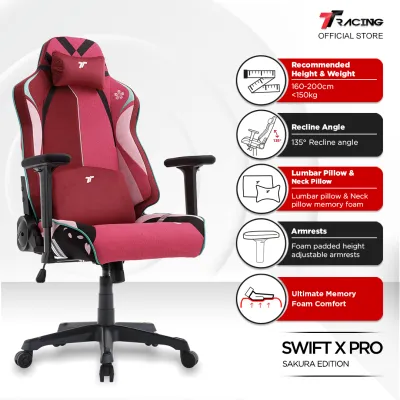
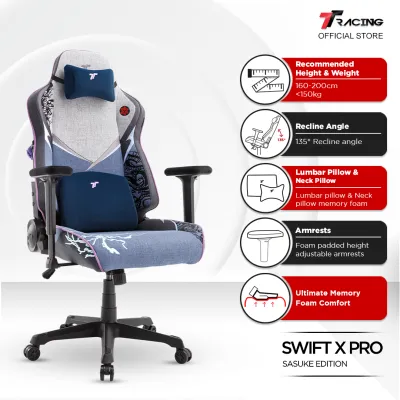
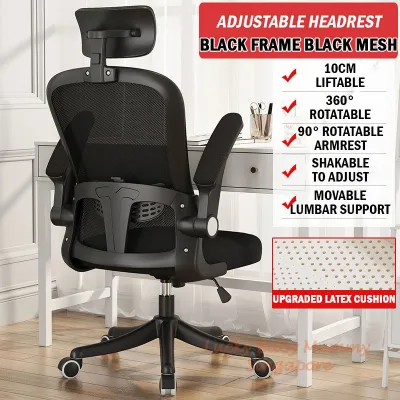
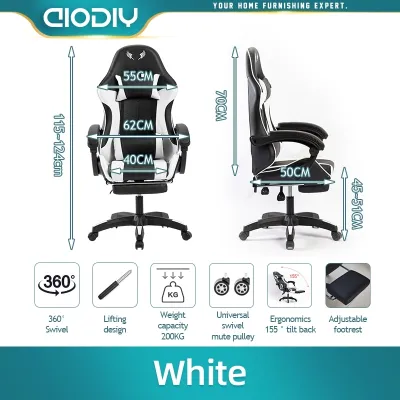
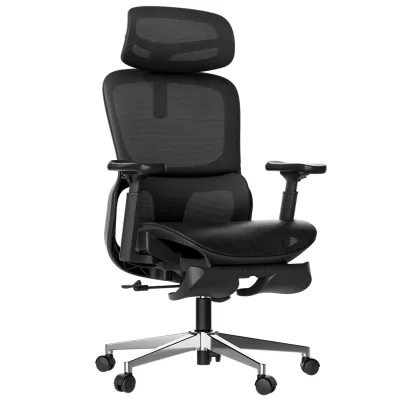
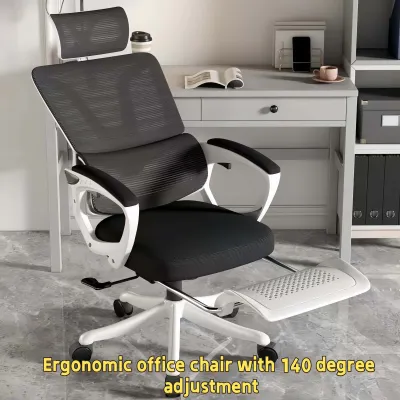
Prices are valid at publication and may change. Please refer to the product page for the latest price.
Adjustability mechanisms also vary significantly between the two categories, though both offer a wide range of customization depending on the manufacturer. High-quality ergonomic chairs often feature advanced synchro-tilt mechanisms, where the backrest and seat pan recline at a synchronized ratio (usually 2:1) to keep your feet flat on the floor and maintain proper spinal alignment. Gaming chairs more commonly use a tilt-lock mechanism that allows the entire seat unit to rock back together, or a deep recline function that lets the backrest tilt independently up to 135 degrees or more. Armrest adjustability is another key factor; look for three-dimensional (3D) or four-dimensional (4D) armrests on either chair type to ensure you can adjust the height, depth, width, and angle to support your forearms comfortably while typing.
Material selection is particularly crucial if you live in a warm or humid climate, such as Singapore, where temperature regulation directly affects daily comfort. Many gaming chairs are upholstered in synthetic leathers, such as polyurethane (PU) or polyvinyl chloride (PVC). While these materials are easy to wipe clean and offer a sleek look, they tend to trap body heat and moisture during long sitting sessions. Ergonomic office chairs frequently employ breathable mesh backrests and sometimes mesh seat pans, which promote continuous airflow and keep you cool. When browsing online marketplaces or local showrooms, always check the product labels and manufacturer specifications for material breathability, foam density, and care instructions to ensure the chair matches your home’s ventilation setup.
Posture and Comfort: Support for Long Work Hours
Maintaining a healthy posture during an eight-hour workday requires consistent, targeted support for your spine’s lumbar region. Ergonomic office chairs typically address this with built-in, adjustable lumbar support systems that allow you to modify both the height and depth of the curve to fit the small of your back. This ensures continuous contact with your lower spine even as you shift positions. Gaming chairs generally rely on external, removable lumbar pillows held in place by elastic straps. While these pillows offer decent cushioning, they can slide out of alignment and may not provide the firm, structured support required to prevent slouching over long periods.

Head and neck support is another area of contrast. Because gaming chairs feature a tall backrest, they almost always include a matching neck pillow that straps near the top of the chair. This setup is highly comfortable when you are in a reclined position watching a presentation or taking a break, but it may not align correctly with your neck when sitting upright to type. Ergonomic chairs often treat headrests as an optional accessory; when present, these headrests are highly adjustable in height and angle, allowing you to position them precisely to support your skull without pushing your head forward. You should measure your torso length and check the chair’s specifications to ensure the headrest aligns with your neck rather than your shoulders.
Underneath you, the seat cushion design plays a major role in lower-body circulation. Many ergonomic office chairs feature a “waterfall” front edge, which slopes gently downward to reduce pressure on the back of your thighs and knees, promoting healthy blood flow. Gaming chairs often have flatter seat pans with raised side edges that can feel restrictive if you prefer to sit with your legs slightly apart or occasionally cross-legged. When evaluating cushions, look for high-density, cold-cured molded foam specifications, as this material retains its shape and supportive properties much longer than standard cut foam, preventing you from bottoming out against the hard seat frame.
Space and Aesthetics: Fitting the Chair into Your Home
Beyond physical comfort, your choice of chair must fit the practical constraints of your living space. Gaming chairs tend to have a larger overall footprint, featuring wider five-star caster bases and bulkier backrests to accommodate their reclining mechanisms. If you are working from a compact study corner in a typical Singapore apartment or HDB flat, a bulky chair can easily block walkways or make the room feel cluttered. It is vital to measure your available floor space, the distance between your desk legs, and even your doorway or lift clearance before ordering a fully assembled unit.
Visual integration with your home decor is another major consideration. Gaming chairs are famous for their bold, high-contrast color schemes, embroidered logos, and aggressive styling. While this look is highly popular among content creators and gaming enthusiasts, it may not blend seamlessly into a multi-purpose living room or a minimalist home office. Ergonomic office chairs generally favor a more understated, professional aesthetic, utilizing neutral colors like black, grey, or white, and clean lines that easily complement modern home interiors. If your home office doubles as a guest bedroom or sits in a shared living area, a low-profile ergonomic chair often provides a more cohesive look.
Desk clearance is a final spatial detail that is easily overlooked. You must check the minimum and maximum seat height specifications of the chair to ensure your thighs clear the underside of your desk drawer or tabletop. Furthermore, check if the armrests can be lowered sufficiently to slide the chair fully under the desk when not in use. This simple check can save valuable floor space in tight quarters and ensure your arms remain at a comfortable 90-degree angle relative to your keyboard during work hours.
How to Choose: Decision Framework for Your Needs
To finalize your decision, evaluate your daily habits, physical needs, and workspace constraints against the following targeted guidelines.
Choose an ergonomic office chair if:
- You spend more than six hours a day sitting and require strict, continuous posture correction to prevent lower back fatigue.
- Your workspace is located in a room without constant air conditioning, making a highly breathable mesh backrest essential for thermal comfort.
- You prefer a minimalist, professional aesthetic that blends quietly into your home's existing interior design.
- You require precise, built-in adjustments such as seat depth sliders and synchronized tilting to match your exact body proportions.
Choose a gaming chair if:
- Your daily routine involves a mix of active typing, casual media consumption, and frequent reclining breaks where a high backrest and neck pillow are highly utilized.
- You enjoy a snug, cradled sitting sensation similar to a car seat and do not mind restricted lateral shoulder movement.
- You want to make a bold visual statement in your workspace or coordinate your chair with a dedicated gaming setup.
- You prefer a thick, padded foam seat cushion over the suspended feel of a mesh seat pan.
Verify first if:
- You have specific physical requirements; always check the manufacturer's stated maximum weight capacity and recommended height range.
- The chair's caster wheels are suitable for your flooring type, as hard nylon casters can scratch delicate wooden floors unless paired with a protective mat.
- The retailer offers a clear warranty period covering the gas lift cylinder and adjustment mechanisms, which are the components most prone to wear over time.
Frequently Asked Questions (FAQ)
Can I use a gaming chair for standard office work?
Yes, you can comfortably use a gaming chair for standard office work, provided you adjust it correctly. However, you should be aware that many gaming chairs lack advanced ergonomic features like seat depth sliders, which help distribute your weight evenly across the seat pan. To maintain a healthy posture during work tasks, ensure you adjust the backrest to a nearly upright position (around 90 to 100 degrees) and lock the tilt mechanism to prevent slouching while typing.
Are ergonomic office chairs always more expensive than gaming chairs?
No, both categories span a wide pricing spectrum, from budget-friendly entry-level models starting under S$150 to premium, high-end designs that exceed S$1,000. Instead of assuming price dictates quality, you should compare the specific materials used, the adjustability options provided, and the length of the manufacturer’s warranty. A mid-range ergonomic chair with a solid warranty often provides better long-term value and durability than a similarly priced gaming chair made with cheap synthetic leather.
How do I know if a chair will fit my body type?
To ensure a proper fit, you should measure your personal dimensions and compare them directly with the manufacturer’s detailed sizing chart. Measure your seat-to-floor height while wearing your typical footwear and verify that the chair’s gas lift range accommodates this measurement. Additionally, check the inner seat width—excluding any raised side bolsters—and the seat depth to ensure your thighs are fully supported without the front edge pressing uncomfortably against the back of your knees.

Community discussion
Share your experience or ask a question. Comments are reviewed before publication.