
Finding the right office chair with effective back support for your home office is a highly personal decision. Because every individual has a unique spinal curvature, torso length, and sitting posture, no single brand can claim a universal victory. Instead of choosing a chair based solely on brand reputation or aesthetic appeal, the key to long-term comfort lies in understanding how different built-in lumbar support mechanisms interact with your body. By focusing on adjustable specifications, structural materials, and practical testing methods, you can select a chair that maintains healthy spinal alignment throughout long working hours.
Understanding Built-in Lumbar Support Mechanisms
Manufacturers approach lower back support through several distinct engineering methods. The most common is the adjustable lumbar pad, which can be moved vertically and sometimes horizontally. This design allows you to align the support directly with the lordotic curve of your lumbar spine. Fixed lumbar curves, on the other hand, rely on a static frame shape. While simpler, they only work well if your height and proportions perfectly match the manufacturer’s default mold.
Another modern approach is the dynamic or flexible backrest. These systems use pivoting joints or flexible materials that automatically adjust their angle and pressure as you shift your weight. This is particularly beneficial if you tend to move frequently, transition between typing and taking calls, or stretch throughout the day. The chair adapts to your movement, ensuring continuous contact with your lower back without requiring manual adjustments.
Products mentioned in this guide
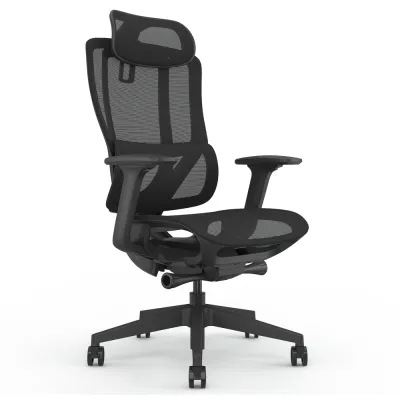
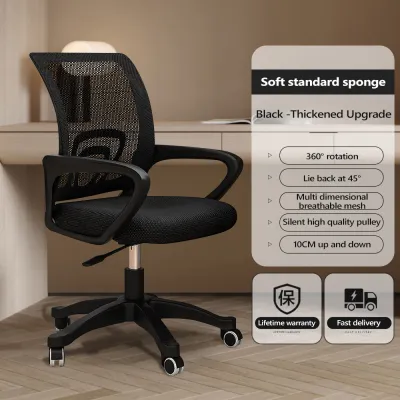
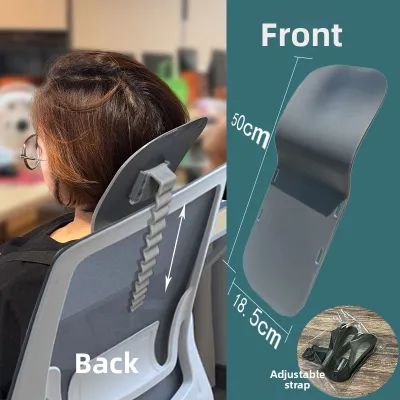
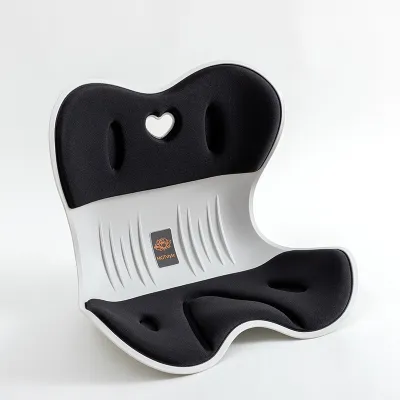
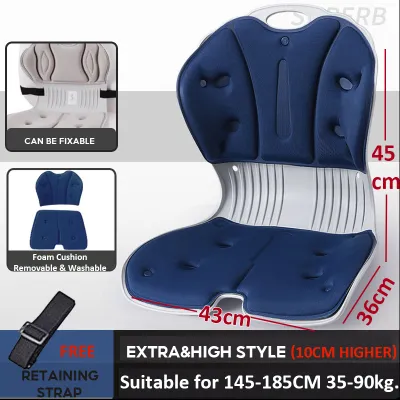
Prices are valid at publication and may change. Please refer to the product page for the latest price.
For those living in warm, humid climates like Singapore, integrated mesh tension zones offer an excellent alternative to traditional foam padding. Instead of a physical pad pressing against your back, the mesh fabric itself is woven with varying levels of elasticity. Tighter tension in the lower section provides firm, breathable support, while a softer weave higher up allows your shoulders to sink in comfortably. This design eliminates rigid plastic pressure points and promotes airflow, keeping you cool during long afternoon sessions.
Key Specifications to Compare Across Brands
When comparing different models online or in local showrooms, looking at a specification sheet can save you from a mismatched purchase. The first metric to evaluate is the lumbar adjustment range. Ideally, a chair should allow you to adjust the height of the support by at least several centimeters. Depth adjustment is equally valuable, as it lets you control how firmly the support presses into your lower back, preventing over-correction or insufficient support.

Backrest height and width are also critical, especially if you require full-body support. A high-back chair supports the thoracic spine and shoulders, which helps distribute upper body weight and reduces the load on your lumbar region. If you prefer a mid-back design, ensure the top of the backrest does not press uncomfortably into your shoulder blades when you lean back.
The recline and tilt mechanism dictates how well the chair maintains lumbar contact when you change postures. Look for chairs with tilt tension control, which adjusts the resistance of the backrest to match your body weight. A multi-position tilt lock is also beneficial, allowing you to secure the backrest at specific angles for focused work or relaxed reading while keeping the lumbar support firmly positioned against your spine.
Seat pan depth is an often-overlooked factor that directly impacts back support. If the seat pan is too deep, you will be forced to slide forward, leaving a gap between your lower back and the lumbar support. Conversely, a seat pan that is too shallow fails to support your thighs properly, increasing pressure on your sit bones. Look for a chair with an adjustable seat slider, ensuring you can maintain a two-to-three-finger gap between the edge of the seat and the back of your knees.
Matching Support Features to Your Body and Work Habits
Your physical proportions should dictate the type of built-in support you choose. Taller individuals with longer torsos often find that standard, non-adjustable lumbar curves sit too low, pressing on the sacrum rather than the lumbar spine. If you are on the taller or shorter end of the spectrum, prioritizing a wide vertical adjustment range is essential to ensure the support lands precisely in the small of your back.
Your daily work habits also influence the ideal support mechanism. If your work involves intense, upright typing for hours, a firm, locked lumbar support or a forward-tilt mechanism can help you maintain an active posture. However, if your day is filled with virtual meetings, video editing, or reading, a dynamic backrest that reclines smoothly while keeping the lumbar pad in contact with your spine is often more comfortable.
Consider the duration of your daily sitting sessions. For short, intermittent use, a basic ergonomic chair with moderate adjustability may suffice. However, if you work from home full-time, investing in a highly adjustable model is crucial. Over eight hours, muscle fatigue sets in, and a highly customizable chair allows you to fine-tune the support as your posture naturally shifts throughout the day.
How to Verify Comfort and Fit Before Buying
While online research is valuable, physically testing a chair in a showroom remains the most reliable way to verify fit. When sitting in a test model, slide your hips all the way to the back of the seat. Pay close attention to how the lumbar support feels; it should feel like a gentle, supportive hand holding up your lower spine, not a hard bar pushing you forward. Check if your shoulders feel rounded or if there is an empty gap behind your lower back.
If you are purchasing from an online marketplace or a direct-to-consumer brand, carefully review the return and trial policies. Many local retailers offer trial periods ranging from a few days to a couple of weeks. Because your body needs time to adjust to a new ergonomic posture, testing the chair in your actual home office environment—paired with your specific desk height—is the ultimate test of compatibility.
Before making a final decision, look for verified user reviews that specifically mention long-term durability and back comfort. Pay attention to feedback regarding the mechanical parts of the lumbar support. Over time, cheap plastic adjustment clips can slip or lose tension, causing the support to slide down during use. High-quality models use robust locking mechanisms or self-adjusting tension systems that maintain their position over years of daily use.
Frequently Asked Questions (FAQ)
Is built-in lumbar support better than aftermarket lumbar pillows?
Built-in lumbar support mechanisms generally offer superior stability and alignment consistency compared to aftermarket pillows. An integrated support is fixed to the chair’s frame, meaning it will not slide, compress, or require constant readjustment every time you stand up. However, an aftermarket memory foam pillow can serve as a helpful, low-cost temporary solution if you are not yet ready to replace your current chair. If you experience persistent lower back stiffness or find yourself constantly adjusting your posture despite using external cushions, it is a clear sign that your current chair lacks the structural integrity needed for your body, and upgrading to a dedicated ergonomic chair with built-in support is highly recommended.
How do I know if a chair's lumbar support is adjustable enough for me?
To determine if a chair’s adjustment range is sufficient, start by checking the manufacturer’s specification sheets for the vertical and horizontal travel measurements of the lumbar pad. When testing a chair in person, adjust the lumbar support to its absolute highest and lowest positions. If the support cannot be positioned directly in the curve of your lower back—just above your belt line—while your feet are flat on the floor and your thighs are parallel to the ground, the adjustment range is inadequate. Physical warning signs of a poor fit include a feeling of being pushed forward out of the seat, pressure on your tailbone, or a complete lack of contact between your lower back and the backrest.

Community discussion
Share your experience or ask a question. Comments are reviewed before publication.