
An ergonomic chair is one of the most critical investments for a productive work-from-home setup, yet navigating the endless list of mechanical features can be overwhelming. The features that genuinely impact daily comfort are those that allow you to customize the chair to your unique body proportions and desk setup. Rather than paying a premium for high-tech gimmicks, focusing on core adjustability, material quality, and physical space compatibility will yield the greatest long-term benefits for your posture and well-being.
The Essential Adjustability Specs That Reduce Daily Strain
To maintain a healthy posture during long hours of desk work, certain mechanical adjustments are non-negotiable. These features allow the chair to adapt to your body rather than forcing your body to adapt to a rigid structure.
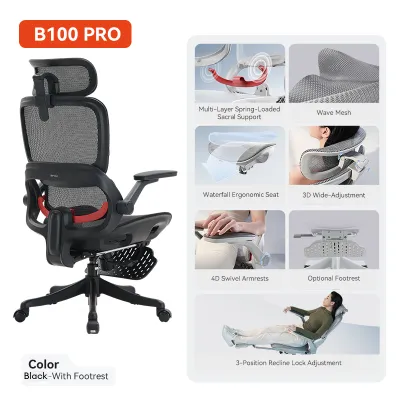
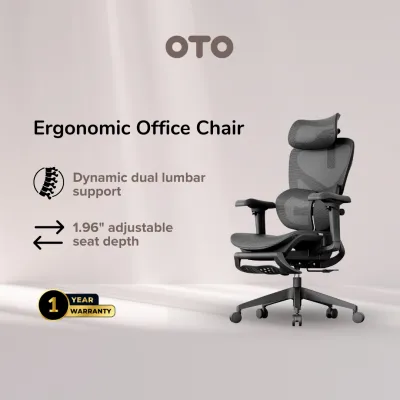
Lumbar Support A fixed lumbar curve rarely fits everyone. Look for lumbar support systems that offer adjustable height and depth. This allows you to position the support precisely in the inward curve of your lower spine. When evaluating a chair, check if the lumbar mechanism can be locked into place so it does not slip down during active movement.
Products mentioned in this guide
![[NEW LAUNCH] Hinomi Q2 Pro Ergonomic Office Chair Adjustable Lumbar Support Memory Foam Headrest Armrest Legrest](https://img.lazcdn.com/g/p/0b7241fcc12b459ca71f9ff200c641b3.jpg_400x400q80.jpg_.webp)
![[SG Ready Stocks] Ergonomic Office Chair - 8.5cm Thick Cushion + Antislip Surface Adjustable Backrest & Detachable Headrest Flip-Up Arms Rocking & Lock Function 15-Min Easy Assemble for Home/Office](https://img.lazcdn.com/g/p/056ecb65b2a442dd9a476ff654362085.jpg_400x400q80.jpg_.webp)
![[SG Ready Stocks] PRO Ergonomic Full Mesh Chair – Lumbar/Headrest/Armrest Support – Adjustable Height & Recline – Home & Office Use](https://img.lazcdn.com/g/p/f29dfd5001316f50493cad61e5b9bc5f.jpg_400x400q80.jpg_.webp)
Prices are valid at publication and may change. Please refer to the product page for the latest price.
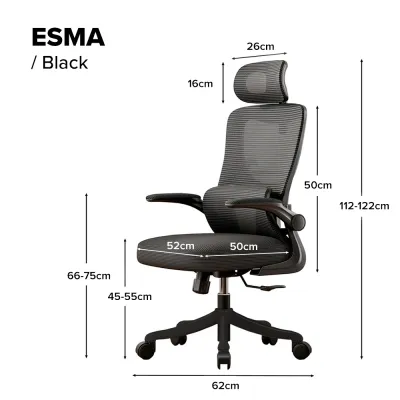
Seat Pan The seat pan is highly critical for managing pressure on your thighs and lower back. A quality ergonomic chair should feature a seat depth slider, allowing you to adjust the distance between the backrest and the front edge of the seat. Ideally, you want a gap of about two to three fingers between the back of your knees and the edge of the seat. Additionally, a waterfall edge design—where the front of the seat slopes gently downward—helps maintain healthy circulation in your legs.
Armrests Armrests reduce strain on your shoulders and neck by supporting the weight of your arms. While fixed armrests might suffice for short tasks, multi-dimensional adjustability is highly beneficial for long work sessions. These allow you to adjust the height, width, angle, and depth of the armrests to align precisely with your desk height, keeping your elbows at a comfortable 90-degree angle.
Material and Build Claims: What to Verify on the Product Label
Marketing descriptions often use buzzwords to describe materials, but verifying actual technical specifications on the product label or manufacturer datasheet is the most reliable way to ensure durability and comfort.

Upholstery Mesh and foam are the two primary seating materials, each offering distinct advantages. Mesh provides excellent heat dissipation, which is particularly valuable in warm, humid climates like Singapore. However, you must check the mesh tension; low-quality mesh can sag over time, leading to uneven pressure distribution. High-density molded foam offers robust, long-term support and retains its shape better than cut foam, though it may retain more body heat.
Weight Capacity and Base Always check the manufacturer’s certified weight capacity to ensure structural safety. The base material also matters; reinforced nylon or aluminum bases offer superior stability compared to basic plastic. Additionally, verify the caster type. Hard casters are designed for carpeted floors, while soft, polyurethane-coated casters are essential for protecting hard surfaces like vinyl, laminate, or parquet from scratches.
Recline Mechanism The way a chair reclines affects how your body moves throughout the day. A basic rocking mechanism tilts the seat and backrest together at a fixed angle, which can lift your feet off the floor and strain your thighs. A synchronous tilt mechanism is highly effective; it tilts the backrest at a faster rate than the seat, keeping your feet flat on the floor and maintaining proper spinal alignment as you stretch back.
Features You Can Often Skip to Simplify Your Choice
When shopping for an ergonomic chair, it is easy to get distracted by premium add-ons that drive up the price without offering significant daily utility for standard office tasks.
Headrests While a headrest seems like a premium addition, it is often unnecessary for active, upright typing. Headrests are primarily designed to support your neck when you are in a reclined position during phone calls or breaks. If you spend the majority of your day leaning slightly forward or sitting fully upright to type, you can safely skip this feature or opt for a model where the headrest is removable.
Extreme Recline Angles Some chairs advertise deep recline angles of 135 degrees or more, mimicking gaming chairs or lounge recliners. For standard work-from-home tasks, an active recline range of 100 to 115 degrees is more than sufficient. Extreme tilt ranges are rarely used during actual work and often require a larger footprint, which may not be practical for compact home offices.
Gimmicky Add-Ons Features like built-in massage nodes, USB-powered heating elements, or integrated speakers might sound appealing on an online marketplace listing, but they often compromise the structural integrity of the chair. These electronic components are prone to wear and tear, complicate assembly, and rarely provide the targeted therapeutic relief of dedicated wellness devices.
Space and Clearance Checks Before Purchasing
An ergonomic chair can only perform well if it fits seamlessly into your physical workspace. Before finalizing your purchase, take precise measurements of your home office environment.
Desk Clearance Measure the height from the floor to the underside of your desk. Compare this with the maximum height of the chair’s armrests when fully raised. If the armrests cannot slide under the desk, you may be forced to sit too far back from your keyboard, leading to shoulder strain and poor posture.
Recline Footprint and Floor Protection Consider the total depth of the chair when fully reclined. Ensure there is enough clearance behind your desk so you do not hit walls, cabinets, or other furniture. If you are using the chair on hard flooring, factor in the space needed for a protective chair mat to prevent wear on your floor tiles or wood panels.
Delivery and Assembly Access Do not overlook the logistics of getting the chair into your home. Verify the dimensions of your doorways, hallways, and elevator access. Many high-end ergonomic chairs are shipped fully assembled in large boxes, requiring sufficient clearance to navigate tight corners and entryways.
Frequently Asked Questions (FAQ)
How do I know if an ergonomic chair fits my body proportions?
To verify if a chair fits you, check the manufacturer’s recommended user height and weight guidelines before buying. When sitting, your feet should rest flat on the floor with your knees bent at a 90-degree angle, and there should be a small gap between the front of the seat and the back of your knees. Finally, ensure the lumbar support curve aligns naturally with the small of your lower back without forcing your spine into an awkward or exaggerated arch.
Is a more expensive ergonomic chair always better for back pain?
A higher price tag does not guarantee relief from back pain. Premium pricing often reflects high-end materials, extended warranties, or brand prestige rather than superior ergonomic benefits. Proper adjustability and correct sitting habits are far more critical than the cost of the chair. If you experience persistent or severe back pain, it is always advisable to consult a healthcare professional for personalized medical advice rather than relying solely on a furniture upgrade.

Community discussion
Share your experience or ask a question. Comments are reviewed before publication.