
Selecting an ergonomic office chair requires looking past marketing buzzwords and analyzing how technical specifications translate to daily physical support. For those considering the Hinomi Q2, understanding the practical implications of its adjustability ranges, material composition, weight limits, and spatial footprint is essential for ensuring long-term comfort during extended work sessions. By decoding these specifications, you can determine whether this chair aligns with your body dimensions, workspace constraints, and daily sitting habits.
Evaluating an ergonomic chair involves matching its physical capabilities to your unique anatomy. A chair that fits one person perfectly may cause discomfort for another if the adjustment ranges do not align with their height, torso length, or desk setup. Taking a systematic approach to these specifications allows you to make an informed decision based on verifiable physical metrics.
Understanding the Adjustability Range for Posture Support
An ergonomic chair’s primary job is to adapt to your body rather than forcing your body to adapt to the chair. When examining the seat height and depth specifications of the Hinomi Q2, compare them directly to your lower leg length and thigh length. To check this, sit in your current chair with your feet flat on the floor and measure from the floor to the back of your knee; this measurement should fall comfortably within the chair’s seat height adjustment range. For seat depth, look for a sliding adjustment that allows you to leave a small gap of about two to three fingers between the front edge of the seat and the back of your knees, which prevents pressure on your blood vessels.
Products mentioned in this guide
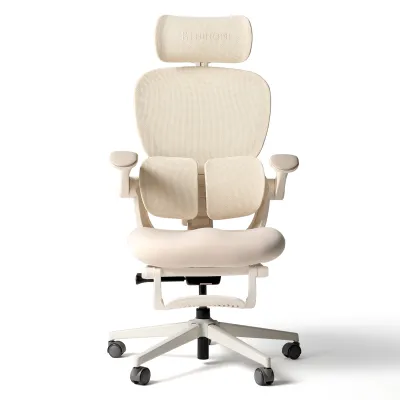
Prices are valid at publication and may change. Please refer to the product page for the latest price.
Armrest adjustability is another critical factor for reducing upper body fatigue. Look for multi-directional armrest specifications, often labeled as 3D or 4D adjustments, which allow you to modify the height, width, angle, and depth. Properly adjusted armrests should support your forearms so that your shoulders remain relaxed and your elbows rest at a 90-degree angle while typing, preventing strain in your neck and rotator cuffs.
Lumbar support specifications must align with the natural inward curve of your lower spine. Because torso lengths vary significantly, check whether the lumbar support mechanism can be adjusted vertically. This ensures the support curve targets your lumbar region precisely rather than pressing against your mid-back or sacrum, which can lead to slouching and muscle fatigue over hours of sitting.
Evaluating Materials and Breathability for Long Sessions
In warm or humid climates, such as Singapore, the materials used in your office chair directly impact your thermal comfort and focus. Mesh backrests and seats are highly valued for their airflow properties, which help dissipate body heat and prevent moisture buildup. When reviewing the material specifications, check the type of mesh utilized; high-tensile woven mesh is designed to distribute weight evenly and retain its shape over time, whereas lower-quality mesh may sag and cause you to bottom out against the frame.

While mesh offers excellent ventilation, some users prefer cushioned seats for a more traditional feel. If you are evaluating a cushioned variant, check the specification sheet for foam density. High-density molded foam provides firm, consistent support that holds its shape over years of use, while low-density cut foam may feel soft initially but flatten quickly under daily pressure.
Maintenance and durability are also tied to material specifications. Review the manufacturer’s care instructions to understand how to clean the upholstery. Mesh surfaces generally require regular vacuuming with a soft brush attachment to remove dust, while fabric or synthetic leather components may require specific spot-cleaning methods to prevent staining and premature wear.
Weight Capacity and Structural Stability Checks
Before purchasing, it is vital to verify the structural limits of the chair to ensure safety and longevity. Locate the maximum weight capacity on the official product label or specification sheet and compare it to your own weight. It is advisable to choose a chair with a weight capacity that offers a comfortable safety margin above your actual weight to minimize stress on the mechanical joints and gas lift cylinder.
Stability is heavily influenced by the base material and the quality of the casters. Look for specifications detailing the base construction, such as reinforced nylon or aluminum alloy. A wider, heavier base provides a lower center of gravity, reducing the risk of tipping when you recline or move. Additionally, check the caster specifications to ensure they are compatible with your flooring; hard nylon casters are suitable for carpets, while soft polyurethane-coated casters are recommended for hardwood, laminate, or tiled floors to prevent scratching.
The gas lift cylinder is the heart of the chair’s height adjustment mechanism. Check the specifications for a certified class rating, typically Class 3 or Class 4. These certifications indicate that the cylinder has undergone rigorous pressure and durability testing, ensuring it can support daily height adjustments without losing pressure or sinking over time.
Recline Angles and Tension Settings for Task Switching
Dynamic sitting—the ability to shift postures throughout the day—is key to reducing spinal compression. Review the maximum recline angle and the number of lockable tilt positions specified for the chair. A deeper recline angle is beneficial for resting, reading, or taking calls, while an upright lock is necessary for focused typing and computer work.
To make reclining comfortable and safe, the chair must feature an adjustable tilt tension mechanism. This control, usually a knob located beneath the seat, allows you to adjust the resistance of the backrest to match your body weight. If the tension is too loose, you may feel like you are falling backward; if it is too tight, reclining will require excessive physical effort. Check the specifications to see if the tension control is manual or self-weight-adjusting.
Additionally, identify the type of tilt mechanism used. A synchro-tilt mechanism is highly ergonomic because it reclines the backrest and the seat at a synchronized ratio (typically 2:1). This movement keeps your feet flat on the floor and maintains proper spinal alignment as you lean back, unlike simple tilt mechanisms that lift your knees and strain your thighs.
Space and Clearance Requirements Before You Buy
Even the most comfortable chair can become a nuisance if it does not fit your physical workspace. Begin by measuring the overall footprint of the chair, specifically the diameter of the five-star base. Ensure your desk area has sufficient clear floor space to accommodate this footprint, allowing you to roll, swivel, and exit the chair without hitting walls or nearby furniture.
Next, measure your desk’s height and the clearance underneath. Compare these measurements to the chair’s maximum seat height and the height of the armrests at both their lowest and highest settings. If you plan to slide the chair fully under the desk when not in use to save space, ensure the armrests can lower sufficiently to clear the underside of your desk frame or drawer units.
Finally, account for the full recline footprint. When you lean back completely, the top of the backrest extends significantly backward. Measure the distance between your desk and any rear obstructions, such as bookshelves or walls, to ensure you can utilize the chair’s full recline range safely and without restriction.
Frequently Asked Questions (FAQ)
How do I reset the tilt mechanism if it feels too stiff? (FAQ)
If the tilt mechanism feels too stiff to recline comfortably, locate the tension adjustment knob underneath the seat. Turn the knob counter-clockwise to decrease the resistance, making it easier to recline. Refer to your user manual to confirm the correct direction for your specific model, and make gradual adjustments while sitting in the chair to find a tension level that balances your body weight.
What floor types are compatible with the standard casters? (FAQ)
Standard nylon casters are designed primarily for low-pile carpets and durable office flooring. If you plan to use the chair on delicate hard surfaces such as hardwood, parquet, or vinyl, check the caster material specifications. To prevent scratching or scuffing, consider placing a protective chair mat over the floor or replacing the standard casters with soft polyurethane (PU) casters designed specifically for hard floors.

Community discussion
Share your experience or ask a question. Comments are reviewed before publication.