
When setting up a productive home office, a motorised office chair can offer dynamic ergonomic support that manual chairs cannot. However, comparing leading brands requires looking beyond marketing claims to evaluate how specific motorised mechanisms, build quality, and long-term reliability align with your daily workflow. Since motorised features range from powered recline to active lumbar support, there is no single universal winner. Instead, the best choice depends on matching the chair’s electrical capabilities, spatial footprint, and warranty terms to your specific environment and work habits.
To make an informed decision, you must evaluate how these chairs operate under daily physical and electrical demands. Unlike traditional office seating, where adjustments are purely mechanical, motorised models introduce electrical actuators, control units, and power sources into your workspace. This means your comparison must balance physical comfort with technical reliability, ensuring that the electronic components enhance your posture without introducing maintenance challenges or safety hazards to your home.
Understanding Motorised Features and Mechanisms
Motorised office chairs are not all designed for the same purpose, and understanding the specific mechanisms available is the first step in comparing different brands. The most common motorised feature is powered recline, which allows you to adjust the backrest angle smoothly at the touch of a button. This is particularly useful for users who transition between active typing, video calls, and relaxed reading phases throughout the day. Some advanced models go further by integrating motorised seat height or lift mechanisms, which assist users in standing up or adjusting the seat pan angle to relieve pressure on the thighs.
Products mentioned in this guide
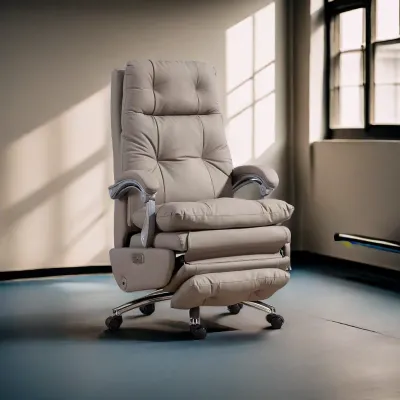
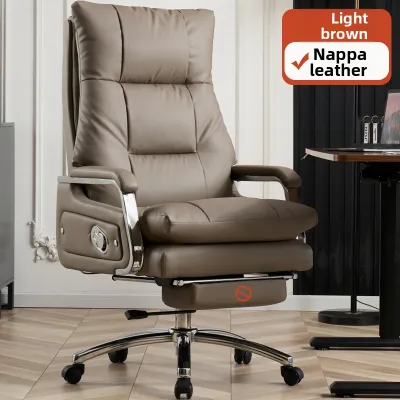
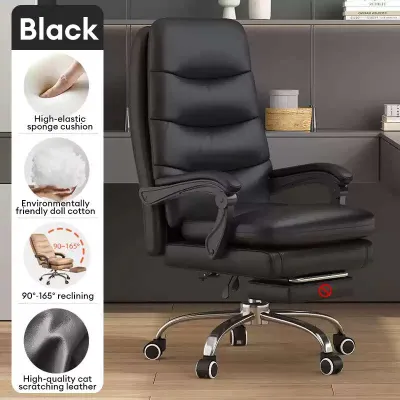
Prices are valid at publication and may change. Please refer to the product page for the latest price.
Another critical category is powered lumbar support. Unlike manual lumbar dials that require you to reach around the back of the chair, motorised lumbar systems allow you to adjust the depth and height of the lower back support while remaining seated in your natural working posture. Some high-end brands even feature active lumbar tracking, where internal sensors detect your movements and automatically adjust the support level as you lean forward or recline. When comparing brands, identify whether your primary goal is to facilitate effortless relaxation or to receive continuous, active postural correction during intensive tasks.
Power delivery is a major differentiator that affects both aesthetics and usability in a home office. Motorised chairs generally fall into two categories: those powered by a continuous plug-in cable and those equipped with built-in rechargeable batteries. Plug-in models offer uninterrupted power but require proximity to a wall outlet, which can lead to cable clutter and potential tripping hazards. If you choose a plug-in model, inspect the chair’s cable management system to see if it includes routing clips or a coiled power cord that stretches safely without catching on the chair’s casters. Battery-powered models offer complete mobility, allowing you to roll freely across your workspace, but they require periodic charging and add weight to the chair’s base.
Finally, consider the noise levels of the integrated motors. A loud, grinding motor can be highly disruptive during video conferences or periods of deep focus. When researching different brands, look for specifications detailing the decibel output of the motors or check user feedback regarding operational noise. High-quality brands typically use brushless motors or insulated gearboxes that operate quietly, ensuring that adjusting your seating position during a call does not draw unwanted attention or break your concentration.
Evaluating Build Quality and Spatial Requirements
The addition of motors and electrical wiring introduces unique structural demands that traditional office chairs do not face. When evaluating build quality, the relationship between the chair’s maximum weight capacity and the mechanical strain on the motors is paramount. A motor that is constantly pushed to its physical limit will degrade quickly, leading to slow adjustments, increased noise, or complete mechanical failure. Ensure the manufacturer’s specified weight limit comfortably exceeds your body weight, which provides a safety margin that protects the motor from premature wear during dynamic movements.

The physical frame must also be robust enough to handle the torque generated by the motors. When a chair reclines or lifts electronically, the shifting center of gravity puts immense stress on the base, gas lift, and recline joints. Look for chairs constructed with heavy-duty steel or reinforced aluminum frames rather than plastic components. During motorised transitions, the base must remain perfectly stable without any wobbling, tipping, or creaking. Inspecting the quality of the moving joints and the upholstery surrounding the mechanical parts is also essential; poorly routed wires or tight fabric clearances can lead to pinching, fraying, or premature wear as the chair moves through its range of motion.
Spatial planning is another critical factor that is easily overlooked when shopping online. Motorised chairs, especially those with extensive recline features, often have a larger physical footprint than standard task chairs. You must measure your home office carefully, taking into account the full clearance required behind and beside the desk when the chair is fully reclined or extended. A chair that hits a wall, a filing cabinet, or the edge of your desk during an automated recline sequence can damage both the surrounding furniture and the chair’s internal motors.
Additionally, consider the clearance beneath your desk. Motorised armrests or control panels mounted on the side of the seat pan can add height and width, potentially preventing the chair from sliding neatly under your desk when not in use. If your home office is tight on space, look for models with compact bases and zero-wall recline mechanisms, which slide the seat pan forward as the backrest reclines to minimise the rear clearance needed.
Comparing Value, Warranties, and Long-Term Reliability
Investing in a motorised office chair is a significant financial commitment, making it essential to analyze the true cost of ownership and the level of support provided by the brand. The most critical aspect of this comparison is the warranty structure. Many buyers assume a ten-year warranty covers the entire chair, only to discover later that the electrical components, motors, and batteries are subject to much shorter coverage terms. It is common for brands to offer a long warranty on the steel frame and mechanical structure, but limit the electrical warranty to just one to three years. Carefully read the warranty terms of each brand to ensure you are comfortable with the duration of coverage for the electronic parts.
Beyond the warranty period, long-term reliability depends heavily on the availability and cost of replacement parts. Because motorised chairs use proprietary electronics, you cannot simply buy a generic replacement motor or control box from a local hardware store if something breaks. Check whether the brand sells individual replacement parts, such as backup batteries, control units, wiring harnesses, or remote controls, directly to consumers. If a brand requires you to ship the entire chair back to a service center for a simple battery replacement, the shipping costs and downtime can quickly outweigh the initial value of the chair.
Return policies and delivery terms also deserve close scrutiny, particularly for heavy, electrical furniture. Returning an assembled motorised chair is vastly different from returning a standard office chair. Many brands impose strict return conditions, requiring you to disassemble the chair and pack it back into its original shipping boxes—a task that can be incredibly difficult once the gas lift and motorised components are locked into place. Furthermore, check for restocking fees, which can be substantial for heavy items, and verify whether the brand covers the return shipping costs or if you are expected to pay for freight delivery yourself.
Decision Framework: Choosing the Right Motorised Chair
To choose the right motorised office chair, you must translate these technical specifications into a practical decision framework based on your daily work habits and physical environment. Start by analyzing how you spend your workday. If your schedule involves frequent virtual meetings, webinars, or periods of passive reading, a model with a motorised recline feature is highly beneficial. This allows you to transition effortlessly from an upright typing posture to a relaxed, angled position, shifting the pressure off your lower spine and promoting better circulation during long calls.
On the other hand, if your work consists of continuous, high-intensity typing, data entry, or creative tasks that require you to remain upright and focused, prioritising powered ergonomic adjustments is a wiser choice. Look for chairs that offer active, motorised lumbar support or automated tilt tension. These systems ensure that your lower back remains supported even as you shift slightly in your seat, reducing fatigue and preventing slouching without requiring you to stop working to make manual adjustments.
However, a motorised chair may not be suitable for every home office. If your workspace lacks easily accessible power outlets and you do not want to deal with the hassle of charging a battery every few days, a traditional high-end manual ergonomic chair may be a more practical and reliable choice. Similarly, if your home office is highly compact and cannot accommodate the extended footprint of a reclining chair, the motorised features may go unused, making the extra cost hard to justify.
Finally, verify that the chair’s control interface aligns with your personal preferences. Brands offer various control methods, including integrated buttons on the armrest, tethered remote controls, or even smartphone applications connected via Bluetooth. While app-based controls can offer advanced features like automated posture tracking and scheduled movement reminders, they also introduce software compatibility issues and potential connectivity bugs. If you prefer simplicity and immediate responsiveness, physical buttons integrated directly into the side of the seat pan or armrest are often the most reliable and user-friendly option.
Frequently Asked Questions (FAQ)
Are motorised office chairs safe for continuous daily use?
Yes, motorised office chairs are safe for daily use, provided they carry recognized electrical safety certifications on their product labels. When shopping, look for certifications that indicate the electrical components have been tested for thermal safety and power stability. To ensure safe operation, always adhere strictly to the manufacturer’s specified weight limits, as overloading the chair puts excessive strain on the motor, leading to overheating or premature burnout. Additionally, keep the area around the chair’s moving parts clear of loose cables, rugs, or pet toys to prevent pinching hazards during automated adjustments.
How long do the batteries in motorised chairs typically last?
The lifespan and daily duration of a motorised chair’s battery depend heavily on the motor type, the weight of the user, and how frequently adjustments are made. For chairs used moderately—such as adjusting the recline or lumbar support a few times a day—a single charge can often last several weeks. However, the overall lifespan of the rechargeable battery pack will degrade over several years of continuous charge cycles. Before purchasing, check the manufacturer’s guidelines regarding the expected battery lifecycle and verify if replacement battery packs are readily available for purchase when the original battery eventually loses its capacity to hold a charge.
Can I manually adjust a motorised chair if the power fails?
Whether you can adjust a motorised chair during a power failure or battery depletion depends entirely on the chair’s design. Some models feature manual override levers or mechanical fallback systems that allow you to adjust basic functions like seat height or backrest tilt without electrical power. However, many highly automated models rely completely on their electronic actuators, meaning the chair will remain locked in its last active position until power is restored. It is highly recommended to check the product specifications or user manual before buying to understand how the chair behaves during a power outage and whether a manual override is available.

Community discussion
Share your experience or ask a question. Comments are reviewed before publication.