
Selecting the right Astra TV console for your living room requires balancing your television’s physical dimensions, your available wall space, and the overall layout of your home. A well-chosen console not only anchors your entertainment setup but also ensures smooth traffic flow and provides necessary storage for media devices. By measuring your space accurately and matching your storage needs to the console’s configuration, you can find a model that enhances both the functionality and aesthetics of your living area.
Assessing Your Living Room Dimensions and TV Proportions
Before browsing specific console designs, you must establish the physical boundaries of your entertainment area. Begin by measuring the exact width of the wall where you plan to position the console. Be sure to account for permanent architectural features such as power outlets, light switches, air conditioning conduits, and the swing path of nearby doors or balcony entryways. Leaving these details unmeasured can lead to a console blocking essential access points.
Visual balance is equally critical when pairing a console with a television. As a general rule, the TV console should extend at least 10 to 15 centimeters beyond the outer edges of your television screen on both sides. This overhang prevents the setup from looking top-heavy and provides a stable visual base. If your television is wall-mounted, this proportion rule still applies, as a console that is narrower than the screen above it can make the entire wall feel unbalanced.
Products mentioned in this guide
![[CozyNest ]GV Extendable TV Console Cabinet Living Room Stretch with Drawers Cabinet TV Console Table](https://img.lazcdn.com/g/p/b953783699fff60bc19e8fdc531b2dbb.jpg_400x400q80.jpg_.webp)
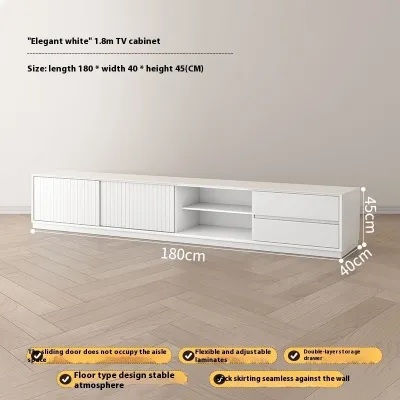
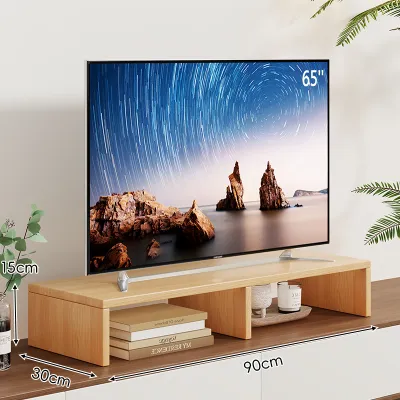
![[Ready Stock] TV console nordic wall-mounted TV cabinet wall cabinet wall racks set-top rack set-top cabinet TV cabinets simple small-sized TV rack wall TV console wall TV cabinet](https://img.lazcdn.com/g/p/cfdf1ff4d0a9e38b9b7833f1ef9be69d.jpg_webp_400x400q80.jpg_.webp)
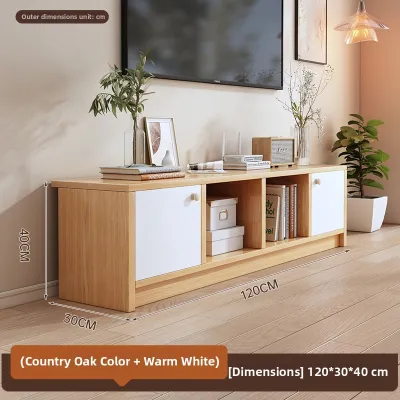
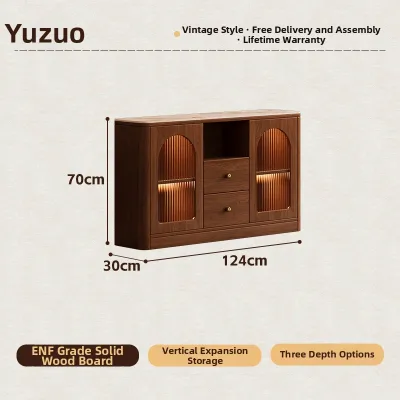
Prices are valid at publication and may change. Please refer to the product page for the latest price.
Finally, consider how the depth of the console affects your viewing distance and walking paths. In typical Singapore apartments, where living room widths can be compact, a console that is too deep can restrict the walkway between the sofa and the television. Measure the distance from your seating to the wall, and ensure the console’s depth leaves at least 60 to 90 centimeters of clear walkway space for comfortable movement.
Matching Astra TV Console Sizes to Room Layouts
TV consoles generally fall into three broad size categories: compact, standard, and extended. Selecting the right category depends heavily on your floor plan and how you intend to utilize the surrounding space. Matching the console’s footprint to your room’s scale ensures the furniture complements the architecture rather than crowding it.

Compact Spaces and Studio Layouts
For smaller living areas, studio apartments, or study rooms, maximizing floor space is the primary objective. In these layouts, compact consoles with narrower depths—typically around 30 to 40 centimeters—work best. Choosing a model with elevated legs or a wall-mounted floating configuration creates the illusion of more space by keeping the floor visible beneath the unit.
When placing a console in a tight space, pay close attention to adjacent furniture and walkways. Ensure there is sufficient clearance to open cabinet doors or drawers fully without hitting coffee tables or armchairs. If the console is positioned near a balcony door or a hallway entrance, verify that its width does not encroach on these high-traffic transition zones.
Standard and Open-Concept Living Rooms
Medium to large living rooms, particularly open-concept layouts that combine dining and lounging areas, require a console with more visual weight. A standard or extended console helps anchor the main entertainment wall, defining the living zone within a larger open floor plan. Low-profile, elongated designs are highly effective here, as they stretch the visual line of the room without dominating the vertical space.
For exceptionally wide walls, modular configurations or extended consoles allow you to balance larger television screens, such as those 65 inches and above. These wider units also offer ample surface area for decorative items, books, or secondary media devices, ensuring the wall does not look sparse or unfinished.
Evaluating Storage Configurations and Functional Needs
Your storage requirements should dictate the internal layout of your TV console. A mix of open shelving and closed cabinetry offers the most flexibility, but the ideal ratio depends on the specific equipment you own and your personal tolerance for visible clutter.
Open shelving is highly functional for devices that generate heat, such as gaming consoles, media receivers, and cable boxes. These compartments allow for natural airflow, preventing sensitive electronics from overheating during prolonged use. Open shelves also ensure that infrared remote control signals can reach your devices without obstruction.
Closed drawers and cabinets, on the other hand, are highly effective for concealing items you prefer to keep out of sight, such as remote controls, charging cables, instruction manuals, and board games. If you prefer a minimalist aesthetic, choosing a console with sliding doors or push-to-open drawers can keep your living room looking tidy and organized.
Regardless of the storage configuration, integrated cable management is essential. Look for consoles that feature pre-drilled cable cutouts or wire routing channels at the back of the compartments. This allows you to run power cords and HDMI cables directly to the wall outlets or the television without leaving a tangled mess of wires exposed to view. Additionally, verify if the internal shelves are adjustable, which allows you to customize the compartment heights for taller audio equipment or vertical gaming systems.
Pre-Purchase Verification and Installation Checks
Before finalizing your purchase, you must perform several practical checks to ensure the console is safe, stable, and compatible with your home’s structure. The most critical check is verifying the weight capacity of the console’s top surface and internal shelves. Compare these limits against the combined weight of your television, soundbar, and any heavy media receivers to prevent the unit from bowing or sagging over time.
Next, inspect the baseboards along your target wall. Many modern consoles are designed to sit flush against the wall, but thick baseboards can push the top of the console forward, leaving an unsightly gap. Some models feature baseboard cutouts at the back of the frame to accommodate this; if yours does not, you may need to account for a slight offset or choose a wall-mounted option. Additionally, check for wall unevenness using a spirit level, as uneven floors or walls can cause freestanding consoles to wobble or cabinet doors to hang misaligned.
Finally, consider the assembly and installation process. Large, solid-wood consoles often arrive fully assembled and require sufficient doorway and lift clearance for delivery. Conversely, flat-pack or modular units will require assembly on-site. If you are opting for a wall-mounted floating console, professional installation is highly recommended to ensure the unit is securely anchored to the wall studs or masonry, especially if you plan to place heavy items on top.
Decision Framework: Which Configuration Suits You Best?
To simplify your decision, evaluate your living room against these primary scenarios to identify the most suitable console configuration:
- Compact Rooms & Minimalist Needs: If your space is limited and you primarily stream content without extra media boxes, choose a compact, wall-mounted, or high-legged console. This keeps the floor clear and maintains an airy feel.
- Standard Rooms & Active Media Setups: If you have a medium-sized room with multiple gaming consoles, sound systems, and streaming devices, opt for a standard-width console featuring a mix of open shelves for ventilation and closed drawers for cable storage.
- Large Open-Plan Spaces & Large Screens: For spacious living areas with TVs larger than 65 inches, select an extended, low-profile console. This provides the necessary visual balance and storage capacity to anchor the entire room.
For edge cases, such as living in a rental property where wall drilling is restricted, avoid floating models and choose a sturdy freestanding console with protective floor pads. If your walls are uneven or your flooring is slightly sloped, look for consoles equipped with adjustable leveling feet to ensure a stable, level setup.
Frequently Asked Questions (FAQ)
How much space should I leave on the sides of the TV console?
For optimal visual balance, it is ideal to leave at least 15 to 30 centimeters of open wall space on either side of your TV console. This prevents the furniture from looking cramped against adjacent walls or corners. Additionally, leaving this clearance ensures you have easy access to wall outlets, light switches, and side-facing ports on your media equipment.
Can I place a freestanding TV console on a carpet or rug?
Yes, you can place a freestanding console on a rug, but you must ensure the unit remains completely level and stable. Thick or plush rugs can cause the console to tilt slightly, which may affect the alignment of cabinet doors or cause the television to wobble. If you notice any instability, use hard furniture coasters under the legs or adjust the leveling feet to compensate for the soft surface.

Community discussion
Share your experience or ask a question. Comments are reviewed before publication.