
In Singapore’s compact HDB flats, maximizing every square centimetre of floor space is essential. When desks are squeezed into bedrooms or living room corners, traditional floor-standing drawer units can restrict movement and make a room feel cramped. Utilizing the dead space directly beneath your desk surface offers a practical alternative. By mounting storage solutions under the table, you can keep your daily essentials within arm’s reach while keeping the floor completely clear, preserving both physical legroom and visual openness.
Assessing Your Under-Table Space and Needs
Before purchasing any under-table storage accessory, precise measurements are critical to avoid buying items that restrict your movement or fail to fit your desk’s structure. Start by measuring the clearance height from the underside of the desk to the floor. This measurement determines how much vertical space you have for your legs and chair armrests once a storage unit is installed. Next, measure the width between the desk legs and the total depth of the tabletop. These dimensions establish the absolute physical boundaries for any add-on drawer or basket.
Do not overlook the structural design of your desk’s underside. Many modern desks, especially height-adjustable models or budget-friendly flat-pack options, feature metal support beams, cable management trays, or crossbars that run along the center or edges. Measure the distance between these structural elements to find the actual flat surface area available for mounting. Additionally, check the thickness of your tabletop and its edge profile. Beveled or curved edges can interfere with clamp-on storage units, while thin tabletops may not support heavy screw-in drawers.
Products mentioned in this guide
![[SG] Adjustable Desk Wire Organizer Rack Study Table Under Desk Storage Rack Home Office Tray Socket Organizer](https://img.lazcdn.com/g/p/abde575302c9f731c32cffb92b7106d2.jpg_400x400q80.jpg_.webp)
![Under Desk Drawer / Shelf Sliding Drawer/ Storage Drawer / Self Adhesive [Dear J]](https://img.lazcdn.com/g/p/5666b004144ac756d72c5884181044d9.png_400x400q80.png_.webp)
Prices are valid at publication and may change. Please refer to the product page for the latest price.
Finally, categorize the items you plan to store. Grouping items by weight, size, and frequency of use helps determine the type of storage mechanism you need. Lightweight, frequently accessed items like pens, notepad, and earphones require quick-access solutions like shallow drawers or adhesive bins. Heavier or bulkier items, such as external hard drives, power banks, or laptop chargers, demand robust, screw-mounted options that can handle higher load requirements without sagging or pulling loose from the desk.
Types of Under-Table Storage for Compact Layouts
Under-table storage solutions come in several designs, each utilizing the unused space beneath your desk in different ways. By shifting storage from the floor or the desktop to the underside of the table, these options help maintain a clean, minimalist workspace. However, choosing the right type requires balancing accessibility, visual clutter, and installation complexity. While some options offer instant access, others prioritize hidden organization or tool-free installation.

Slide-Out Drawers and Trays
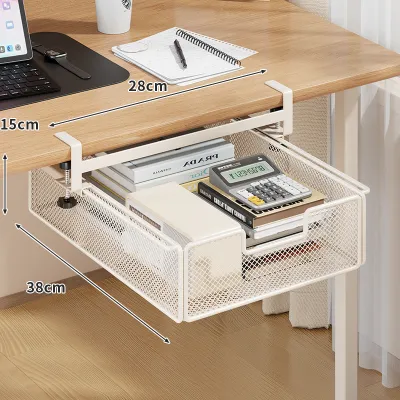
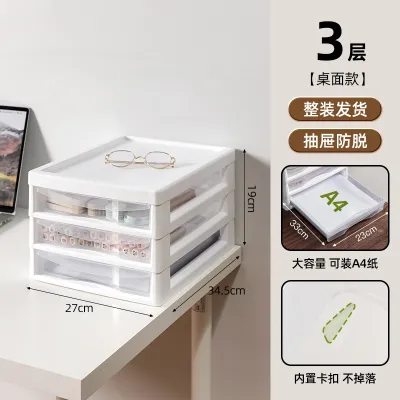
Slide-out drawers and keyboard trays are excellent for organizing small, loose items that otherwise clutter your desktop. These units typically mount flat against the underside of the desk and slide forward when needed, keeping stationery, charging cables, and small electronics neatly tucked away when not in use. Because they are enclosed, they protect your items from dust and maintain a clean, streamlined look under the desk.
When selecting a slide-out drawer, it is essential to check the track clearance and overall depth of the unit. Ensure that the drawer, when fully retracted, does not hang down so low that it strikes your knees or prevents your office chair from sliding completely under the desk. You should also verify that the drawer’s extension path does not collide with the armrests of your chair when you are seated in your preferred working position.
Hanging Baskets and Mesh Nets
Hanging baskets and mesh nets offer a flexible, lightweight alternative for storing irregular, soft, or bulky items. These solutions often clamp onto the edge of the desk or screw into the underside, creating a suspended hammock or wire shelf. They are particularly useful for holding items like notebooks, reference documents, soft peripherals, or routing loose power strips and cables away from the floor.
Because mesh and wire structures are flexible, you must verify their attachment points and material stretch before loading them with heavy items. Over time, fabric or mesh nets can sag if overloaded, which can reduce your legroom and look untidy. Check the manufacturer’s recommended weight limits and ensure the mounting brackets are securely fastened to prevent the basket from tilting or slipping under load.
Adhesive Bins and Organizers
Adhesive bins and stick-on organizers are highly popular among renters and those with temporary setups because they require no drilling or clamping. These compact plastic drawers or pockets use double-sided adhesive tape to bond directly to the flat underside of your desk. They are ideal for holding lightweight, frequently accessed items such as pens, reading glasses, or smartphone accessories.
To ensure these organizers remain securely attached, proper surface preparation is vital. The underside of the desk must be thoroughly cleaned of dust, oils, and manufacturing residues before application. Additionally, most heavy-duty adhesives require a specific curing time—often up to 24 hours—before any weight is placed in the bin. Understanding these installation steps and the removal conditions is crucial to avoid damaging the desk’s laminate or veneer finish when it is time to move.
Key Selection Criteria for HDB Homes
When selecting under-table storage for an HDB flat, durability and weight capacity should be your primary considerations. Because space is limited, these storage units often work harder and hold a wider variety of items than they would in a larger home office. Examine the materials used in the construction of the storage unit. Sturdy plastics, powder-coated steel, and high-density fabrics generally offer the best balance of durability and weight. Always check the manufacturer’s stated weight capacity and compare it to the total weight of the items you intend to store, leaving a safe margin to prevent overloading.
The mounting method is another critical factor, especially if you live in a rented flat or own a premium desk with a strict warranty. Screw-in storage options provide the most secure and permanent hold, making them suitable for heavier items. However, drilling holes into your desk can void its warranty and may not be permitted under rental agreements. Clamp-on options offer a non-destructive alternative that is easy to install and remove, though they do leave visible clamps on the top surface of your desk. Adhesive options are completely hidden and tool-free, but they are limited to lightweight items and can sometimes peel away laminate finishes during removal if not detached carefully.
Ergonomics must not be sacrificed for the sake of storage. The space beneath your desk is primarily meant for your legs, allowing you to sit comfortably, cross your legs, and move your chair freely throughout the day. Before finalizing any purchase, simulate the presence of the storage unit under your desk. Ensure that the installed unit will not force you into an awkward seating posture or restrict your ability to pull your chair close to the desk, as poor ergonomics can lead to physical discomfort over long working hours.
Installation and Safety Checks
Before beginning the installation of any under-table storage unit, always consult the desk manufacturer’s guidelines and warranty terms. This is particularly important for height-adjustable standing desks, which often contain internal motors, wiring, or structural reinforcement bars within the tabletop. Drilling into these areas can cause permanent damage to the desk’s electrical components or compromise its structural integrity.
Once you have verified that it is safe to proceed, install the storage unit according to the manufacturer’s instructions. After installation, test the stability and load limits of the unit gradually. Start by placing a few light items inside and checking for any signs of sagging, loose screws, or peeling adhesive. Gradually increase the weight to your desired level, monitoring the mount closely. If you notice any wobbling, cracking sounds, or gaps forming between the storage unit and the desk, remove the items immediately.
If you are unsure about the material of your desk—such as whether it has a hollow honeycomb paper core or a solid wood structure—stop the installation immediately. Drilling into hollow-core desks without specialized anchors can cause the screws to pull out easily, damaging the desk and potentially causing your stored items to fall. In such cases, consult the desk manufacturer or a qualified professional to determine the safest mounting method.
Frequently Asked Questions (FAQ)
Can I install under-table storage on a glass desk?
Installing under-table storage on a glass desk requires extreme caution, as drilling or using heavy-duty screw-in clamps is generally unsafe and can shatter the glass. Standard glass tabletops cannot support the localized stress of screws or tight metal clamps. Instead, look for specialized adhesive options or suction-based mounts designed specifically for non-porous surfaces. Keep in mind that these adhesive options have strict weight restrictions and should only be used for very lightweight items like paper, pens, or cables to prevent the adhesive from failing and damaging your belongings.
How do I prevent adhesive bins from falling off?
To prevent adhesive bins from falling off, start by thoroughly cleaning the mounting surface on the underside of your desk. Use isopropyl alcohol to remove all dust, grease, and oils, and let the surface dry completely. Apply the adhesive tape firmly to the bin, then press the bin against the desk surface with steady pressure for at least 30 seconds. Crucially, allow the adhesive to cure completely—typically for 24 hours—before placing any items inside the bin. Finally, always adhere to the manufacturer’s rated weight capacity and avoid overloading the bin to ensure a long-lasting bond.
Community discussion
Share your experience or ask a question. Comments are reviewed before publication.