
Selecting the right ergonomic chair for your home office in Singapore is a significant investment in your daily comfort and long-term physical well-being. With many professionals spending long hours at their desks, the choice often comes down to premium models from established manufacturers. Steelcase is a prominent name in this space, offering several highly regarded options. The best model for your specific setup depends on your daily work habits, physical proportions, and spatial constraints. While one model might excel in dynamic, multi-device environments, another is engineered for prolonged, focused sitting with targeted spinal support, and a third provides essential ergonomics in a more compact footprint. Understanding how these designs align with your personal workspace is the first step toward making an informed decision.
Defining Your Workspace and Ergonomic Requirements
Before comparing specific chair models, you must evaluate the physical boundaries of your home office. Start by measuring your available floor space, paying close attention to the area behind your desk where the chair will roll and recline. You should also measure your desk height and the under-desk clearance to ensure the chair’s armrests can slide underneath when not in use. This is particularly important in Singapore’s compact residential layouts, where study corners or spare bedrooms often double as workspaces. Additionally, consider the access route to your home, including doorway widths and lift dimensions, to avoid delivery complications.
Your daily working habits and primary devices also dictate your ergonomic needs. If you constantly switch between typing on a desktop, sketching on a tablet, and taking calls on a mobile phone, your posture changes continuously throughout the day. This requires a highly adaptable chair. Conversely, if you remain in a fixed, forward-facing position for hours, you will require robust, continuous lumbar support and precise seat depth adjustments. Take note of your typical sitting duration and any specific areas of discomfort, such as lower back tension or shoulder strain, to help you prioritize which adjustability features are non-negotiable for your setup.
Products mentioned in this guide
Prices are valid at publication and may change. Please refer to the product page for the latest price.
Evaluating the Steelcase Gesture for Multi-Device Work
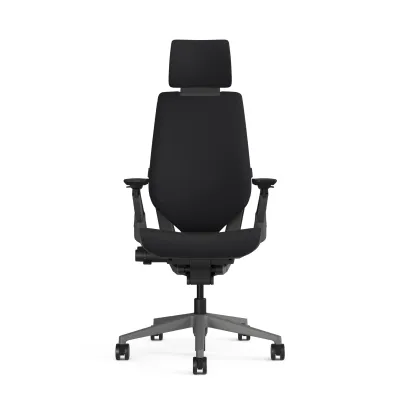
The Steelcase Gesture is designed to accommodate the diverse postures associated with modern, multi-device work. If your daily routine involves transitioning between a laptop, a secondary monitor, a tablet, and a smartphone, you likely find yourself leaning back, shifting sideways, or propping up your elbows. The Gesture addresses these movements with highly adjustable armrests that move mimic the human arm, allowing you to bring them inward to support your forearms while holding a mobile device, or slide them outward when typing on a full-sized keyboard.

When considering the Gesture for your home, you must verify its physical footprint against your measured workspace. The chair features a robust base and a backrest design that supports a wide range of motion, which may require slightly more clearance than standard office chairs. You should consult the manufacturer’s official specifications to check the recommended user height and weight ranges, ensuring the tension system and seat pan dimensions align with your body type. Because the Gesture utilizes a synchronized system where the seat and back move together, testing how this mechanism responds to your weight is crucial for determining if it provides the right level of resistance and support.
Evaluating the Steelcase Leap for Prolonged Sitting
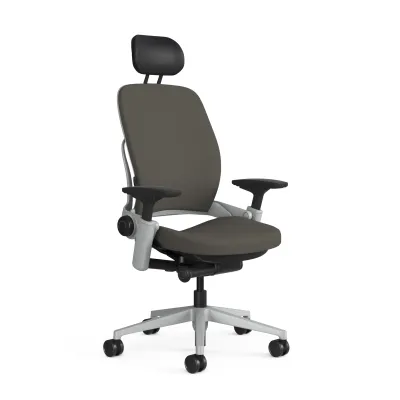
For users who spend extended, uninterrupted hours engaged in focused desk work, the Steelcase Leap is often a primary candidate. The design of the Leap focuses heavily on targeted spinal support and individual adjustability. It features a flexible backrest system designed to change shape as your spine moves, which can help distribute pressure more evenly during long sessions. The adjustable lumbar support allows you to control both the height and the firmness of the lower back curve, making it highly customizable for different spinal profiles.
To determine if the Leap is suitable for your body, you should carefully review its seat depth adjustment and recline tension controls. A proper seat depth ensures there is a small gap between the edge of the seat cushion and the back of your knees, preventing restricted blood flow. The Leap allows you to slide the seat forward or backward to achieve this fit. Additionally, you should consult the official specification sheet to verify the exact weight limits, base materials, and care instructions. Since home offices in Singapore can experience high humidity, checking the breathability of the available fabric options and the manufacturer’s cleaning guidelines is essential for maintaining the chair’s condition over time.
Evaluating the Steelcase Series 1 for Compact Setups
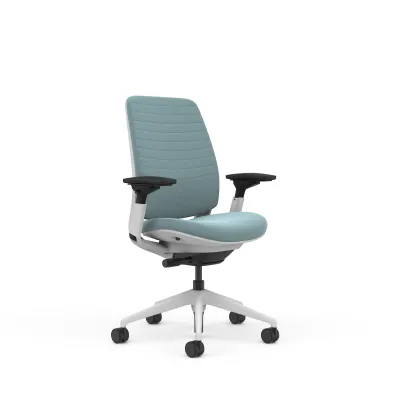
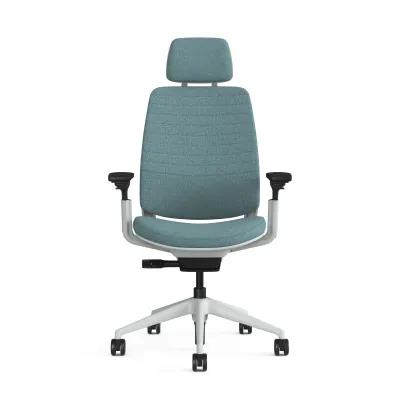
If you are working with limited square footage or a dedicated study nook, a bulky executive chair may overwhelm your space. The Steelcase Series 1 is engineered to offer essential ergonomic features within a more compact and lightweight footprint. This model is particularly suited for smaller rooms where space efficiency is a priority, yet it still provides integrated lumbar support and responsive back tension. Its simplified adjustment mechanisms make it easy to set up and use without a steep learning curve.
When evaluating the Series 1, pay close attention to how its armrest adjustment ranges align with your specific desk height and typing posture. While it offers multi-directional armrests, the overall range of motion is more streamlined compared to the premium models. You should also review the manufacturer’s warranty terms and the specific upholstery options available in your region. Because the Series 1 often features a mesh backrest, it can offer excellent ventilation in warm climates, but you should verify the durability and feel of the mesh material to ensure it meets your comfort standards for daily use.
Comparing Key Specifications and Adjustability
To make an objective decision, it is helpful to compare the physical dimensions and mechanical features of these three models side by side. Each chair utilizes a distinct approach to ergonomics, from the highly dynamic mechanism of the Gesture to the highly adjustable, targeted support of the Leap, and the space-saving simplicity of the Series 1.
Below is a structured overview of the key specifications you should verify when choosing between these models:
- Armrest Adjustability: The Gesture features 360-degree rotating arms designed for multi-device use; the Leap offers highly adjustable 4D arms; the Series 1 provides standard height, width, and depth adjustments.
- Backrest and Lumbar Support: The Gesture uses a 3D LiveBack system that automatically adapts to your posture; the Leap features an adjustable LiveBack system with separate controls for lower back firmness; the Series 1 utilizes a weight-activated mechanism with built-in lumbar support.
- Footprint and Space Requirements: The Gesture and Leap require a larger operating area to accommodate their full recline and armrest ranges; the Series 1 has a narrower base and a more upright profile, making it ideal for tight corners.
- Seat Depth Adjustment: Both the Gesture and Leap offer precise sliding seat pans to accommodate different thigh lengths; the Series 1 also includes seat depth adjustment but with a slightly shorter overall range.
Please note that exact pricing in S$ and current stock availability must be verified directly with authorized local retailers or official online brand stores in Singapore, as these factors can fluctuate based on shipping schedules, custom upholstery selections, and promotional periods.
Final Decision Framework and Purchasing Steps
To finalize your choice, apply a straightforward decision framework based on your primary work habits and space constraints. Choose the Steelcase Gesture if you frequently use multiple devices, constantly shift postures throughout the day, and have sufficient space to accommodate its dynamic arm movements. Choose the Steelcase Leap if your work requires long, focused hours of sitting in a relatively consistent position, and you require highly customized, firm lumbar support to manage back comfort. Choose the Steelcase Series 1 if you have a compact home office setup, prefer a lightweight and breathable mesh design, and want essential ergonomic support without a massive footprint.
Once you have narrowed down your choice, the next step is to test the chairs in person. Visiting an authorized local showroom in Singapore is highly recommended, as it allows you to physically sit in each model, adjust the controls, and verify how the seat cushions and backrests feel against your body. When visiting the showroom, bring your desk measurements and notes on your typical working posture. Finally, before making your purchase, confirm the delivery lead times, whether the chair arrives fully assembled or requires home assembly, and the specific return policies and warranty coverage offered by the local distributor. This ensures a smooth acquisition process and long-term peace of mind for your home office investment.
Community discussion
Share your experience or ask a question. Comments are reviewed before publication.