
Choosing between the Razer Iskur V2 NewGen and other premium gaming chairs in Singapore requires evaluating your physical dimensions, comfort preferences, and room layout. While the Iskur V2 NewGen features a highly adjustable adaptive lumbar system, other premium models offer alternative seat designs, materials, and tension mechanisms. To make an informed decision, you must verify specific product dimensions, material specifications, and adjustability ranges against your own body measurements and home setup.
Core Differences in Lumbar Support and Ergonomics
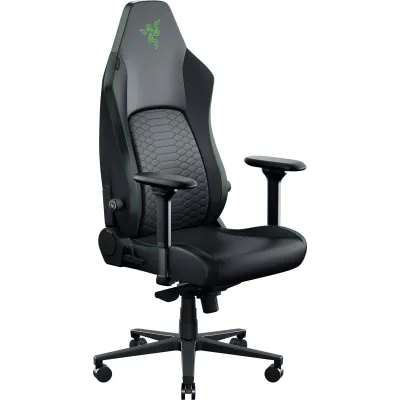
The adaptive lumbar system of the Razer Iskur V2 NewGen is designed to pivot and shift dynamically with your spine’s lateral and vertical movements. This active tracking aims to maintain contact with your lower back even when you shift positions or lean to the side. By adjusting the height and depth dials on the side of the backrest, you can customize how far the support protrudes to match your natural lumbar curve.
In contrast, competing premium chairs often utilize different lumbar support philosophies. Some models feature built-in, dial-controlled internal systems that move strictly forward and backward without lateral pivoting. Other designs rely on external memory foam pillows or strap-on cushions, which can slide out of place and require manual repositioning. Some high-end ergonomic chairs bypass localized lumbar mechanisms entirely, opting for a flexible mesh backrest that distributes pressure evenly across your entire back.
Products mentioned in this guide
Prices are valid at publication and may change. Please refer to the product page for the latest price.
An active, highly pronounced lumbar curve can feel restrictive or overly firm if your natural spine curvature is flatter, or if you prefer to sit cross-legged or slouch occasionally. Conversely, if you require constant, firm lower-back support to maintain an upright posture during long gaming or working sessions, an active tracking system can prevent the slouching that often occurs as muscle fatigue sets in. You should verify the depth adjustment range of any lumbar system to ensure it does not push your hips too far forward on the seat pan, which can reduce thigh support.
Build Quality, Materials, and Longevity Checks
Singapore’s high relative humidity and warm temperatures place significant stress on chair materials. Synthetic leathers, such as standard polyurethane (PU) or polyvinyl chloride (PVC), are prone to hydrolysis—the chemical breakdown that leads to peeling and cracking—especially when exposed to sweat and body oils. If choosing synthetic leather, check if the manufacturer specifies a multi-layered or reinforced coating designed to resist moisture. Alternatively, breathable fabric or mesh upholstery options allow better airflow, reducing heat buildup, though they may require more frequent vacuuming and prompt spot-cleaning to prevent staining.

Beyond upholstery, examine the structural components of the chair base and casters. Premium chairs typically feature a reinforced aluminum or heavy-duty steel wheelbase, which offers greater stability and resistance to bending than nylon bases. Casters should be selected based on your flooring: hard polyurethane (PU) casters are ideal for protecting vinyl, laminate, or parquet flooring from scratches, while standard nylon casters are suitable for carpeted areas.
Verify the gas lift class on the official specification sheet; a Class 4 gas lift is standard for premium chairs, indicating high durability and smooth height adjustment. Always match the manufacturer’s stated weight capacity to your actual weight, leaving a safety margin of at least 15% to 20% to account for dynamic forces, such as sitting down quickly or reclining fully.
Adjustability and Fit for Different Body Types
Multi-directional (often termed 4D) armrests allow adjustments in height, depth, width, and horizontal angle. This adjustability is crucial for maintaining proper ergonomic alignment, where your elbows rest at a 90-degree angle and your shoulders remain relaxed. Before purchasing, measure the height from the floor to the top of the armrests at their lowest setting to ensure they can slide under your desk when the chair is not in use, saving valuable floor space.
Check the seat depth and height range of the chair. A seat pan that is too deep will press against the back of your knees, restricting circulation, while a seat that is too shallow will not provide adequate thigh support. The backrest recline angle and its locking mechanism should allow you to transition smoothly between an upright focus posture and a relaxed recline. Verify if the chair uses a multi-tilt mechanism that tilts the seat pan in tandem with the backrest, which helps maintain a comfortable hip angle.
To ensure a proper fit, measure your personal inseam (from the underside of your thigh behind the knee to the sole of your foot) while wearing your typical footwear. Compare this measurement to the chair’s seat height range. Additionally, measure your desk height to confirm that the chair’s armrests and seat height can be adjusted to align perfectly with your keyboard and mouse setup.
Space, Clearance, and Setup Requirements
Premium gaming chairs often feature wide wheelbases to ensure stability, particularly when reclining. Measure the diameter of the wheelbase (typically ranging from 65 to 75 centimeters) and verify that this footprint fits comfortably within your designated study or gaming corner. Ensure there is sufficient clearance between the desk legs and nearby furniture to allow the chair to swivel freely.
Calculate the total depth required when the backrest is fully reclined. If your desk is positioned close to a wall, window, or display shelf, a deep recline could cause the top of the backrest to collide with these surfaces. Check the manufacturer’s specifications for the maximum recline angle and add a buffer of at least 10 to 15 centimeters to determine the safe distance your desk must sit from the wall.
In Singapore, residential layouts like HDB flats and condominiums often feature narrow corridors, tight doorways, and compact passenger lifts. Verify the packaged box dimensions before ordering to ensure the delivery team can navigate these spaces without obstruction. Additionally, check if the chair requires specialized assembly tools or if standard hex keys are included in the box. Ensure you have a clear, flat area of at least two square meters to safely unbox and assemble the chair without damaging the components or your flooring.
Decision Framework: When to Choose Which
Opt for the Razer Iskur V2 NewGen if you actively prefer a highly pronounced, dynamic lumbar support system that adapts to your posture changes throughout the day. It is suitable if you prefer a structured, body-hugging seat design and find that its specific fabric or synthetic leather options align with your aesthetic preferences and comfort requirements.
Consider alternative premium models if you require a wider, flatter seat pan that allows for more varied seating positions (such as sitting cross-legged), or if you prefer a simpler, less aggressive lumbar support profile. Competing models may also be preferable if you seek specific third-party ergonomic certifications, alternative materials like full elastomeric mesh, or a different style of tension-controlled tilt mechanism.
If you suffer from chronic back pain, herniated discs, or other specific musculoskeletal conditions, do not rely solely on a gaming chair’s marketing claims to resolve these issues. Always consult a qualified healthcare professional or an ergonomic specialist to obtain personalized recommendations tailored to your medical history before making a purchase.
Frequently Asked Questions (FAQ)
How do I clean and maintain the adaptive lumbar mechanism?
To maintain the moving parts of the adaptive lumbar mechanism, consult the manufacturer’s instruction manual for specific care guidelines. Avoid spraying liquid cleaners or applying heavy lubricants directly into the internal joints, as this can attract dust and degrade the mechanism over time. For the surrounding fabric or mesh, use a dry microfiber cloth or a low-powered vacuum attachment to remove dust and debris. If the mechanism begins to squeak, feels restricted in its movement, or shows visible signs of structural wear, cease adjustments and contact the official customer support channel for guidance.
Is a gaming chair better than an ergonomic office chair for long sessions?
Whether a gaming chair is better than an ergonomic office chair depends entirely on your individual body mechanics, daily habits, and aesthetic preferences. Gaming chairs typically offer high backrests, integrated headrests, and deep recline angles, which are highly suited for relaxed viewing or console gaming. Ergonomic office chairs, on the other hand, often focus on promoting active sitting postures with flexible mesh backrests, synchronized tilt mechanisms, and highly adjustable lumbar zones designed for upright typing and desk work. Evaluate the specific adjustability features, material breathability, and dimensions of each model rather than relying on the product category label to determine comfort.

Community discussion
Share your experience or ask a question. Comments are reviewed before publication.