
Finding the right size for a wall-mounted TV console in a Singapore HDB flat or condominium requires balancing physical constraints with visual proportions. To achieve a clean, modern look that does not overwhelm your living room, your TV console should ideally be wider than your television, while maintaining a shallow depth that preserves precious floor space. By aligning the console’s dimensions with your specific wall layout, television size, and seating distance, you can create a functional, visually balanced entertainment zone that feels open and uncluttered.
Measure Your Available Wall Space and TV Width
Before browsing online marketplaces or visiting showrooms, establish the physical boundaries of your living room wall. Measure the total usable width and height of the wall where you plan to mount the console. In many HDB flats and condos, this wall space is often interrupted by structural pillars, baseboards, light switches, power outlets, or air-conditioning trunking. Mark these features clearly on a rough sketch of your room layout, as they dictate where the console can be positioned without blocking essential access points.
Next, measure the actual physical width and weight of your television. Homeowners often make the mistake of relying solely on the diagonal screen size when planning their layout. However, diagonal measurements do not represent the actual horizontal width of the TV frame, which varies depending on the bezel thickness. Use a physical measuring tape to find the exact outer width from left to right, and check the manufacturer’s specifications for the television’s weight without its stand.
Products mentioned in this guide
![[Ready Stock] TV console nordic wall-mounted TV cabinet wall cabinet wall racks set-top rack set-top cabinet TV cabinets simple small-sized TV rack wall TV console wall TV cabinet](https://img.lazcdn.com/g/p/92b7eec424498f0cf6ba8e2d55261e7d.jpg_webp_400x400q80.jpg_.webp)
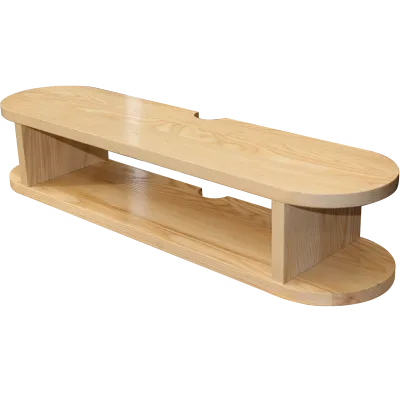
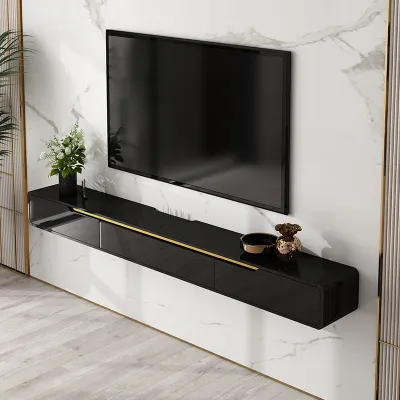
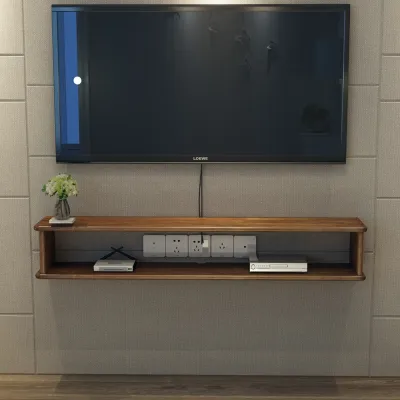
Prices are valid at publication and may change. Please refer to the product page for the latest price.
Finally, measure the viewing distance from your sofa to the wall. In compact living rooms, every centimeter of walkway space matters. A console that protrudes too far can disrupt the natural flow of traffic. Knowing the exact distance between your seating and the wall helps you determine how deep the console can be before it begins to interfere with your walking path.
Match the Console Width to Your TV and Room Proportions
Achieving visual harmony in your living room depends heavily on the proportional relationship between your television and the console below it. As a general rule of thumb, a wall-mounted TV console should always be wider than the television itself. If the console is the same width or narrower than the TV, it creates an awkward, top-heavy appearance that makes the entire setup look unstable. Aiming for a console that extends past the TV frame on both sides establishes a solid visual anchor, drawing the eye downward and creating a more balanced, grounded aesthetic.

For compact HDB or condo living rooms, choosing the right console width can also influence how spacious the room feels. A floating, full-width console that spans nearly the entire length of the feature wall can make a small room appear wider by emphasizing horizontal lines. Alternatively, if you prefer a centered look, ensuring the console leaves a comfortable margin of empty wall space on either side prevents the room from feeling overcrowded.
While maximizing console width is visually appealing, you must carefully check for potential spatial conflicts in your layout. Ensure that the extended width of the console does not block adjacent doorways, entryways, or corridors. In some condominium layouts, the TV wall may be close to the main entrance or a hallway opening; a console that is too wide can create a physical hazard or block the swing path of doors.
Choose the Right Depth and Installation Height
Selecting the appropriate depth for your wall-mounted TV console is a balancing act between storage needs and physical clearance. In narrow living areas, opting for a shallow or floating design is highly beneficial. A standard depth of 30 to 40 centimeters is typically sufficient to house modern media devices without encroaching too far into the room’s main walkway. Keeping the console off the floor entirely creates an illusion of more space, as the continuous floor visibility makes the room feel larger and simplifies daily cleaning routines.
Determining the correct installation height is equally critical for both comfort and ergonomics. The primary goal is to position the television so that the center of the screen aligns naturally with your eye level when you are seated comfortably on your sofa. Once you have determined this ideal TV height, you can position the wall-mounted console directly below it. Typically, leaving a gap of 15 to 20 centimeters between the bottom of the TV and the top of the console provides a clean, separated look while keeping the console at a comfortable height for accessing its storage compartments.
Before finalizing a shallow console depth, you must audit your internal storage requirements. Take inventory of the specific electronics you plan to store inside, such as media players, internet routers, smart home hubs, and gaming consoles. Measure the depth of these devices, factoring in the extra space required for rear cable connectors and power plugs.
Verify Wall Structure and Weight Capacity
Before purchasing a wall-mounted TV console, you must verify that your living room wall can safely support the combined weight of the furniture and your media equipment. Different wall materials possess vastly different load-bearing capabilities. In Singapore, HDB flats and condominiums commonly feature solid concrete walls, lightweight concrete panels, or hollow brick walls. Drywall or gypsum partition walls are also frequently used to divide spaces. Solid concrete walls offer the highest weight capacity and are ideal for heavy floating consoles, whereas drywall partitions require careful reinforcement and specialized mounting techniques.
To ensure a safe installation, always cross-reference the console manufacturer’s weight limit labels with the actual weight of your television and any items you plan to store inside. Never assume a wall-mounted console can support unlimited weight. Check the specifications of the wall anchors, brackets, and screws you intend to use, ensuring they are rated for your specific wall type. If you are mounting onto a partition wall, the mounting brackets must be anchored directly into the internal metal or wooden studs rather than the plasterboard alone.
Additionally, plan the routing for your cables before drilling any holes. A clean, wire-free look is one of the main appeals of a wall-mounted setup, but concealing cables requires careful planning. If you are routing cables inside the wall, ensure you are not drilling into existing electrical conduits, water pipes, or structural reinforcement bars.
Avoid Common Sizing and Clearance Mistakes
One of the most frequent mistakes homeowners make when choosing a TV console is relying solely on the diagonal screen measurement of their television. A 65-inch TV refers to the diagonal distance from corner to corner, not the actual horizontal width. Purchasing a console based on this diagonal number often results in a unit that is too short, leaving the television hanging over the edges and creating an unbalanced, top-heavy look. Always use the physical width of the TV as your baseline measurement.
Another common oversight is ignoring the precise placement of wall switches, power outlets, and network panels. If you do not account for these fixtures during the planning stage, you may find that your new console completely covers an essential light switch or blocks access to your main fiber broadband point.
Finally, failing to leave adequate ventilation space inside the console can lead to the premature failure of your electronic devices. Media players, gaming consoles, and routers generate significant heat during operation. If these devices are enclosed in a tightly sealed console without proper airflow, the internal temperature can rise rapidly, causing performance issues.
Frequently Asked Questions (FAQ)
Can I mount a TV console on a drywall or partition wall?
Yes, you can mount a TV console on a drywall or partition wall, but it requires specific precautions to ensure safety. Because drywall itself cannot support the weight of a heavy floating console, the mounting brackets must be secured directly into the internal vertical studs (the wooden or metal framing behind the plasterboard). If the studs do not align with your desired console position, you may need to install a plywood backing board behind the drywall to distribute the weight safely. For heavier setups, or if you are unsure of your wall’s internal structure, it is highly recommended to consult a qualified professional installer to prevent structural damage.
How much clearance should I leave around the TV console?
To maintain a balanced look and ensure proper functionality, aim to leave at least 10 to 15 centimeters of clear wall space on both the left and right sides of your TV console. This prevents the furniture from looking crammed into a corner or up against adjacent walls. For internal clearance, ensure there is at least 5 centimeters of open space around all sides of your electronic devices inside the console compartments. This gap allows air to circulate freely, preventing heat buildup and ensuring your routers, media boxes, and gaming systems operate within safe temperature limits.

Community discussion
Share your experience or ask a question. Comments are reviewed before publication.