
To fit comfortably in a compact Singapore bedroom or HDB study area, a small gaming chair should ideally have a star base diameter of 60 to 65 cm, a seat width of 45 to 50 cm, and a seat depth of 45 to 48 cm. Standard-sized gaming chairs often feature wide, sprawling bases of 70 cm or more and tall, bulky backrests that can easily overwhelm a tight room, blocking walkways or colliding with built-in wardrobes. Selecting a small game chair with a compact footprint ensures you maintain ergonomic support while preserving precious floor space and keeping your room’s pathways clear.
Finding the right balance between ergonomic comfort and spatial efficiency requires looking closely at specific measurements. Because Singaporean bedrooms and study alcoves often pull double duty as sleeping and working spaces, every centimeter counts. By understanding how to measure both the chair and your room, you can avoid the frustration of a chair that jams against your desk or blocks your wardrobe doors.
Essential Dimensions to Check for a Small Game Chair
When shopping for a small game chair, relying solely on marketing labels like “mini,” “compact,” or “small” can be misleading. Manufacturers often use these terms to describe the size of the seat cushion, while the actual physical footprint of the chair remains quite large. To ensure a true fit, you must evaluate several critical dimensions that dictate how the chair interacts with your room and your desk.
Products mentioned in this guide
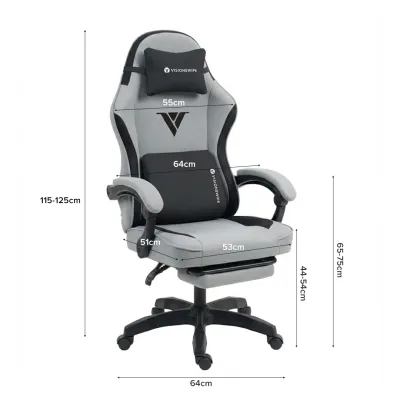
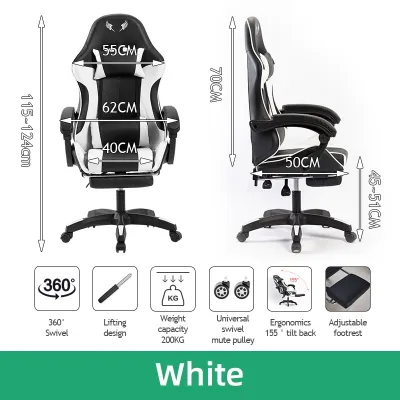





Prices are valid at publication and may change. Please refer to the product page for the latest price.
Star Base Diameter
The star base diameter is the most critical measurement for determining the chair’s actual floor footprint. This is the circular span of the five-star wheel base at the bottom of the chair. While standard gaming chairs typically feature a base diameter of 70 cm or more, a compact model should ideally measure between 60 cm and 65 cm. Because the base is a circle, a 70 cm diameter requires a clear 70 cm by 70 cm square of floor space just to sit stationary, which can quickly crowd a narrow HDB bedroom walkway.
Seat Width and Depth
The seat cushion dimensions affect both your physical comfort and the chair’s overall width. For a compact setup, look for a seat width of 45 to 50 cm. The seat depth—the distance from the front of the cushion to the backrest—should range between 45 and 48 cm. A seat that is too deep will prevent your lower back from reaching the lumbar support, while a seat that is too wide unnecessarily increases the chair’s overall profile, making it harder to maneuver in tight spaces.
Armrest Width and Height
Armrests often extend past the edges of the seat cushion, adding significant width to the chair’s upper profile. Check the maximum distance between the outer edges of the armrests, which should ideally not exceed 60 to 65 cm for small spaces. Additionally, verify the armrest height range from the floor. Adjustable armrests that can drop low enough to clear the underside of your desk are essential for tucking the chair away when it is not in use.
Overall Backrest Height and Width
Traditional gaming chairs are famous for their high, racing-style backrests, which often stand over 80 cm tall from the seat cushion. In a small room, a massive backrest can block natural light from windows, obstruct wall-mounted shelves, and make the space feel visually cluttered. A compact gaming chair should feature a lower backrest profile, ideally between 70 cm and 75 cm, or utilize a hybrid mid-back design that provides ergonomic neck support without the excessive upper bulk.
Recline Depth Clearance
Many gaming chairs offer generous recline angles, sometimes up to 135 or 180 degrees. While this is excellent for relaxing, reclining shifts the backrest significantly backward, expanding the chair’s depth footprint by an extra 30 to 45 cm. If you plan to use the recline feature, you must factor this extended depth into your spatial calculations to avoid slamming the backrest into walls, windows, or delicate bedroom decor.
How to Measure Your HDB Study Area and Bedroom Space
To ensure your new chair fits seamlessly into your room, you must measure your available space before making a purchase. Taking a systematic approach to measuring your study area prevents layout conflicts and ensures that daily routines remain unobstructed.

Step 1: Measure Desk Clearance
Start by measuring the height from the floor to the lowest point of the underside of your desk. If your desk has a drawer unit, a keyboard tray, or a support beam, measure from the floor to the bottom of that specific obstacle. This measurement represents the maximum height your chair’s armrests and seat cushion can be if you want to slide the chair fully under the desk. Next, measure the width between the desk legs or drawers to ensure the chair’s star base can roll in without scraping the sides.
Step 2: Map Walkway Widths and Door Swings
Measure the clear walking path behind and beside your desk setup. In standard HDB layouts, walkways should ideally remain at least 60 to 70 cm wide to allow for comfortable movement. Factor in the swing radius of nearby bedroom doors, built-in wardrobe doors, and cabinet drawers. If you have swing-out wardrobe doors, open them fully and measure the remaining distance to your desk to ensure the chair will not block access to your clothes.
Step 3: Calculate the Dynamic Footprint
A chair does not just sit in one place; it requires space to roll back, swivel, and allow you to stand up. To calculate this dynamic footprint, add at least 30 to 40 cm to the star base diameter of the chair. For example, if your chair has a 60 cm base, you will need a clear floor depth of at least 90 to 100 cm from the edge of your desk to comfortably push back and exit the chair without bumping into a bed frame or wall behind you.
Matching Chair Specifications to Specific Room Layouts
Different room layouts present unique spatial challenges. Matching your chair’s specifications to your specific room configuration ensures maximum usability and comfort.
Built-in Study Desks and Tight Alcoves
Many compact bedrooms in Singapore feature custom built-in study desks nestled into alcoves or running along a single wall. These desks are highly space-efficient but completely fixed, meaning you cannot adjust their height or position to accommodate a bulky chair.
For built-in desks, prioritize a chair with a low-profile seat height adjustment and highly adjustable or flip-up armrests. The goal is to ensure that the chair can slide completely under the desk surface when you are finished gaming or working. This simple action reclaims up to one square meter of floor space, instantly opening up the room’s walkway. Look for chairs where the armrests can be lowered below 65 cm or flipped upward parallel to the backrest, allowing the seat to glide smoothly under standard 75 cm-high built-in desks.
Open Floor Areas with Narrow Walkways
In layouts where the desk is placed in an open area but sits directly adjacent to a high-traffic path—such as the entry to the bedroom or the walkway beside the bed—the chair’s base design becomes the primary concern.
A sprawling 70 cm wheelbase in a narrow walkway acts as a constant tripping hazard for family members and can easily catch on the edges of area rugs, causing frustration and wear. For these layouts, select a chair with a compact star base diameter of 60 cm to 62 cm. A smaller wheelbase keeps the caster wheels tucked neatly beneath the seat’s vertical profile, reducing the risk of stubbed toes and allowing you to maneuver around the chair with ease, even when the room is busy.
Space-Saving Design Features for Small Rooms
When space is at a premium, certain design innovations can make a massive difference in how a gaming chair functions in your room. Looking for these specific features can help you maximize your limited square footage.
- Flip-Up Armrests: Armrests that rotate upward by 90 degrees are incredibly beneficial for compact spaces. When flipped up, they eliminate the chair's side-to-side bulk, allowing you to push the chair flush against the desk even if the desk has a low clearance height or built-in under-desk drawers.
- Compact Star Bases: Some manufacturers design specialized bases with shorter, reinforced spokes. These bases maintain structural stability and weight capacity while reducing the overall diameter to around 60 cm, making them ideal for tight corners.
- Low-Profile Backrests: Choosing a mid-back gaming chair or a hybrid ergonomic model with a shorter backrest prevents the chair from dominating the room visually. It allows natural light to flow freely across the room, keeping a small bedroom feeling bright and open.
- Smooth-Rolling Polyurethane (PU) Casters: Typical Singaporean homes feature hard flooring such as vinyl, laminate, or ceramic tiles. Standard plastic casters can scratch these surfaces, often forcing owners to buy bulky, space-consuming plastic floor mats. Choosing a chair equipped with soft PU casters ensures smooth, quiet rolling directly on hard floors, eliminating the need for an unsightly floor mat that clutters your limited visual space.
Common Sizing Mistakes to Avoid
To ensure a successful purchase, avoid these common pitfalls that buyers frequently encounter when selecting a gaming chair for a compact room.
Focusing Only on Seat Width
A common mistake is measuring only the width of the seat cushion and assuming the chair will fit. Always remember that the star base at the bottom is almost always wider than the seat itself. A chair with a comfortable 48 cm seat might still feature a sprawling 72 cm base that blocks your bedroom door or wardrobe drawers. Always use the star base diameter as your primary guide for floor compatibility.
Forgetting to Measure Desk Underside Height
Many buyers assume all desks have standard clearances, only to find that their new chair’s armrests collide with the desk frame or drawer units. This prevents the chair from being tucked in, leaving it permanently protruding into the room’s main walkway. Always measure your desk’s lowest clearance point and compare it to the chair’s maximum armrest height in its lowest position.
Assuming All “Compact” Chairs Are Identical
Sizing standards vary wildly between brands. A “small” chair from one manufacturer might have completely different dimensions than a “small” chair from another. Avoid general assumptions and always download the detailed, dimensioned product sheet from the manufacturer’s official website to verify every measurement before purchasing.
Frequently Asked Questions (FAQ)
Will a standard gaming chair fit under a typical built-in study desk?
Standard gaming chairs often feature fixed, high armrests and tall backrests that prevent them from sliding under typical built-in desks, which usually have a clearance height of around 70 to 75 cm. To ensure a proper fit, it is highly recommended to choose a compact gaming chair with adjustable or flip-up armrests that can be lowered or cleared out of the way, allowing the seat to glide smoothly beneath the desk surface when not in use.
How much floor space does a small gaming chair actually take up?
While a small gaming chair’s seat cushion may only measure around 45 to 50 cm in width, the actual floor space it occupies is determined by its star base diameter, which typically ranges from 60 to 65 cm. This means you need a clear, unobstructed circular footprint of at least 65 cm on your floor just to place the chair, plus an additional 30 to 40 cm of depth clearance behind the desk to allow for swiveling, rolling back, and sitting down comfortably.

Community discussion
Share your experience or ask a question. Comments are reviewed before publication.