
Quick Answer: Is the Hbada E3 Pro Right for Your Home Office?
The Hbada E3 Pro positions itself as a competitive option in the mid-range ergonomic seating market, designed to bridge the gap between basic task chairs and premium office seating. If you are setting up a home office in Singapore and require a chair that offers targeted lumbar support, multi-directional armrests, and high breathability for warm climates, the E3 Pro provides a compelling balance of features. It is engineered to compete with entry-to-mid-tier models by offering customizable adjustments that help mitigate the physical strain of sitting for extended periods.
However, it is essential to set realistic expectations. While the E3 Pro features an advanced-looking dual-back design and multiple adjustment points, it does not possess the highly specialized, auto-adaptive mechanical systems or the top-tier material refinement found in premium ergonomic chairs from luxury brands. The ideal user is a professional or remote worker seeking a highly adjustable, breathable mesh chair for daily use who wants to avoid the high price tag of high-end commercial office furniture.
Core Ergonomic Features of the Hbada E3 Pro
Lumbar Support and Backrest Design
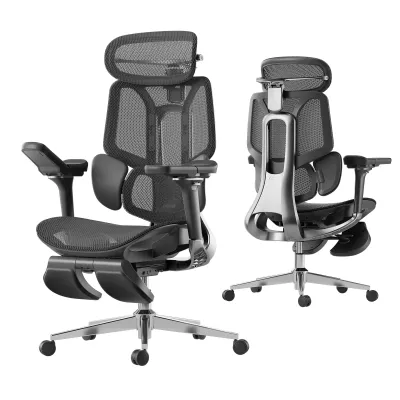
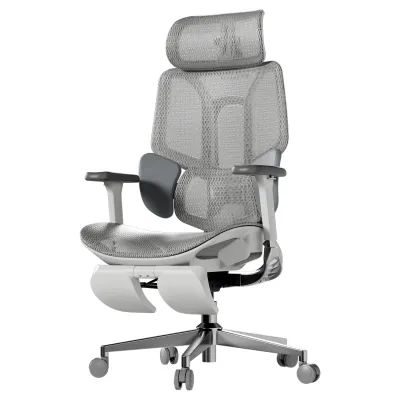
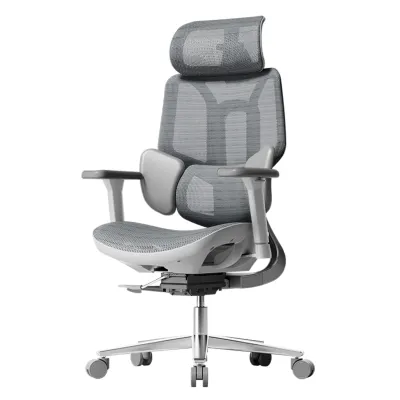
The backrest of the Hbada E3 Pro utilizes a split-back or dual-back structure, which separates the upper thoracic support from the lower lumbar support. This design is specifically engineered to address lower back strain by providing a dedicated, flexible panel that cradles the lumbar region. In theory, this split configuration allows the lower portion of the backrest to move somewhat independently, accommodating small shifts in your posture throughout the day.
Products mentioned in this guide
Prices are valid at publication and may change. Please refer to the product page for the latest price.

Sitting flat causes the pelvis to rotate backward, flattening the lumbar curve. The dual-back design of the E3 Pro aims to counter this by applying forward pressure specifically to the lower lumbar vertebrae while allowing the upper backrest to support the thoracic spine. This separation prevents the compromise of a single-frame backrest, where adjusting for upper back support often misaligns the lumbar support.
When evaluating this chair, you should closely inspect the manufacturer’s technical specifications regarding the lumbar adjustment mechanisms. Some iterations of this model offer manual height or depth adjustments, while others rely on a spring-tensioned passive system that pushes forward against your lower back. Proper lumbar alignment is critical because it helps maintain the natural inward S-curve of your spine, reducing the load on your intervertebral discs. Before finalizing a purchase, verify whether the lumbar support can be adjusted to align precisely with the curve of your lower back, as a misaligned support panel can cause discomfort rather than relieve it.
Adjustability: Armrests, Headrest, and Recline
Beyond back support, the overall ergonomic utility of an office chair depends heavily on how well it can be customized to your body dimensions and desk setup. The Hbada E3 Pro features multi-directional armrests, often referred to as 3D or 4D armrests depending on the specific model variant. These armrests adjust for height, depth, angle, and sometimes width. This level of adjustment is vital for preventing shoulder elevation and wrist strain; it allows you to position the armrests so your elbows rest at a comfortable 90-degree angle, level with your keyboard tray or desktop.
Unsupported arms pull down on the shoulder muscles, leading to neck strain. The 3D or 4D armrests on the E3 Pro mitigate this by transferring the weight of your arms to the chair’s frame. Adjusting the armrests inward helps when typing on a compact keyboard, while angling them outward accommodates wider postures or mouse usage.
The headrest supports the cervical spine and typically features height and angle adjustments to fit the curve of your neck. Note that a headrest is most functional when you are reclined during breaks or video calls, rather than during active typing when your head should naturally align over your shoulders.
For recline functionality, the chair includes a tension-adjustable tilt mechanism with locking positions. This allows you to transition from an upright working posture to a relaxed, reclined angle. When setting up the chair in your home, check the maximum recline angle and ensure the tilt tension is adjusted to match your body weight, allowing you to lean back smoothly without feeling like you are falling backward or struggling against stiff resistance. Additionally, verify whether the model utilizes a synchro-tilt mechanism, where the seat tilts at a lesser angle than the backrest, keeping your feet flat on the floor and maintaining proper leg circulation.
Comparing the Hbada E3 Pro to Other Popular Office Chairs
Lumbar Support: Adaptive vs. Fixed Designs
To understand where the Hbada E3 Pro stands, it is helpful to compare its lumbar support system with other design philosophies on the market.
- Basic Task Chairs: Entry-level office chairs typically feature a flat, fixed, or minimally adjustable backrest. In these models, lumbar support is often just a static plastic bar or a slight curve in the foam cushion. The E3 Pro represents a significant upgrade from this tier, as its dynamic dual-back design actively targets the lumbar region and responds to your movements, offering far better posture correction than static alternatives.
- Premium Ergonomic Chairs: On the other end of the spectrum, high-end ergonomic chairs utilize highly sophisticated, auto-adaptive lumbar systems. These premium models often feature complex spring-loaded mechanisms or self-adjusting mesh tension that automatically calibrates to your spine's shape and weight distribution without requiring manual levers. While the E3 Pro offers a dynamic feel, it still requires more manual adjustment to find the optimal sweet spot, and the materials used in its moving joints may not offer the same fluid, seamless transition as premium models.
When deciding, consider your preference: if you prefer a highly pronounced, active push against your lower back, the E3 Pro’s dual-back system is excellent. If you prefer a subtle, completely automated support system that disappears into the background, a premium adaptive chair may be worth the investment.
Seat Comfort and Material Breathability
The choice of seat material is a critical factor for long-term comfort, especially in Singapore’s tropical climate, where high humidity and heat can make poorly ventilated chairs incredibly uncomfortable.
- Mesh vs. Foam: The Hbada E3 Pro prominently features a full-mesh design, including both the backrest and the seat cushion. High-quality elastomeric mesh allows for continuous airflow, preventing heat and moisture buildup during long working hours in humid environments. In contrast, traditional high-density foam cushions offer a plush, contouring feel but tend to trap body heat over time.
- Mesh Quality and Edge Pressure: When choosing a mesh seat, it is crucial to verify the mesh density and the flexibility of the front edge of the seat frame. Some users find that firm mesh seats can create pressure points on the undersides of their thighs, potentially restricting circulation if the front edge lacks sufficient padding or a downward "waterfall" slope. Check the manufacturer's design details to ensure the E3 Pro's seat frame incorporates a padded edge or a sloping front to prevent this pressure on the popliteal artery and sciatic nerve.
- Seat Depth Adjustment: The E3 Pro often includes a seat slider mechanism, allowing you to adjust the seat depth. This is a major advantage over standard office chairs. A proper seat depth ensures there is a gap of about two to three fingers between the front edge of the seat and the back of your knees, supporting your thighs fully without putting pressure on the sensitive popliteal fossa.
Build Quality and Weight Capacity
An ergonomic chair’s long-term value is directly tied to its structural integrity and safety standards.
- Base and Frame Materials: The E3 Pro typically utilizes a reinforced nylon or aluminum alloy base. Aluminum bases generally offer superior stability and a higher weight capacity compared to standard plastic or low-grade nylon bases found on budget chairs. Always verify the specific base material and the class of the gas lift cylinder (Class 4 is standard for reputable ergonomic chairs) before purchasing.
- Weight Capacity and Stability: Check the manufacturer's official documentation for the maximum weight limit. While mid-range chairs like the E3 Pro are built to accommodate a wide range of users, they may exhibit slight flexing or minor creaking over years of heavy use compared to the cast-aluminum frames of commercial-grade premium chairs.
- Certifications: Look for recognized safety and durability certifications such as BIFMA or SGS. These certifications indicate that the chair's components have undergone rigorous mechanical testing to ensure they can withstand daily wear and tear safely.
- Delivery and Assembly Considerations: When purchasing online in Singapore, consider the delivery and assembly conditions. Ensure the packaged dimensions can fit through your doorway or lift access, especially if you reside in a high-rise HDB flat or condominium. Many retailers offer optional assembly services, which can save time and ensure the chair is correctly constructed for maximum stability.
Evaluating Value for Long Work Sessions
When sitting for eight or more hours a day, the chair you choose becomes an investment in your physical health. To evaluate the true value of the Hbada E3 Pro, you must look beyond the initial purchase price and calculate its cost-per-use over its expected lifespan.
A high-quality mid-range chair that lasts five years provides far better value than a cheap task chair that needs replacement every eighteen months due to sagging foam or a failing gas lift. The E3 Pro offers a rich feature set—including a seat slider, 3D/4D armrests, a dynamic lumbar support system, and a headrest—at a price point that is significantly lower than high-end commercial office chairs. For many home office users in Singapore, this represents an optimal sweet spot of high functionality and reasonable cost.
However, you must ensure that the chair’s physical dimensions align with your body type. A chair is only ergonomic if it fits you correctly. If a chair is too large or too small, even the most advanced lumbar support will fail to align with your spine, rendering its features useless. Before purchasing, check the current pricing on the brand’s official website or authorized local retailers in Singapore. Pay close attention to the warranty terms; a longer warranty (e.g., three to five years) covering the gas lift, mesh, and structural frame is a strong indicator of the manufacturer’s confidence in their product’s durability and ensures you have access to replacement parts if needed.
Consider how the chair fits into your wider home office setup. Many Singapore homes feature built-in study desks fixed at a standard 75 cm height, which is often too high for average-height individuals. If you must raise the seat to align your elbows with the desk, your feet may no longer rest flat on the floor. Under these conditions, the E3 Pro’s seat height range and the potential need for a footrest become critical decision factors.
Decision Framework: Which Chair Should You Choose?
To help you make the right choice for your home office, use this condition-based decision framework:
- Choose the Hbada E3 Pro if: You want a highly adjustable, full-mesh ergonomic office chair that offers targeted lower back support and excellent breathability for warm environments. It is ideal if you sit for long hours, have a mid-range budget, and want advanced features like a seat slider, adjustable headrest, and multi-directional armrests without paying premium commercial prices.
- Choose a premium ergonomic alternative if: You have a flexible budget and require top-tier, auto-adaptive support that self-calibrates to your movements. This is also the preferred route if you have specific orthopedic concerns, require highly refined materials, or want a chair backed by a 10-to-12-year commercial warranty.
- Choose a basic task chair if: Your daily sitting time is limited to two hours or less, you have a highly constrained budget, and you only require basic height adjustability without advanced lumbar or arm support.
- Verify first if: You fall outside typical height and weight ranges. Cross-reference your measurements with the manufacturer's dimension charts, paying attention to seat height, width, and armrest height. If possible, visit a local showroom in Singapore to test the chair's mesh tension and frame comfort firsthand.
Frequently Asked Questions (FAQ)
How do I know if the Hbada E3 Pro fits my height and weight?
To ensure a proper fit, check the manufacturer’s official specification sheet for the recommended user height and weight limits. Additionally, measure your current desk height and the clearance under your desk. Compare these measurements with the chair’s minimum and maximum seat height, as well as the height of the armrests at their lowest and highest settings, to ensure the chair can slide fully under your desk when not in use.
Is a headrest necessary for long work sessions?
A headrest is not strictly necessary for active, upright typing, as your head should naturally align over your spine. However, a headrest is highly beneficial if you frequently recline to read, take phone calls, or rest during breaks. It helps relieve cervical spine tension by supporting the weight of your head during these relaxed periods. If you prefer a strictly upright posture, you may find a chair without a headrest, or one with a removable headrest, to be perfectly sufficient.
Community discussion
Share your experience or ask a question. Comments are reviewed before publication.