
Finding the ideal haworth chair for long home office sessions requires matching the chair’s mechanical philosophy to your physical habits, as no single ergonomic design fits every body shape or work style. Selecting the wrong seating configuration can lead to localized pressure points, poor spinal alignment, and premature fatigue during eight-hour workdays.
To make an informed decision, evaluate your primary sitting behavior against these three distinct categories:
- For targeted, asymmetrical lower-back support during disciplined upright tasking: Choose a model featuring independent left-and-right lumbar adjustments, such as the Zody series. This design is highly suited for individuals who maintain a structured posture and require precise pressure relief on specific sides of the lower back.
- For dynamic movement, frequent shifting, and a frameless, adaptive backrest: Opt for a model utilizing a central stem design and multi-layered flexible back support, such as the Fern series. This configuration accommodates active sitters who stretch, twist, or recline frequently throughout the day.
- For compact home offices and reliable core ergonomics: Select a streamlined utility model, such as the Soji or Very series. These chairs balance essential adjustments like seat depth and synchro-tilt with a smaller visual and physical footprint, making them highly practical for shared spaces or smaller rooms.
Before finalizing any purchase, verify these mechanical options against your specific desk height, physical proportions, and home workspace constraints to ensure a proper ergonomic fit.
Products mentioned in this guide
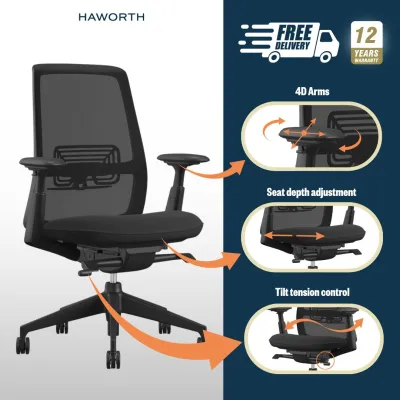
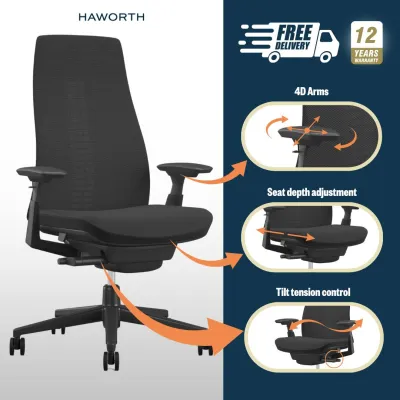
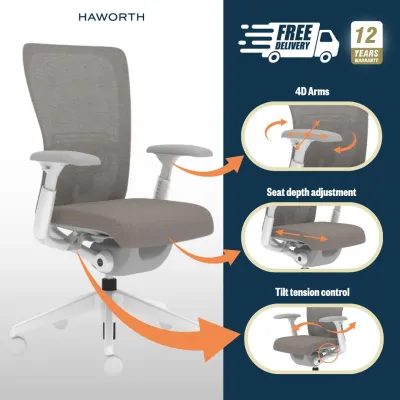
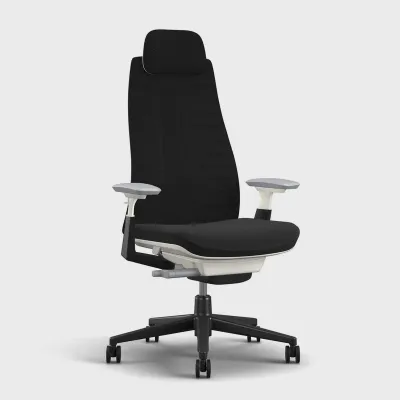
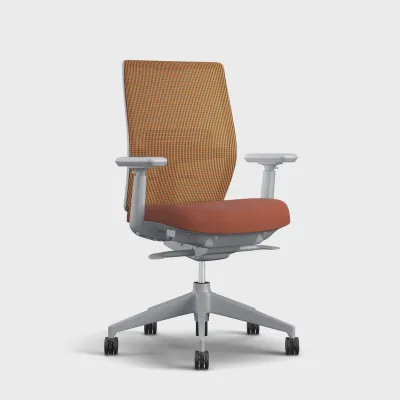
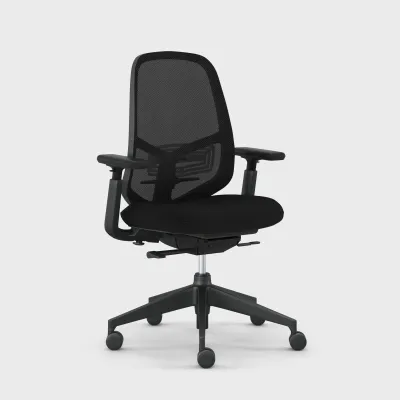
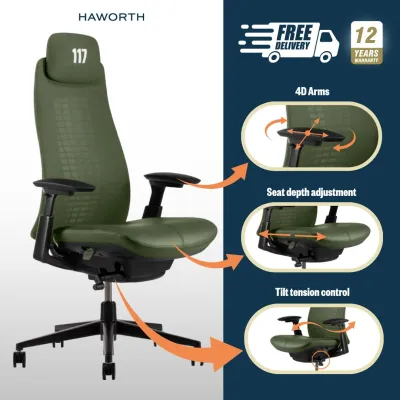
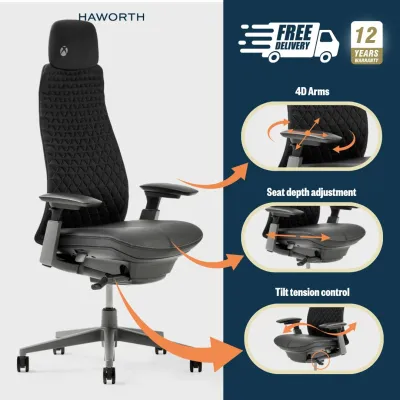
Prices are valid at publication and may change. Please refer to the product page for the latest price.
Essential Ergonomic Dimensions for Extended Home Office Use
Sitting for extended periods places significant mechanical stress on the human body, particularly on the lumbar spine, pelvis, and shoulder girdle. Understanding the core adjustment mechanisms of a high-performance task chair allows you to configure your workspace to minimize physical strain and prevent long-term musculoskeletal discomfort.
Seat Depth and Pan Adjustability
The seat pan is the foundation of your sitting posture, bearing the majority of your body weight. A proper seat pan must offer depth adjustability to accommodate variations in thigh length. When sitting with your lower back fully supported by the backrest, there should be a gap of approximately three fingers (roughly 3 to 5 centimeters) between the front edge of the seat cushion and the back of your knees.
If the seat pan is too deep, it presses against the blood vessels and nerves behind the knees, restricting circulation and causing numbness or lower leg fatigue. Conversely, if the seat pan is too shallow, it fails to support the thighs adequately, which concentrates excessive pressure on the ischial tuberosities (the sit bones) and forces the pelvis to tilt backward, flattening the natural curve of the lower spine.
4D Armrests and Desk Alignment
Armrests are critical for reducing load on the upper body, specifically the trapezius muscles, shoulders, and neck. Highly adjustable armrests—often referred to as 4D armrests—can be adjusted in four distinct dimensions: height, depth (forward and backward), width (inward and outward), and pivot angle.
To achieve proper alignment, adjust the armrest height so your elbows rest at approximately a 90-to-100-degree angle while your shoulders remain completely relaxed. The width adjustment should allow the armrests to sit close to your torso, preventing you from flaring your elbows outward. Slide the armrest pads backward so you can pull the chair close to your desk without the armrests striking the desk edge, allowing your wrists to remain in a neutral, straight position while typing.
Synchro-Tilt and Tension Control
Static sitting is inherently taxing on the spinal discs, which rely on movement to absorb nutrients and stay hydrated. A synchro-tilt mechanism addresses this by linking the movement of the backrest and the seat pan at a set ratio, typically 2:1. As you recline, the backrest tilts backward twice as fast as the seat pan, opening up the angle of your hips.
This movement decompresses the spine, improves blood circulation, and keeps your feet flat on the floor, maintaining stability. To make this mechanism effective, adjust the tilt tension control so the chair responds naturally to your body weight; you should be able to recline without pushing hard, yet feel fully supported when sitting upright.
Lumbar Support Types
The lumbar spine naturally curves inward, a shape known as lordosis. Sitting tends to flatten this curve, placing high pressure on the spinal discs. Ergonomic chairs counter this with various lumbar support systems: passive, height-adjustable, and depth-adjustable.
Passive lumbar support relies entirely on the built-in curve of the chair’s backrest frame. Height-adjustable lumbar support features a movable pad that can be positioned to align precisely with the curve of your lower back. Depth-adjustable and asymmetrical lumbar systems allow you to control the firmness of the support, sometimes letting you apply different levels of pressure to the left and right sides of your lower back to accommodate minor structural asymmetries or localized muscle tightness.
Comparing Design Philosophies Across Haworth Chair Categories
Haworth designs its seating lines around specific structural philosophies, resulting in distinct sitting experiences. Comparing these design approaches helps identify which model category aligns best with your physical needs and daily work habits.

Targeted Support and Asymmetrical Lumbar Systems
Chairs built around highly targeted, customizable support systems are engineered for users who require precise control over their lower-back alignment. The primary design feature in this category is an independent, split-zone lumbar mechanism that allows the user to adjust the support level on each side of the lower spine independently.
This approach is highly beneficial for individuals who maintain a disciplined, upright posture for long hours, such as software engineers, financial analysts, or writers. By providing firm, direct pressure to the lower back, these chairs help maintain a neutral pelvic tilt and prevent slouching during intense, focused work sessions.
When considering a chair with this style of support, check the manufacturer’s specification sheet to verify the vertical travel range of the lumbar pad. A wider travel range ensures the support can be positioned accurately against your third and fourth lumbar vertebrae, regardless of your torso height. Additionally, observe how the firm lumbar pad interacts with the mesh backrest; it should provide a solid, supportive cradle without creating hard, uncomfortable pressure points against your spine.
Flexible Backrests and Natural Spinal Movement
In contrast to rigid frame designs, flexible backrest systems focus on accommodating the natural, multi-directional movements of the human torso. These chairs typically feature a central, spine-like vertical support element (often referred to as an endoskeleton) that holds a series of flexible, lateral support elements, completely eliminating a hard outer plastic rim.
This design allows the backrest to twist, flex, and bend in response to your movements. When you reach to the side, stretch, or lean back to take a phone call, the backrest moves with you, maintaining continuous contact and support along the entire length of your spine. This continuous support reduces pressure points on the shoulder blades and encourages micro-movements that keep muscles active and joints lubricated.
This category of chair is highly suited for dynamic sitters, creative professionals, and individuals who find traditional, framed office chairs restrictive. Because these designs rely on complex, multi-layered mesh or flexible elastomer materials, it is important to verify the durability and tension retention of the backrest material. Review the manufacturer’s warranty terms to ensure the flexible backrest components are fully covered against sagging or tearing over years of daily use.
Streamlined Profiles with Core Adjustability
For many home offices, balancing high-end ergonomic support with spatial and aesthetic constraints is a primary concern. Streamlined task chairs are designed to provide essential ergonomic adjustments within a more compact, visually lightweight frame. These models typically feature a classic mesh backrest with a clean, simple border and a standard, highly reliable synchro-tilt mechanism.
While these chairs may omit highly specialized features like asymmetrical lumbar adjustment or complex frameless back structures, they retain the core adjustments necessary for long-term comfort, including adjustable seat depth, height-adjustable lumbar support, and highly functional armrests. This makes them an excellent choice for shared home workstations, study nooks, or multi-purpose rooms where a large, bulky executive chair would look out of place.
When evaluating a streamlined model, consider whether the built-in adjustments meet your minimum comfort requirements for long work sessions. For example, ensure the seat cushion utilizes high-density, contoured foam that distributes weight evenly without bottoming out over hours of continuous use. These chairs offer a practical, cost-effective entry point into professional-grade ergonomics without compromising on build quality or structural integrity.
Adapting Chair Specifications to Your Home Environment
An ergonomic chair does not operate in isolation; it must function harmoniously within the physical limits of your home office. Before purchasing a premium task chair, measure your workspace and verify its compatibility with your flooring, desk, and personal physical dimensions.
Space and Clearance
Home offices, particularly in high-density urban apartments where space is limited, require careful spatial planning. A standard professional-grade task chair features a five-star caster base with a diameter ranging from 68 to 73 centimeters. Measure your designated floor space to ensure the base can rotate freely without striking desk legs, walls, or nearby furniture.
Additionally, factor in the recline radius of the chair. When fully reclined, the top of the backrest extends significantly backward, often requiring an additional 30 to 40 centimeters of clearance behind the upright position. Ensure your room layout accommodates this movement so you can recline comfortably without hitting bookshelves, filing cabinets, or delicate wall surfaces.
Flooring Compatibility
The wheels, or casters, of your chair must match your floor surface to ensure smooth movement and prevent permanent damage. Casters are generally categorized into hard and soft varieties:
- Hard Casters: Made of solid nylon, these are designed specifically for carpeted floors. They provide enough resistance to prevent the chair from rolling too easily while allowing smooth movement over carpet fibers.
- Soft Casters: Typically coated with a soft polyurethane (PU) layer, these are designed for hard surfaces such as hardwood, laminate, vinyl, or ceramic tiles. The soft coating provides grip, reduces rolling noise, and prevents the wheels from scratching or wearing down the floor finish.
Using hard nylon casters on hardwood or vinyl floors can result in deep scratches and unsightly wear patterns over time. Always check the product specifications to verify which caster type is pre-installed, and select soft casters if you have hard flooring.
Desk Height Alignment
To maintain a healthy typing posture, your desk and chair must work together. Standard fixed-height desks in Singapore typically sit at 75 centimeters from the floor. Verify that the chair’s seat height adjustment range (which usually spans from 40 to 52 centimeters) allows you to sit high enough to keep your elbows level with the desk surface while keeping your feet flat on the floor.
If you must raise the chair to its maximum height to align with a tall desk, your feet may dangle, which places pressure on the back of your thighs and strains your lower back. In such cases, you must use a dedicated footrest to support your feet. Alternatively, if you use a height-adjustable standing desk, ensure the chair’s armrests can lower sufficiently to slide completely under the desk surface when the desk is lowered, saving floor space when the chair is not in use.
Weight Capacity and Gas Lifts
Every task chair is engineered to operate safely within a specific weight range. Most professional-grade Haworth chairs are rated to support up to 150 kilograms (approximately 325 pounds), but you should always verify the exact weight capacity on the manufacturer’s product label.
The gas lift cylinder is the pressurized component responsible for height adjustment and shock absorption. To ensure long-term safety and durability, look for cylinders that carry recognized safety certifications, such as ANSI/BIFMA X5.1 or TÜV LGA DIN 4550 Class 4. These certifications guarantee that the pneumatic cylinder has undergone rigorous cycle testing and will not slowly sink or lose pressure over years of daily use.
Steps to Verify Comfort and Retailer Policies
Investing in a premium ergonomic chair is a long-term commitment to your physical health. To ensure your chosen model provides the expected comfort and support, follow a structured verification process before and after your purchase.
In-Person Testing
While online reviews and specification sheets provide valuable data, they cannot replicate the physical sensation of sitting in a chair. Visit an authorized showroom or official brand store in Singapore to test the models in person. When testing, wear the typical clothing you work in and spend at least 15 to 20 minutes in each chair.
Do not simply sit down and stand back up. Take the time to adjust every control: set the seat depth, adjust the lumbar height and tension, and position the armrests. Pay close attention to how the seat foam feels; it should feel firm and supportive, preventing you from feeling the hard plastic seat pan underneath. Lean back to test the synchro-tilt tension, ensuring the backrest supports your weight smoothly without requiring excessive effort to recline.
Comfort Trials and Returns
Because your body requires time to adapt to a new ergonomic posture, a chair that feels comfortable in a showroom for fifteen minutes might cause minor aches during the first week of extended use at home. Review the retailer’s return and exchange policies thoroughly before buying. Look for retailers that offer a dedicated comfort trial period, which typically ranges from 14 to 30 days.
Verify the specific terms of the return policy:
- Are there restocking fees? Some retailers charge a fee, often 10% to 20% of the purchase price, to process returns of bulky furniture.
- Who covers the return shipping cost? Bulky items are expensive to transport, so clarify whether the retailer provides free return pickup or if you must arrange and pay for transport.
- Must the chair be returned in its original packaging? Keeping the large cardboard box during the trial period is often mandatory for a successful return.
Warranty Verification
A high-quality ergonomic chair is designed to last a decade or more, and a robust warranty is a key indicator of manufacturing quality. Haworth chairs generally come with highly competitive warranties, but the coverage periods are rarely uniform across all components. Review the warranty documentation to understand what is covered and for how long:
- Structural Components: The steel frame, aluminum base, and seat/backrest structures often carry a 10-to-12-year warranty.
- Mechanical Parts: The synchro-tilt mechanism, armrest assemblies, and gas lift cylinder may carry a slightly shorter warranty, though they are often covered for the same 10-to-12-year period on premium models.
- Wear Items: Foam cushions, mesh fabrics, knit covers, and armrest pads typically carry a shorter warranty period, often ranging from 3 to 5 years, as these materials are subject to direct physical wear and environmental factors.
Confirm how warranty claims are handled locally. Ensure there is a dedicated service center or authorized distributor in Singapore that can supply replacement parts or perform repairs if needed.
Assembly and Safety
If your chair is delivered flat-packed, follow the manufacturer’s assembly instructions precisely to ensure structural safety. Pay close attention to the insertion of the gas lift cylinder into the five-star base and the underside of the seat mechanism; these components rely on a tight friction fit and must be aligned perfectly straight.
Use the tools provided to tighten all structural bolts securely, but avoid over-tightening, which can strip the threads. After assembling the chair, sit on it and operate the height adjustment several times to settle the gas cylinder into place. It is highly recommended to check and re-tighten all assembly bolts after two weeks of daily use, as the initial settling of the components can sometimes cause bolts to loosen slightly.
Frequently Asked Questions (FAQ)
Is a headrest necessary for long home office work?
A headrest is highly beneficial if your daily routine involves frequent reclining, such as during long video conferences, reading documents, or taking phone calls, as it supports the cervical spine and reduces neck strain in a tilted position. However, during active, upright typing, your head should align naturally over your shoulders without leaning back against a headrest. If your work consists almost entirely of active keyboard input, a headrest is generally unnecessary and, if poorly adjusted, can push your head too far forward, straining your neck muscles.
How do I maintain the mesh and moving parts of an ergonomic chair?
To maintain the performance and appearance of your ergonomic chair, perform simple, low-risk maintenance on a regular basis. Vacuum the mesh backrest and fabric seat cushion weekly using a soft brush attachment to remove dust, lint, and skin cells that can abrade the fibers over time. For spills or stains, consult the manufacturer’s care label first; typically, spot cleaning with a damp microfiber cloth and a highly diluted, mild soap solution is safe, but avoid harsh chemical solvents or abrasive scrubbers. Periodically check the underside of the chair and use an Allen key to tighten any structural bolts that may have loosened slightly from the vibrations of daily movement.
Community discussion
Share your experience or ask a question. Comments are reviewed before publication.