
Finding the right office chair for a small home office in Singapore requires balancing ergonomic support with physical spatial constraints. In space-limited layouts like Housing & Development Board (HDB) flats or modern condominiums, a bulky executive chair can easily block walkways, collide with nearby wardrobes, or refuse to slide under your desk. To optimize a compact workspace, focus on brands like IKEA, Secretlab, Herman Miller, and Steelcase, which offer compact wheelbases, highly adjustable armrests, and slim profiles.
Selecting a chair is not merely about finding a smaller seat, as reducing seat size too much can compromise your posture and long-term comfort. Instead, the goal is to find a model with a highly efficient structural footprint. By evaluating specific design features, measuring your room accurately, and targeting brands known for precise engineering, you can maintain a healthy work posture without overcrowding your living space.
Defining Your Space: HDB and Condo Home Office Challenges
Setting up a home office in Singapore often means working with multi-purpose rooms or tight corners. Many residents convert a bedroom corner, a living room alcove, or a segment of a household shelter into a dedicated workstation. In these environments, every square centimeter of floor space affects the daily usability of the room.
Products mentioned in this guide
![[NEW LAUNCH] Hinomi Q2 Pro Ergonomic Office Chair Adjustable Lumbar Support Memory Foam Headrest Armrest Legrest](https://img.lazcdn.com/g/p/2511c0cbd726c874804f10dec73624a5.jpg_400x400q80.jpg_.webp)
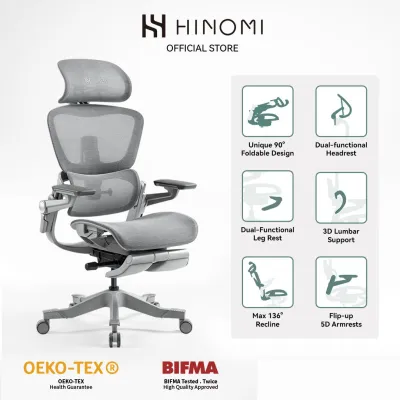
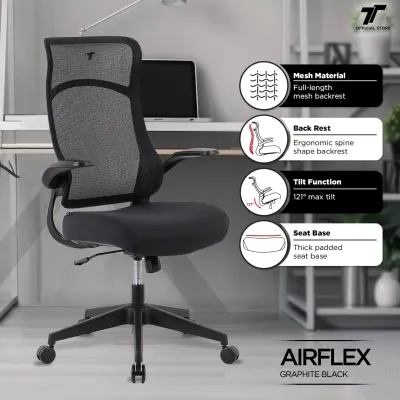
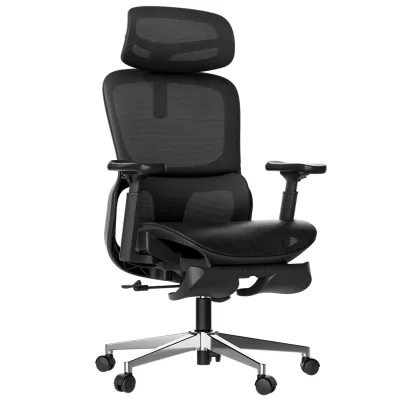
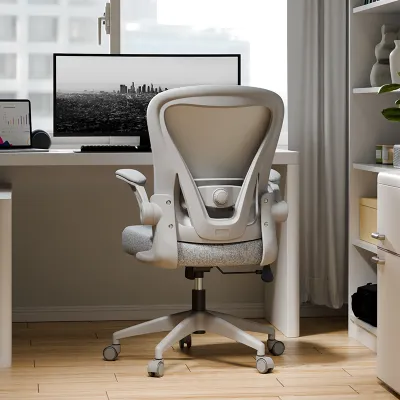
Prices are valid at publication and may change. Please refer to the product page for the latest price.
Traffic flow is a primary concern when placing furniture in small rooms. An office chair with an oversized wheelbase can easily obstruct the path between your bed and wardrobe, or prevent nearby doors from opening fully. When a chair sits in a high-traffic zone, even a minor protrusion can become a constant physical obstacle.
Furthermore, modern Singaporean homes frequently rely on dual-purpose furniture to maximize utility. A desk might double as a dressing table, or be positioned directly adjacent to a dining area. Because these zones serve multiple functions throughout the day, your office chair must be able to tuck away completely when not in use to restore the room’s original layout.
To address these challenges, you must look at the overall footprint of the chair rather than just the seat width. A truly compact chair minimizes the diameter of its five-star wheeled base and limits its rear recline sweep. Understanding these spatial boundaries prevents you from purchasing a chair that fits on paper but restricts movement in reality.
Essential Design Features for Space-Saving Office Chairs
When evaluating chairs for a small room, specific physical components dictate how well the furniture integrates into your space. Adjustability and component design determine whether a chair can adapt to tight physical boundaries.

Armrest Configurations
Armrests are often the main reason a chair cannot be pushed fully under a desk. Armless chairs provide the ultimate space-saving profile, allowing the seat to slide completely under the desktop regardless of desk height. However, they lack upper-body support for long working sessions.
Flip-up armrests offer a practical middle ground, allowing you to rotate the arms upward when you finish working so the chair can tuck away. Alternatively, highly adjustable 3D or 4D armrests can be lowered to their minimum height setting to clear the underside of your desk frame, keeping your workspace tidy and open.
Base and Caster Footprint
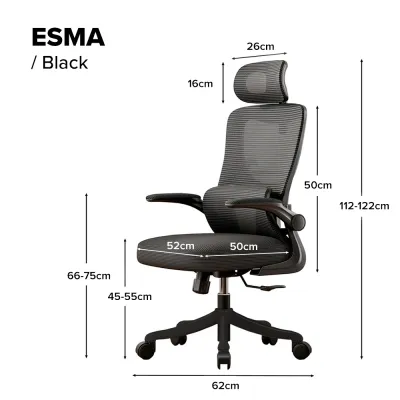
The five-star caster base provides stability but represents the widest part of any office chair. Standard bases often measure between 68 and 70 centimeters in diameter, which can easily collide with desk legs or nearby walls. For tight spaces, look for compact bases measuring 60 to 65 centimeters.
Additionally, consider the type of casters fitted to the base. Hard nylon casters are standard but can scratch parquet or vinyl flooring common in Singaporean homes. Opting for soft polyurethane (PU) casters ensures smooth, quiet rolling in tight corners without damaging your floor surfaces.
Seat Dimensions and Backrest Profile
An effective space-saving chair balances a supportive seat depth with a slim backrest profile. Thicker, heavily padded executive chairs add unnecessary depth to the chair’s physical envelope. A slim, mesh backrest provides excellent lumbar support and breathability in Singapore’s warm climate while keeping the physical profile minimal.
To ensure comfort, look for chairs with adjustable seat depth slider mechanisms. This feature allows you to customize the seat pan to support your thighs correctly while keeping the overall depth of the chair as compact as possible when the slider is retracted.
Tilt Mechanisms
Different recline mechanisms require varying amounts of clearance behind the desk. Deep-reclining executive or gaming chairs require a large rear clearance zone to tilt backward safely. This can lead to the backrest striking walls, windows, or storage units.
For compact rooms, synchro-tilt or weight-activated mechanisms are preferred. These systems tilt the backrest at a different ratio to the seat, keeping your body in an upright-focused posture and minimizing the rear recline sweep. Some models also feature tilt-limiter locks that prevent the chair from reclining past a specified, safe angle.
Office Chair Brands With Compact and Ergonomic Options
Several furniture manufacturers design products specifically suited for urban living and tight spaces. These brands range from mass-market home retailers to high-end ergonomic specialists.
Mass-Market and Modular Brands
IKEA is widely recognized for designing furniture tailored to small-space living. Their office chair lineup includes highly budget-friendly options with slim profiles and flip-up or armless designs. These chairs are engineered to fit standard Swedish and global apartment layouts, making them highly compatible with typical Singaporean study corners.
While mass-market brands offer excellent spatial efficiency and affordability, they may lack the advanced ergonomic adjustments found in premium models. However, for casual use or highly constrained budgets, their compact footprints make them a practical choice.
Ergonomic Specialists
Premium ergonomic brands focus on maximizing adjustability, which naturally helps in configuring a chair for tight spaces. Steelcase offers models like the Series 1 and Series 2, which feature exceptionally slim profiles, highly adjustable armrests, and compact wheelbases without sacrificing commercial-grade support.
Similarly, Herman Miller provides compact options such as the Sayl chair, which features a frameless backrest inspired by suspension bridges, giving it a very light visual and physical footprint. Their classic Aeron chair is available in three distinct sizes (A, B, and C), allowing users to select the smaller Size A model for a tighter fit.
Secretlab, while famous for larger gaming seats, offers ergonomic task chairs and smaller sizing configurations in their modern lineups. Their designs often feature highly customizable armrests that can be lowered or narrowed to fit under compact desks.
Evaluation Strategy
To find the best option, bypass generic marketing terms like “space-saving” or “compact.” Instead, locate the manufacturer’s official specification sheet, usually available as a downloadable PDF on their website. Focus on verifying the exact millimeter measurements of the wheelbase diameter, maximum seat depth, and minimum armrest height.
Showroom Testing
Before finalizing your purchase, visit local physical showrooms in Singapore, which are heavily concentrated in areas like Tanjong Pagar, Outram, and Ubi. Testing the chair in person allows you to feel the actual proportions of the seat and verify how easily the armrests adjust. You can also bring a tape measure to confirm the physical clearance dimensions yourself.
How to Measure Your Space and Desk Clearance
To prevent buying a chair that does not fit your setup, you must perform precise measurements of your designated workspace before shopping.
Under-Desk Clearance
Measure the distance from your floor to the absolute lowest point under your desk. Do not simply measure to the top of the desktop; you must account for the thickness of the desk surface, any supporting metal frames, keyboard trays, or under-desk drawer units.
Compare this measurement against the maximum height of the chair’s seat and the minimum height of its armrests. For a clean look, the armrests must be able to slide under this lowest point with at least one to two centimeters of clearance to avoid scratching the desk or pinching your fingers.
Pull-Out and Movement Space
An office chair requires dynamic space to function. To calculate the necessary clearance behind your desk, measure the distance needed to slide the chair back, sit down, stand up, and roll away safely.
As a general rule, you need a clear zone of at least 75 to 90 centimeters directly behind the edge of your desk. If this zone is obstructed by a wall, a bed frame, or a wardrobe, you may find yourself constantly striking obstacles when getting in and out of your seat.
Walkway and Door Checks
Identify any doors, wardrobe panels, or cabinet drawers that open into your workspace. Measure their swing radius to ensure they will not collide with the chair’s wheelbase when the chair is pushed in or when you are actively sitting in it.
If your desk is placed in a hallway or a shared living room edge, ensure the chair’s base does not encroach onto primary walkways. A base that protrudes even slightly into a walkway creates a tripping hazard for family members or housemates.
Common Sizing and Layout Mistakes to Avoid
Many homeowners make predictable errors when selecting seating for small spaces. Recognizing these pitfalls beforehand can save you the hassle of returning heavy furniture.
- Relying on Visual Estimation: Never assume a chair is compact simply because it looks slim in online photos. Always verify the exact millimeter specifications of the wheelbase and seat pan.
- Ignoring the Recline Envelope: A chair may fit perfectly when upright but strike a wall or window behind you the moment you lean back. Always calculate the maximum depth of the chair at full tilt.
- Forgetting Under-Desk Drawers: Many compact desks feature built-in drawer units that restrict the horizontal space between the desk legs. Ensure the chair's wheelbase is narrow enough to roll between these obstructions.
- Sizing the Floor Mat Incorrectly: If you plan to use a plastic floor mat to protect your flooring, ensure the mat is large enough to accommodate the chair's entire range of motion. A wheelbase that constantly rolls off the edge of a small mat causes instability and floor wear.
Frequently Asked Questions (FAQ)
Are armless office chairs comfortable for long working hours?
Armless office chairs are highly effective at saving horizontal space and sliding under low desks, but they may not provide sufficient support for full eight-hour workdays. Without armrests, your shoulders and neck must support the weight of your arms, which can lead to muscle fatigue and strain over extended periods. If you work long hours, consider chairs with highly adjustable armrests that can be lowered completely out of the way, or models with flip-up arms that offer support during tasks and fold away when your workday ends.
How much clearance do I need behind my desk for an office chair?
To use an office chair comfortably and safely, you generally need between 75 and 90 centimeters of unobstructed space behind the front edge of your desk. This clearance zone allows you to push the chair back to stand up, slide forward to sit, and make minor adjustments without hitting walls or furniture. If your chair features a deep recline function, you may need to add an extra 15 to 20 centimeters to this clearance zone to accommodate the backrest’s rear tilt sweep without causing damage.
Community discussion
Share your experience or ask a question. Comments are reviewed before publication.